



Nature Mike
Known Participant
April 13, 2020
해결됨

Can't import workspace through Presets menu on Mac. How do I manually import? Photoshop 2020

  • April 13, 2020
  • 4 답변들
  • 4936 조회

Hello, I recently gave a client my workspace to use on their computer. When they followed the instructions on how to import the workspace thru Edit > Presets > Import/Export Presets they were unable to import the workspace. So I tried and ran ran into the same issue. Photoshop 2020 say the presets were imported succesfully, but when I open the workspace window the workspace is not there.


I have tried closing and reopening Photoshop but that did not fix anything. Can anyone tell me how to manually import a workspace on a mac? I found one discussion on this forum that was marked whith the righ answer but it was from an older version of Photoahop and it appears that Adobe changed the folder structures since then.


Any help would be greatly appreciated.


I'm running Mac osx Catalina 10.15.4 


Thanks


- Mike
이 주제는 답변이 닫혔습니다.
최고의 답변: Jeff Arola

Yes apple hides the user library by default.


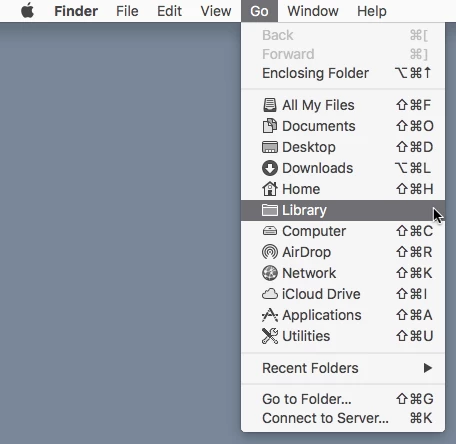
To see your user Library, in the Finder Go menu press the Option key and then you should see Library listed on the Go menu.


4 답변

Inspiring
January 30, 2024

Hello Folks,
I am having the exact same issue like Nature Mike on PSD 2024 on the Windows platform! I am trying to import a workspace I created on the Mac. I'm running Windows 10 Enterprise. I've tried all the suggestions as noted above, to no avail. Any guidance would be greatly appreciated. 

NB, colourmanagement
Community Expert
Community Expert
April 15, 2020
Hi,
 
Are you are you referring to this type of "workspace": Specifically, location of tools and palettes and so forth?
If so, there are instructions here, please paste this link into your browser 
 
Or are you perhaps trying to export / import a 'color settings' file [ a common procedure] to match Photoshop "Working Spaces" between mnachines?
Iam referring to  'color settings' as seen in edit / color settings dialog?
the term "workspace" is perhaps confusing here
in color settings there are Working Spaces for RGB etc?
 

I hope this helps

if so, please "like" my reply and if you're OK now, please mark it as "correct", so that others who have similar issues can see the solution

thanks

neil barstow, colourmanagement.net :: adobe forum volunteer

[please do not use the reply button on a message in the thread, only use the one at the top of the page, to maintain chronological order]

Jeff Arola
Community Expert
Community Expert
April 14, 2020

Yes apple hides the user library by default.


To see your user Library, in the Finder Go menu press the Option key and then you should see Library listed on the Go menu.


Jeff Arola
Community Expert
Community Expert
April 13, 2020

Put the workspace in


/Users/UserName/Library/Preferences/Adobe Photoshop 2020 Settings/WorkSpaces

Nature Mike
Nature Mike작성자
Known Participant
April 14, 2020

I have two mac computers and both are running Photoshop 2020, but one of them does not have that directory. The Adobe Photoshop 2020 Settings folder is missing from the Preferences folder. Any idea what might be going on there?