martinv44029552
Inspiring
September 10, 2021
Answered

Can't Print from Photoshop with Epson SureColor P-600 and Print Profiles

  • September 10, 2021
  • 8 replies
  • 5080 views

Hello All

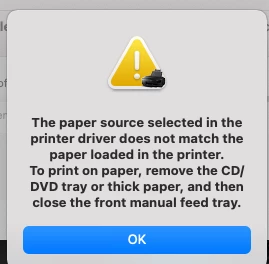
I've added a print profile for, Da Vinci Archival A3 Matte paper 315gms and even though I have that profile in my Printer Settings Profile, I keep getting a pop up window saying, 'The paper source in the print driver does not match the loaded paper'

On the printer display itself I have chosen, A3 Archival Matte and still no joy.

I've uploaded two screen shots
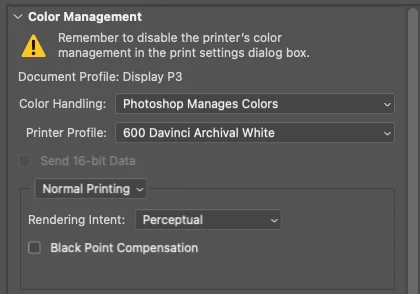
 

Anyone have any thoughts on the problem?


Many Thanks for any help.

Martin

Correct answer NB, colourmanagement

Hi Martin


this is not a Photoshop ICC media profile issue. It's connected with the printer driver software, when you select media type the media feed method is set automatically.

I suggest Epson support should be able to help you.

Or the paper manufacturer who gave you [seemingly] incomplete instructions on how to use their media.


I hope this helps
neil barstow, colourmanagement net :: adobe forum volunteer
google me "neil barstow colourmanagement" for lots of free articles on colour management
[please only use the blue reply button at the top of the page, this maintains the original thread title and chronological order of posts]

8 replies

martinv44029552
Inspiring
September 20, 2021

Hello Conrad and Neil


Just to update you both.

Having spent time on the phone this afternoon with Epson Support and trying a number of configerations and still no luck, my printer is going in for investigation at one of their service centres.

So, for the time being the case appears to be closed.


Thanks so much for your time and effort in trying to help, it's very much appreciated.

Participant
July 25, 2022

Hi Neil & Conrad


Many thanks for your advice re mismatch between paper source selected on printer and what is in printer driver. I have made a post with a similar problem to Martin  though my error message on the printer was a bit different.  Agree it is  not a profile issue at all. Heres what happened with me printing with photoshop with Epson SCP900.  I set the paper source on the printer (there are 3 options..roll, front and top/rear) . Using roll paper , when I send the print I get paper misfeed error on the printer . As you say  the printer driver (using epsons for monterey and not airprint) overides the paper source on the printer. I could nott find any option for paper source when printing from photoshop. I can ,when I use epson print layout. I havent had this problem using an older epson large format printer and previous versions of mac OSX. Solution  to missing paper source option, has been hidden away. Finally after reading your advice I see that paper source is linked to paper size. I can see if I select  A2 in the paper size menu ..the arrow then takes me to select either roll or front feed. Thats a great start but the roll option is set at 420x594 ..and I want to print from roll at 420 x 800. Not sure how that will work but hoping if I set a custom paper size of 420x800 and select A2 roll it will work.  


THANK YOU

NB, colourmanagement
Community Expert
Community Expert
July 25, 2022

Juliem, I suspect that if you don't see paper source options in the print driver when printing from Photoshop, you may be using the default macOS driver NOT the Epson driver, please post a screenshot of the media options (paper names) you see listed in the Print settings menu 

I hope this helps
neil barstow, colourmanagement net :: adobe forum volunteer:: co-author: 'getting colour right'
google me "neil barstow colourmanagement" for lots of free articles on colour management


NB, colourmanagement
Community Expert
Community Expert
September 20, 2021

Hi Martin, please take - and post inline here - a screenshot of the media options listed in the Epson driver, you access it from Photoshop in "Print settings"


I hope this helps
neil barstow, colourmanagement net :: adobe forum volunteer
google me "neil barstow colourmanagement" for lots of free articles on colour management
[please only use the blue reply button at the top of the page, this maintains the original thread title and chronological order of posts]


martinv44029552
Inspiring
September 17, 2021

Hello Conrad and Neil (alphabetical order not favouritism)

Just spent a couple of hours with the paper supplier Chau Digital and it would seem regardless of the many configurations we tried, still couldn't find the correct match, to enable me to print!


Do either of you know if there are any issues with compatability with OS Big Sur 11.5.2 and Epson Print Drivers?

I think I may have said, before I updated to the current driver 10.85, I'd been able to print on an older version of the driver (3.0) and I was able to print either rear load or front load with this particular paper I'm having issues with at the moment? So any reason why the updated driver doesn't recognise the source?


I'm going to ring Epson Support on Monday.


Have a good weekend both.

Conrad_C
Community Expert
Community Expert
September 17, 2021

@martinv44029552 wrote:

Do either of you know if there are any issues with compatability with OS Big Sur 11.5.2 and Epson Print Drivers?


I’m not aware of any myself, because I am running both macOS 10.15 and a different Epson printer model. What would really help here is if someone who uses an P600 with Big Sur could jump in and comment. Epson sold a lot of P600s, so there must be someone out there…

martinv44029552
Inspiring
September 15, 2021

Hello Neil and Conrad


Thanks for both your input.


Unfortunately I haven't been able to progress with both your suggestions, it's been one of those days, lost my mobile and ridiculously all the relevant people needing to be contacted, don't supply email contact support only telephone numbers! 

Er.... hello, I've lost my phone!


I'll try and address those issues you've both suggested tomorrow.


Thanks again.


Martin

NB, colourmanagement
Community Expert
Community Expert
September 14, 2021

Hi Martin

I'm glad my name rings a bell, I've been providing colour management services to clients since just before the Millenium so it's had time to take hold ;~}.

The Epson printers can be a pain with 'paper feed source' at times. It doesn’t matter to that, though, what specific media you're using, the issue is that when you choose the media type** the feed source is automatically set. I don't have that printer so can't give you any specific screenshots.

The ICC profile selected in "Photoshop manages color" has no bearing on the driver's paper feed - so you'd be having the same issue with an Epson paper with the name you've set in 'Media options' .


Heres where media feed is set on my 4900 [in print settings], different options of course as it’s mainly a roll printer :


[**I hope the paper manufacturer has specified the media type you should select in the Epson driver since gettting that right is vital if the ICC profile is to work)


I hope this helps
neil barstow, colourmanagement net :: adobe forum volunteer
google me "neil barstow colourmanagement" for lots of free articles on colour management
[please only use the blue reply button at the top of the page, this maintains the original thread title and chronological order of posts]

martinv44029552
Inspiring
September 13, 2021

Hey Neil

Thanks so much for your response and why does your name ring a bell? I don't think we've met or spoken before?

I have been speaking to Epson Support, they haven't exactly bent over backwards, perhaps because I'm not using one of their papers? I will contact them again.


I've also been in touch with the papaer supplier, Chau Digital but will check with them again.


Thanks again.

NB, colourmanagement
Community Expert
NB, colourmanagementCommunity ExpertCorrect answer
Community Expert
September 13, 2021

Hi Martin


this is not a Photoshop ICC media profile issue. It's connected with the printer driver software, when you select media type the media feed method is set automatically.

I suggest Epson support should be able to help you.

Or the paper manufacturer who gave you [seemingly] incomplete instructions on how to use their media.


I hope this helps
neil barstow, colourmanagement net :: adobe forum volunteer
google me "neil barstow colourmanagement" for lots of free articles on colour management
[please only use the blue reply button at the top of the page, this maintains the original thread title and chronological order of posts]

Conrad_C
Community Expert
Community Expert
September 10, 2021

The alert message is not related to color profiles or Photoshop. It is related to which paper source (in the actual printer) that the current settings (in the Epson printer driver software, not Photoshop) are set to feed the paper from.


First thing to try is to check which paper source is selected: In the Print dialog box in Photoshop, click the Print Settings button to open the macOS printer settings. Look at Page Setup: Which paper source does it list?


If what you see there is not what you expect, click to open the Paper Size menu, and look at which one is selected. For Epson printers, the paper size choice might also list the paper source, such as Sheet Feeder, Manual Rear, or Manual Front. Choose the one you intend to use, then make sure that is where the paper is actually set up. We’re looking at these things because the message is talking about an inconsistency between which paper source the Epson printer driver is set up to find the paper, and where the Epson printer is actually detecting loaded media.


You should also check the printer itself. The alert message mentions the CD/DVD tray and the front manual feed tray. That means the Epson printer driver is getting a signal from the printer that the loaded paper source is different than what is chosen in the software. Check to make sure all of the media slots or trays you do not want to use right now are correctly stowed away, disabled, removed, or not loaded with paper, depending on which media source it is. Then make sure the paper you are using is actually loaded into the same paper source you selected in the printer driver software.


Your printer driver dialog box might look slightly different, because I am using an older version of macOS.

martinv44029552
Inspiring
September 11, 2021

Ah thank you so much Conrad. I'll give this a go, probably tomorrow, Sunday and let you know.