wckdtall
Inspiring
July 7, 2016
Answered

Can't rename layers Photoshop

  • July 7, 2016
  • 3 replies
  • 3827 views

I'm getting inconsistent errors with the below script. It's saying that the program could not complete the requested action.

app.activeDocument.layers[0].name = "test";

Strangely, I just found out how to view the error log, and to be clear I was capturing the right error, I deleted the whole log contents, and now the script runs fine. Does anyone have an explanation for this? Or otherwise know what might be causing the issue?

This topic has been closed for replies.
Correct answer wckdtall

Thanks JJ! I am not sure what's happening here, especially since these are occurring inside a try so they shouldn't side.:: weird part is, I tried one, and additionally later on and it was fine, thoughts on structure etc are welcome.


That's a first, just searched the adobe forums, and found my own question RE the same issue. I still am not sure what causes this, but I was able to find out a couple things. I can replicate it easiest by using the action below, maybe since I created it in an old version, and running the below, isn't formatting the exact same. In fact if I disable the first 4 steps, it doesn't cause an issue.
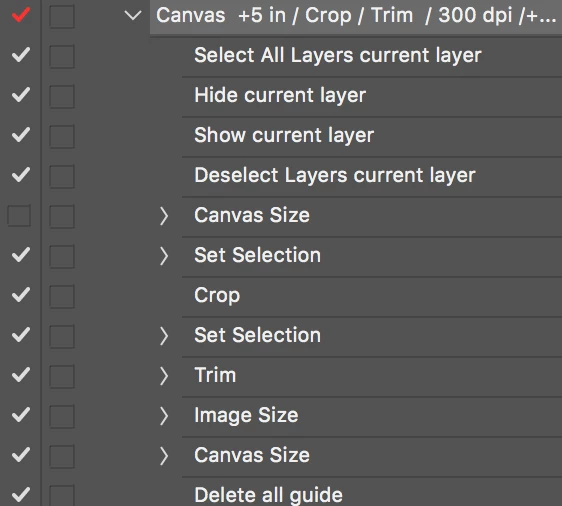
I was however able to figure out a scripting work around, it seems if I create and delete a layer before running this, it negates whatever error is occurring.

var decoyLayer = activeDocument.artLayers.add();

decoyLayer.remove();

app.activeDocument.layers[0].name = "test";

This is definitely a bug, but this workaround is fairly painless. Other option that I didn't seem to run into issues with was renaming the selected layer after running my action.


3 replies

JJMack
Community Expert
Community Expert
July 8, 2016

No problem renaming the background layer. Photoshop make it a normal layer and renames the layer. I tested CS2. CS6. CC, CC 2014, cc2015 and CC 2015.5. The script I wrote rename every layer in a document "test" including the background layer.. The rename never failed  Background layer were made normal layer and layers with their visibility off were turned visible.

JJMack
tssee
Inspiring
July 8, 2016

JJ MACK

you could rename only selected layers

and not all.

wckdtall
wckdtallAuthor
Inspiring
July 8, 2016

Thanks JJ! I am not sure what's happening here, especially since these are occurring inside a try so they shouldn't side.:: weird part is, I tried one, and additionally later on and it was fine, thoughts on structure etc are welcome.

Chuck Uebele
Community Expert
Community Expert
July 8, 2016

If you attempt to rename a background layer, you might get that error.

wckdtall
wckdtallAuthor
Inspiring
July 7, 2016

Experienced the same error again, nothing gets written to the log file, and it doesn't properly name the layers.

JJMack
Community Expert
Community Expert
July 8, 2016

I have tried hard to reproduce your problem on my Dell Windows 10 system. I had created documents with all sort of layers, Smart object, normal layers, Adjustment layers etc. Layer groups and nested groups.  Visible layers. Locked layers, Visibility turn off on layers etc. I created a script to rename all layers to test. I have not been able to reproduce your problem.

Here is the script I wrote.

#target photoshop // this command only works in Photoshop CS2 and higher

app.bringToFront();

if (!documents.length) { alert('There are no documents open.', 'No Document');}

else {processArtLayers(activeDocument);}

function processArtLayers(obj) {

    for( var i = obj.artLayers.length-1; 0 <= i; i--) {obj.artLayers.name = "test"; } // Rename layer

    for( var i = obj.layerSets.length-1; 0 <= i; i--) {processArtLayers(obj.layerSets); } // Process Layer Set Layers

}

JJMack