

Participating Frequently
December 6, 2023
解決済み

Can't select "Spot Colors" when saving Photoshop PDF

  • December 6, 2023
  • 返信数 1.
  • 1283 ビュー

Just wondering if I have a setting turned off or if there's another reason why I can't select spot colors? 

このトピックへの返信は締め切られました。
解決に役立った回答 Conrad_C

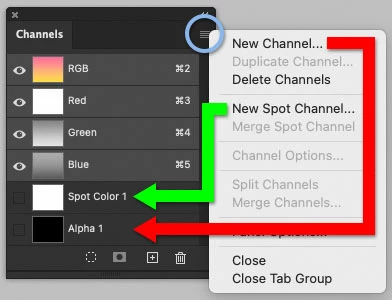
White ink should not be in an alpha channel. Alpha channels don’t print, and they are different than a spot color channel. A spot color channel is technically set up to let print devices know that it should be printed, independently of colors that will be screened into CMYK inks, and independently of other spot color inks.


Make sure the spot color channel was created using the New Spot Channel command, not the New Channel command. If the content is in the wrong channel, I think you should be able to copy and paste between alpha and spot channels.
 

返信数 1

Conrad_C
Community Expert
Community Expert
December 6, 2023

How many spot channels exist in the Channels panel of that document?


When I try it, Spot Colors becomes available after adding just one spot channel to the Channels panel.

Participating Frequently
December 6, 2023

Current Channel panel is attached. What I'm trying to do is print a file on vinyl and I'm using white ink (which is on the Alpha Channel). I've also got cut paths in the file. They're saved as spot colors but obviously aren't showing up on the print side (I'm assuming) because I can't check Spot Colors when saving. 

Stephen Marsh
Community Expert
Community Expert
December 7, 2023

Okay, so I don't need an Alpha channel at all? I changed the Alpha where my white ink currently sits over to a Spot and now when I go to save, I can check Spot Channels - so thank you all for that. For every cut path, do they need to be on separate Spot Channels? There are 8 cut paths in this file along with the white ink layer. Would I need 9 Spot Channels? Or can I have all the cut paths on one Spot Channel with the white ink on another?


In my experience cut path data is only recognised by RIPs on vector objects, not raster.


Photoshop can't create a vector object in a spot colour as is possible in say Illustrator or InDesign.


Your RIP might be different though.