Inspiring
March 4, 2021
Answered

Can't update --conflict process Mac

  • March 4, 2021
  • 1 reply
  • 1048 views

This is a first ever. I read the webpage. I'm on Mac, but Adobe is not telling of the 100 thing in activity monitor what to quit. thanks.

This topic has been closed for replies.
Correct answer Kevin Stohlmeyer

Note, Bridge is ok, so only Photoshop on list.


If Photoshop 2021 is the only thing showing - then that is what you should terminate in Activity Monitor.

In Activity Monitor :
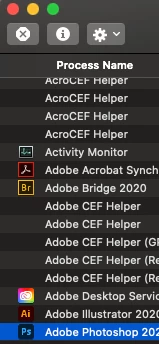
 

  1. Find Adobe Photoshop 2021 in the list of applications and select the application.
  2. Click the X stop sign at the top left of the window.
  3. It will ask if you want to Quit or Force Quit. Force it.
  4. Go back and try to update your Photoshop again using the Creative Cloud app.

1 reply

Kevin Stohlmeyer
Community Expert
Community Expert
March 5, 2021

https://helpx.adobe.com/download-install/kb/close-conflicting-processes.html 

This addresses closing conflicting proceessing when updating.

Select the process mentioned in your error message in Activity Monitor and quit it per the instructions.

larry45Author
Inspiring
March 5, 2021

Thnks I saw that.


T o repeate:


 Of the 100 things in activity monitor what to quit. thanks.


Moderator here?

Kevin Stohlmeyer
Community Expert
Community Expert
March 5, 2021

This is user to user forum, not direct Adobe support.

The message you receive tells you what process to terminate in Activity Monitor.

Can you send a screen shot of the error message?


If you want to reach out to Adobe directly you can use this link:

https://helpx.adobe.com/contact.html