


- Home
- Photoshop ecosystem
- Discussions
- Re: can we use "auto" options in actions?
- Re: can we use "auto" options in actions?

Copy link to clipboard
Copied
Hi
I'm working with aerial photo's. Per project we are talking about 10000 photos.
Sometimes these photos need some adjustments in Photoshop.
We can't review all the photo's indiviual as this would take too long. So I always make an action that benefits all the photos and then run that action in batch.
The problem I have is that the auto adjust option of the camera raw filter doesn't work in an action.
I open a photo, I start recording the action, I open camera raw, press auto, save the result and stop the recording.
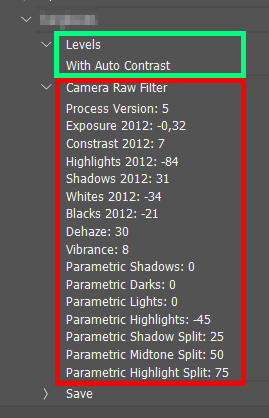
When I check the recording you can see that Photoshop only saved values specific for the photo I opened. So, when I run that action in batch it will adjust all the photo's with the "auto" values of the picture I used to make the action. That's not what I want.
If you use other tools, like auto levels, these work fine.
You'll see what I mean on the screenshot I took.
Is there a workaround or is this just not possible?


 4 Correct answers

Hi Koen
I hope someone else can disagree, but afaik it's not possible out of the box.
I put the log file of these 2 below so you can look under the hood:
// CAMERA RAW ON AUTO =======================================================
var desc493 = new ActionDescriptor();
desc493.putString( charIDToTypeID("CrVe"), "15.1.1" );
desc493.putInteger( charIDToTypeID("PrVN"), 5 );
desc493.putInteger( charIDToTypeID("PrVe"), 184549376 );
desc493.putDouble( charIDToTypeID("Ex12"), 0.760000 );
desc493.putInte


Apologies, that was Adobe Camera Raw plug-in, while the OP was after the Camera Raw Filter:
// Camera Raw Filter - Auto
var desc1 = new ActionDescriptor();
desc1.putBoolean(charIDToTypeID("AuTn"), true); // AuTn = Auto
executeAction(stringIDToTypeID('Adobe Camera Raw Filter'), desc1, DialogModes.NO);
I'm still hunting the source, probably @r-bin or @jazz-y ...
Edit: Looks like it may have been @Lonsn24019487nqnl
Thx for the reply.
So the code you posted should work for the camera raw filter in PS?
My next question is on how to actually run this in PS.
Is it under File>Scripts>???
Do I have to save the code in notepad as .js?
By @Koen278594498gx9

Yes!
Quickstart:
- Copy the code text to the clipboard
- Open a new blank file in a plain-text editor (not in a word processor)
- Paste the code in
- Save as a plain text format file – .txt
- Rename the saved file extension from .txt to .jsx
- Install or br
If installed, the script should be available under File > Scripts – so no need to double-click it or to use File > Scripts > Browse.
The error appears to indicate that the code doesn't work in your version of Photoshop.
The code obviously worked for the version available when it was written.
Do you have an appropriate image open when running the script?

Explore related tutorials & articles
 17
Replies
17
17
Replies
17

Copy link to clipboard
Copied
Hi Koen
I hope someone else can disagree, but afaik it's not possible out of the box.
I put the log file of these 2 below so you can look under the hood:
// CAMERA RAW ON AUTO =======================================================
var desc493 = new ActionDescriptor();
desc493.putString( charIDToTypeID("CrVe"), "15.1.1" );
desc493.putInteger( charIDToTypeID("PrVN"), 5 );
desc493.putInteger( charIDToTypeID("PrVe"), 184549376 );
desc493.putDouble( charIDToTypeID("Ex12"), 0.760000 );
desc493.putInteger( charIDToTypeID("Cr12"), 7 );
desc493.putInteger( charIDToTypeID("Hi12"), -85 );
desc493.putInteger( charIDToTypeID("Sh12"), 53 );
desc493.putInteger( charIDToTypeID("Wh12"), -10 );
desc493.putInteger( charIDToTypeID("Bk12"), -19 );
desc493.putInteger( charIDToTypeID("Vibr"), 20 );
desc493.putInteger( charIDToTypeID("Strt"), 3 );
executeAction( charIDToTypeID("Adobe Camera Raw Filter"), desc493, DialogModes.NO );

// LEVELS =======================================================
var desc500 = new ActionDescriptor();
desc500.putBoolean( charIDToTypeID("Auto"), true );
executeAction( charIDToTypeID("Lvls"), desc500, DialogModes.NO );
You can see absolute values with Camera RAW and an "Auto" value for Levels.
However, you can most likely write a script that can calculate the required values.
If in the histogram of the image you find that the darkest value is "10", apply -10 to Bk12 and you'll get a pure black, etc etc etc.
All the best!
Copy link to clipboard
Copied
Copy link to clipboard
Copied
Apologies, that was Adobe Camera Raw plug-in, while the OP was after the Camera Raw Filter:
// Camera Raw Filter - Auto
var desc1 = new ActionDescriptor();
desc1.putBoolean(charIDToTypeID("AuTn"), true); // AuTn = Auto
executeAction(stringIDToTypeID('Adobe Camera Raw Filter'), desc1, DialogModes.NO);
I'm still hunting the source, probably @r-bin or @jazz-y ...
Edit: Looks like it may have been @Lonsn24019487nqnl
Copy link to clipboard
Copied
Thx for the reply.
So the code you posted should work for the camera raw filter in PS?
My next question is on how to actually run this in PS.
Is it under File>Scripts>???
Do I have to save the code in notepad as .js?
Copy link to clipboard
Copied
Thx for the reply.
So the code you posted should work for the camera raw filter in PS?
My next question is on how to actually run this in PS.
Is it under File>Scripts>???
Do I have to save the code in notepad as .js?
By @Koen278594498gx9
Yes!
Quickstart:
- Copy the code text to the clipboard
- Open a new blank file in a plain-text editor (not in a word processor)
- Paste the code in
- Save as a plain text format file – .txt
- Rename the saved file extension from .txt to .jsx
- Install or browse to the .jsx file to run (see below)
If these simple instructions are too abbreviated, you may need to read on...
https://prepression.blogspot.com/2017/11/downloading-and-installing-adobe-scripts.html
I have also added this to the Photoshop Action Helper Scripts topic, as this was the whole idea to do things that can't be done by an action:
Copy link to clipboard
Copied
Ok, thx. I'll read the how to's and test out the script.
I'll keep you up to date.
Copy link to clipboard
Copied
Ok, I made the script in notepad++.
Changed it to .jsx and copied it in the scripts folder of PS.
If I open the .jsx file in PS of double click it, it gives this error:
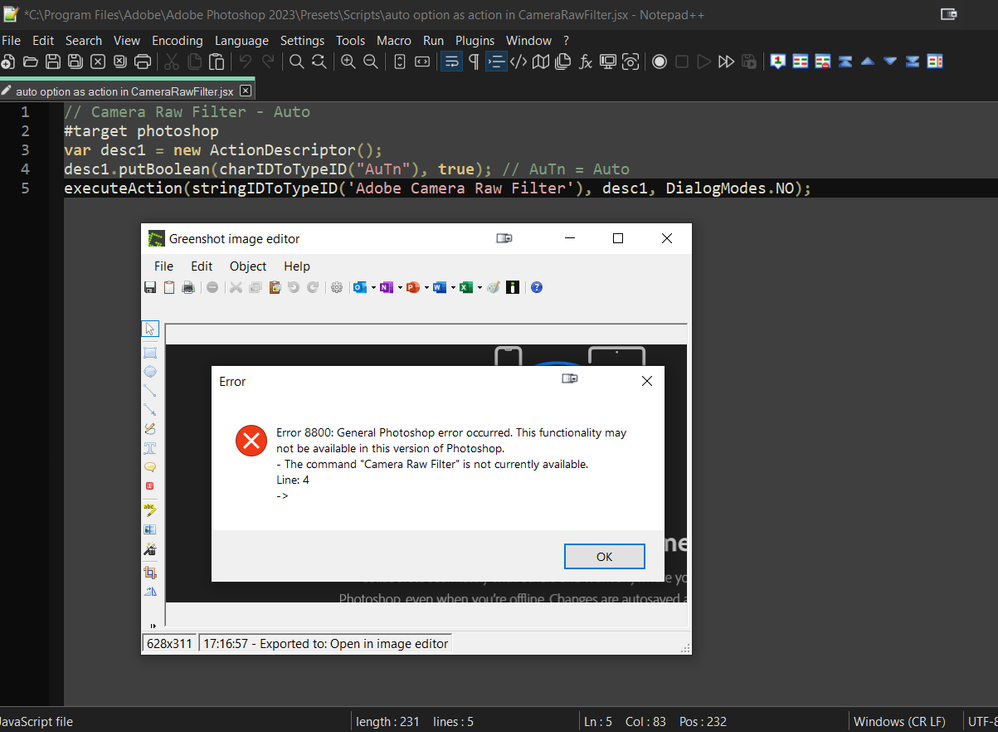
Have I done something wrong?
I'm on PS 2023.
Copy link to clipboard
Copied
If installed, the script should be available under File > Scripts – so no need to double-click it or to use File > Scripts > Browse.
The error appears to indicate that the code doesn't work in your version of Photoshop.
The code obviously worked for the version available when it was written.
Do you have an appropriate image open when running the script?

Copy link to clipboard
Copied
I just tested your code snippet in PS 2023 (running from ESTK on Windows 10 Pro) and it worked correctly.
Copy link to clipboard
Copied
Stephen
I didn't had an image open... 🙂
So it does work, that made my day.
Thanks for the tips and introduction in PS scripts.
Copy link to clipboard
Copied
@Koen278594498gx9 – Thanks for confirming!
Sometimes, error checking is put in place, such as:
#target photoshop

if (app.documents.length) {
    // Camera Raw Filter - Auto
    var desc1 = new ActionDescriptor();
    desc1.putBoolean(charIDToTypeID("AuTn"), true); // AuTn = Auto
    executeAction(stringIDToTypeID('Adobe Camera Raw Filter'), desc1, DialogModes.NO);
} else {
    alert('A document must be open to run this script!');
}
However, I didn't add that as you would obviously have an image open!
So much for assumptions... Glad it worked for you. Full credit to @Lonsn24019487nqnl
Copy link to clipboard
Copied
Just to add to what Stephen said, in production you probably want error checking and try-catch statements.
Copy link to clipboard
Copied
You may want to change your workflow to do bulk changes in Bridge, Lightroom, Photo Mechanic, etc.
Copy link to clipboard
Copied
I'll try to test these programs, but I'm not familiar with them.

Copy link to clipboard
Copied
- I would agree with @Lumigraphics. I would open a large batch of images in camera Raw, then do auto correction. Then run an action or script to finish whatever processing you need to do. I used to do this when I was working. If you open the files via open in ACR in Bridge, and run you final.script in PS, you can have PS running the script on one batch of files, while you open another in ACR. That really speeds up a workflow.
Copy link to clipboard
Copied
Define large batch... Is it 50 photos or 500 photos?
Copy link to clipboard
Copied
Potentially thousands of images at once. For example, you can setup your parameters, save an ACR/Lightroom editing preset, and bulk apply it to as many photos as you want. There is also third-party software like ImageMagick which will be MUCH faster and can handle large numbers of images at once.


Find more inspiration, events, and resources on the new Adobe Community
Explore Now
 AdChoices