
iamdot1997
Participant
November 6, 2019
Answered

Cannot open Photoshop 2020

  • November 6, 2019
  • 13 replies
  • 35180 views

Photoshop 2020 does not respond at the initial launch after installation. The software freezes when the introduction window of new features appears.


I end the software by stoping it in Task Manager and it happens again when I start over. 


I tired both restart my computer and reinstall the software several times but not helping.


I am using the latest version of Windows 10. Please help me I need to use it ASAP. Thank you!
This topic has been closed for replies.
Correct answer

Hi

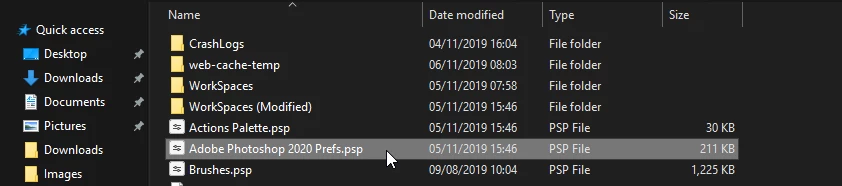
Try deleting the Photoshop preference file from this location

C:\Users\yourname\AppData\Roaming\Adobe\Adobe Photoshop 2020\Adobe Photoshop 2020 Settings


13 replies

clipping path place
Participant
December 6, 2019

This is really helpful

Participant
December 7, 2019

I have the same issue, installed PS 2020 on Mac OSX, application hangs on launch and is completly frozen.

Participant
November 8, 2019

Hi! I'm having the same issue and deleting that file doesn't help.

Participant
November 9, 2019

So, I reinstalled the 2019 version and upgraded to the 2020 version without removing the previous one. 

Saw that tip on another topic and it worked for me. Hope that helps anyone else having the same issue. 😃

tigrezzs12713400
Participant
December 19, 2019

Where did you find the 2019 PS to download ~ have tried reinstalling 2020 and it wont open at all after the download 

Correct answer
November 6, 2019

Hi

Try deleting the Photoshop preference file from this location

C:\Users\yourname\AppData\Roaming\Adobe\Adobe Photoshop 2020\Adobe Photoshop 2020 Settings


Participant
January 13, 2020
I need it to work. 
I have no time for these things
Nicole.M07
Participant
January 27, 2020

I'm having the same problem and need for work. Any advice?