

Participant
November 1, 2013
해결됨

canvas size background colour greyed out

  • November 1, 2013
  • 2 답변들
  • 32215 조회

Canvas size  occasionally the canvas extension colour is greyed out this can happen on any file ie jpg tiff or PSD and in any mode can any one tell me how to correct this please

j

    이 주제는 답변이 닫혔습니다.
    최고의 답변: Jeff Arola

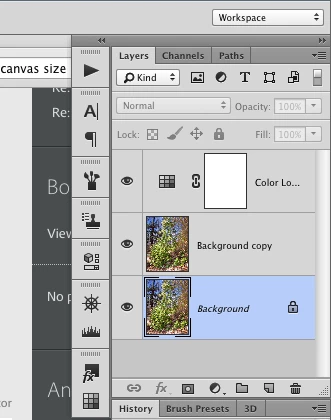
    That usually means your image doesn't have a Background layer.

    If your image doesn't have one you can create a background layer from

    any selected pixel layer by going to Layer>New>Background from Layer.

    http://helpx.adobe.com/photoshop/using/adjusting-crop-rotation-canvas.html

    http://help.adobe.com/en_US/photoshop/cs/using/WSfd1234e1c4b69f30ea53e41001031ab64-78e3a.html
    2 답변

    Jeff Arola
    Community Expert
    Community Expert
    November 3, 2013

    That usually means your image doesn't have a Background layer.

    If your image doesn't have one you can create a background layer from

    any selected pixel layer by going to Layer>New>Background from Layer.

    http://helpx.adobe.com/photoshop/using/adjusting-crop-rotation-canvas.html

    http://help.adobe.com/en_US/photoshop/cs/using/WSfd1234e1c4b69f30ea53e41001031ab64-78e3a.html

    jonh_now작성자
    Participant
    November 4, 2013

    I hadn't thought of that. from a cut out, layer "0" yes thats sounds great.

    I have just tried it , it works perfectly, problem sorted many thanks

    jon

    Peru Bob
    Community Expert
    Community Expert
    November 1, 2013

    Can you post a screen shot so that we can get a better understanding of your problem?

    jonh_now작성자
    Participant
    November 2, 2013

    Bob greetings

    I would love to but wouldn't know where to start, as I said it is occasional and not that often, but annoying when it happens, oh yes I am sure that I am in the wrong place I am using CS6

    jon

    Inspiring
    November 2, 2013

    I will move your thread to the Photoshop forum for you, jonh_now.