


Known Participant
August 25, 2017
해결됨

Changing thickness of a line drawn with Line Tool [in PS 2017.1.1]

  • August 25, 2017
  • 2 답변들
  • 85433 조회

Hi,

I am using Photoshop 2017.1.1 Release.  I have been using the Line Tool to draw line segments.  Sometimes I choose to put an Arrowhead at the Start or End of a line segment.  I have not been using it for very long, but I am pretty sure I remember being able to change the thickness of my line segments by changing the value where I have circled in blue below...
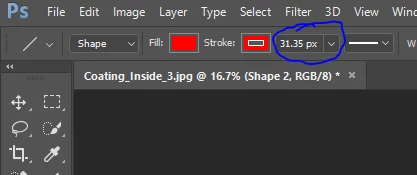
 

... today, changing this value does not seem to have any effect that I can notice.  If anyone can tell me what I am doing wrong, I would greatly appreciate it.


Thanks in advance,
Paul

이 주제는 답변이 닫혔습니다.
최고의 답변: angie_taylor

You need to adjust the line weight value which is further along the control panel to the right :-)

hope this helps :-)

Angie Taylor

2 답변

davescm
Community Expert
Community Expert
August 25, 2017

Hi

The stroke value impacts the width of the stroke around the "line" (shown blue below)

The Weight adjusts the line width (values of 50 and 100 shown below)

Dave

Participating Frequently
July 23, 2021

"The Weight adjusts the line width"

Except it doesn't seem to do anything once the line has been created.

It only seems to have an effect on *future* lines.

Or an I doing something wrong?

Semaphoric
Community Expert
Community Expert
July 25, 2021


@Semaphoric wrote:

The OP and I...


For clarity, can you confirm who you mean by "OP"? @PaulKraemer1 who made the original post in 2017 or @AntonyM6 who replied to this thread in 2021?


~ Jane


Sorry, I meant  Antony.


angie_taylor
Legend
August 25, 2017

You need to adjust the line weight value which is further along the control panel to the right :-)

hope this helps :-)

Angie Taylor