Exit
  • Global community
    • Language:
      • Deutsch
      • English
      • Español
      • Français
      • Português
  • 日本語コミュニティ
  • 한국 커뮤니티
0

Clone stamp copies the whole image at once instead of the part I chose

Community Beginner ,
Aug 02, 2021 Aug 02, 2021

Hi, I have started to edit with photoshop today and learned some of the tools.

And I looked at the stamps settings and touched some of them and now when I try to copy a small part of the image it copies the whole image, How can I fix this?

Thanks. 

TOPICS
Windows
5.5K
Translate
Report
Community guidelines
Be kind and respectful, give credit to the original source of content, and search for duplicates before posting. Learn more
community guidelines

correct answers 1 Correct answer

Community Expert , May 25, 2023 May 25, 2023

Where is the Clone Source Panel? 

Is »Clipped« checked? 

Translate
Adobe
Community Expert ,
Aug 02, 2021 Aug 02, 2021

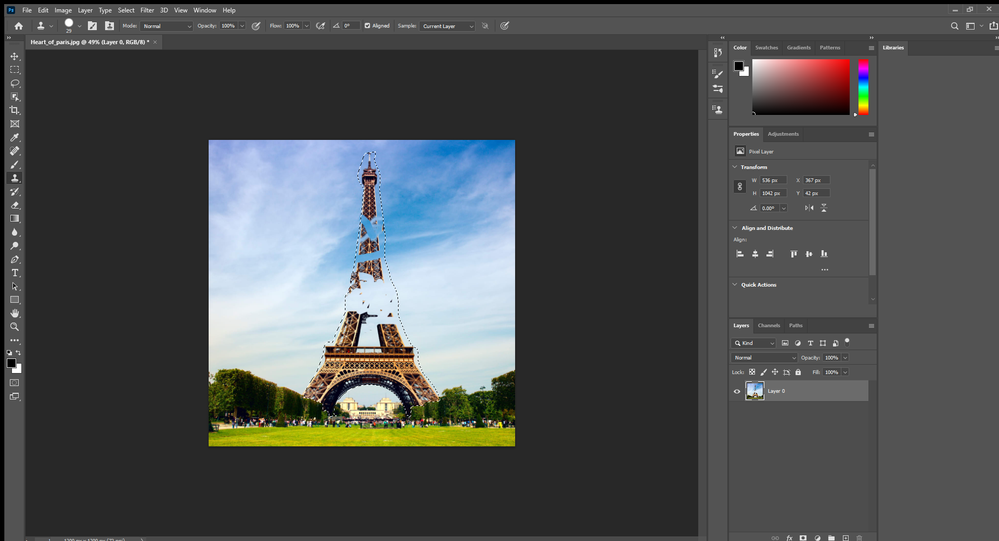
Could you please post screenshots with the pertinent Panels (Toolbar, Layers, Options Bar, Clone Source, …) visible? 


What is the Tool’s diameter? 

Does the Tool actually copy the whole image or only display it without actually affecting the active Layer? 

Translate
Report
Community guidelines
Be kind and respectful, give credit to the original source of content, and search for duplicates before posting. Learn more
community guidelines
Community Beginner ,
Aug 02, 2021 Aug 02, 2021

Yes it just displays it because when i move to other tools the the copy is gone and when i choose the stamp gain the copy is back

Translate
Report
Community guidelines
Be kind and respectful, give credit to the original source of content, and search for duplicates before posting. Learn more
community guidelines
Community Beginner ,
Aug 02, 2021 Aug 02, 2021

Heart_of_paris.jpg @ 49% (Layer 0, RGB_8) _ 02_08_2021 12_40_26.png

Translate
Report
Community guidelines
Be kind and respectful, give credit to the original source of content, and search for duplicates before posting. Learn more
community guidelines
Community Beginner ,
Aug 02, 2021 Aug 02, 2021

Screenshot (8).png

Translate
Report
Community guidelines
Be kind and respectful, give credit to the original source of content, and search for duplicates before posting. Learn more
community guidelines
Community Expert ,
Aug 02, 2021 Aug 02, 2021

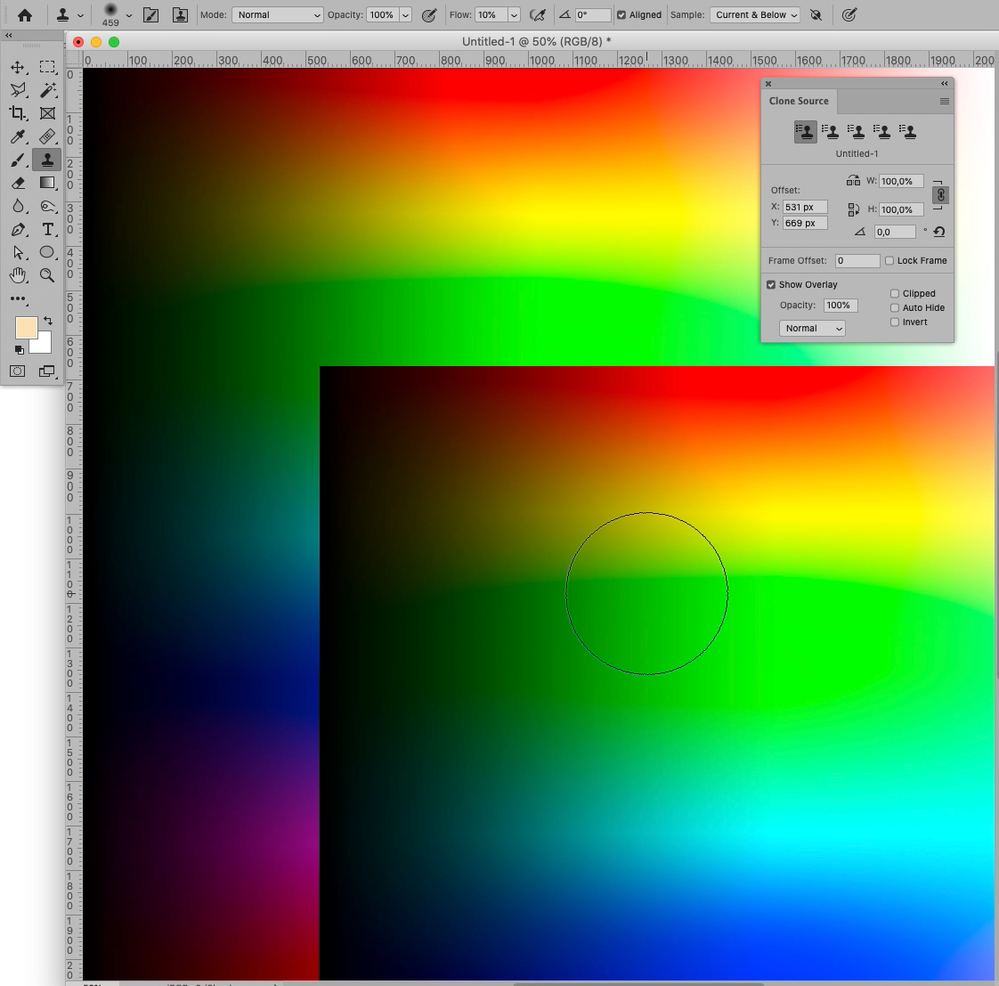
I fail to see the Clone Source Panel in the screenshots so please provide the screenshots I actually asked for. 


Is »Clipped« checked? 

Translate
Report
Community guidelines
Be kind and respectful, give credit to the original source of content, and search for duplicates before posting. Learn more
community guidelines
Community Beginner ,
Aug 02, 2021 Aug 02, 2021

Nvm i unchecked "Show overlay" under clone source

Translate
Report
Community guidelines
Be kind and respectful, give credit to the original source of content, and search for duplicates before posting. Learn more
community guidelines
Community Expert ,
Aug 02, 2021 Aug 02, 2021

I asked about »Clipped«, not »Show Overlay« … so please try checking both »Show Overlay« and »Clipped«. 

Translate
Report
Community guidelines
Be kind and respectful, give credit to the original source of content, and search for duplicates before posting. Learn more
community guidelines
Community Beginner ,
Aug 02, 2021 Aug 02, 2021

but thanks anyways

Translate
Report
Community guidelines
Be kind and respectful, give credit to the original source of content, and search for duplicates before posting. Learn more
community guidelines
Community Expert ,
Aug 02, 2021 Aug 02, 2021

Screenshot 2021-08-02 at 12.30.17.pngScreenshot 2021-08-02 at 12.30.51.png

Edit: I hope these screenshots help you understand what I was hinting at. 

Translate
Report
Community guidelines
Be kind and respectful, give credit to the original source of content, and search for duplicates before posting. Learn more
community guidelines
New Here ,
May 25, 2023 May 25, 2023

I'm getting the same thing, did you ever figure it out ?


Translate
Report
Community guidelines
Be kind and respectful, give credit to the original source of content, and search for duplicates before posting. Learn more
community guidelines
Community Expert ,
May 25, 2023 May 25, 2023

Could you please post screenshots with the pertinent Panels (Toolbar, Layers, Clone Source, Options Bar, …) visible? 

Translate
Report
Community guidelines
Be kind and respectful, give credit to the original source of content, and search for duplicates before posting. Learn more
community guidelines
New Here ,
May 25, 2023 May 25, 2023

yes, see screen recording.
When I select the clone stamp tool, it moves a duplicate of the whole layer.


Translate
Report
Community guidelines
Be kind and respectful, give credit to the original source of content, and search for duplicates before posting. Learn more
community guidelines
Community Expert ,
May 25, 2023 May 25, 2023

Where is the Clone Source Panel? 

Is »Clipped« checked? 

Translate
Report
Community guidelines
Be kind and respectful, give credit to the original source of content, and search for duplicates before posting. Learn more
community guidelines
New Here ,
May 25, 2023 May 25, 2023

ah, 'clipped' wasn't checked. I ticked the box and now it works. Thank you!
I don't ever remember unselecting it, but am relieved.

Translate
Report
Community guidelines
Be kind and respectful, give credit to the original source of content, and search for duplicates before posting. Learn more
community guidelines
New Here ,
Aug 19, 2023 Aug 19, 2023

I have clipped selected and still have the problem 🤔

Translate
Report
Community guidelines
Be kind and respectful, give credit to the original source of content, and search for duplicates before posting. Learn more
community guidelines
Community Expert ,
Aug 20, 2023 Aug 20, 2023

Could you please post screenshots with the pertinent Panels (Toolbar, Layers, Options Bar, Clone Source, …) visible? 

Translate
Report
Community guidelines
Be kind and respectful, give credit to the original source of content, and search for duplicates before posting. Learn more
community guidelines
Community Beginner ,
Aug 30, 2023 Aug 30, 2023

Mine is checked "clipped" & it is still doing it, why on earth does PS keep resetting itsself I have never had this issue in 15 years of using PS, regards BJW

Translate
Report
Community guidelines
Be kind and respectful, give credit to the original source of content, and search for duplicates before posting. Learn more
community guidelines
Community Beginner ,
Aug 30, 2023 Aug 30, 2023

Also I know you are helping c.pfaffenbicher, but can you not post screen shots of what should be ticked & not ticked to have this working correctly? as you are obviously an expert but the shorthand posts are a not really helping as with the menus rearranged everytime the thing updates I spend so much time just trying to do what ive done (in a short range) for ages, thansk again for your assistance Regards BjW, I cant really post screen shots due to what I am working on its confidential work.

Translate
Report
Community guidelines
Be kind and respectful, give credit to the original source of content, and search for duplicates before posting. Learn more
community guidelines
Community Expert ,
Aug 30, 2023 Aug 30, 2023

Then please create a sample file (a simple pattern or gradient) and post a screenshot featuring that. 

Translate
Report
Community guidelines
Be kind and respectful, give credit to the original source of content, and search for duplicates before posting. Learn more
community guidelines
Community Expert ,
Aug 30, 2023 Aug 30, 2023
quote

Also I know you are helping c.pfaffenbicher, but can you not post screen shots of what should be ticked & not ticked to have this working correctly? 

I posted screenshots in 2021 (so further up in the thread). 

Translate
Report
Community guidelines
Be kind and respectful, give credit to the original source of content, and search for duplicates before posting. Learn more
community guidelines
New Here ,
Jul 31, 2024 Jul 31, 2024

I unticked show overlay did the trick. just if anyone else comes around here looking for the answer here it is 
Translate
Report
Community guidelines
Be kind and respectful, give credit to the original source of content, and search for duplicates before posting. Learn more
community guidelines
Explorer ,
Sep 20, 2024 Sep 20, 2024

I am aloso having the same problem - all boxes are unticked in the clone stamp tool.

I alt click the image and it copies the entire image.

Translate
Report
Community guidelines
Be kind and respectful, give credit to the original source of content, and search for duplicates before posting. Learn more
community guidelines
Community Expert ,
Sep 21, 2024 Sep 21, 2024

Could you please post screenshots taken at View > 100% with the pertinent Panels (Toolbar, Layers, Options Bar, Clone Source, …) visible? 

Translate
Report
Community guidelines
Be kind and respectful, give credit to the original source of content, and search for duplicates before posting. Learn more
community guidelines
Community Beginner ,
Sep 21, 2024 Sep 21, 2024

Damnn feels weird looking at this. Last time I edited it my father around

Translate
Report
Community guidelines
Be kind and respectful, give credit to the original source of content, and search for duplicates before posting. Learn more
community guidelines