

Yamonov
Legend
October 24, 2021
Question

Color management not working with Photoshop and Windows 11?

  • October 24, 2021
  • 8 replies
  • 11165 views

In Windows 11, as of October 2021, there seems to be a problem where the color profile of the monitor cannot be obtained from software using the conventional API.


(For correct color management operation, there must be two profiles: the document profile and the correct monitor profile, but since the monitor profile cannot be retrieved correctly, applications that color manage will shift colors.)


Photoshop also has that problem.
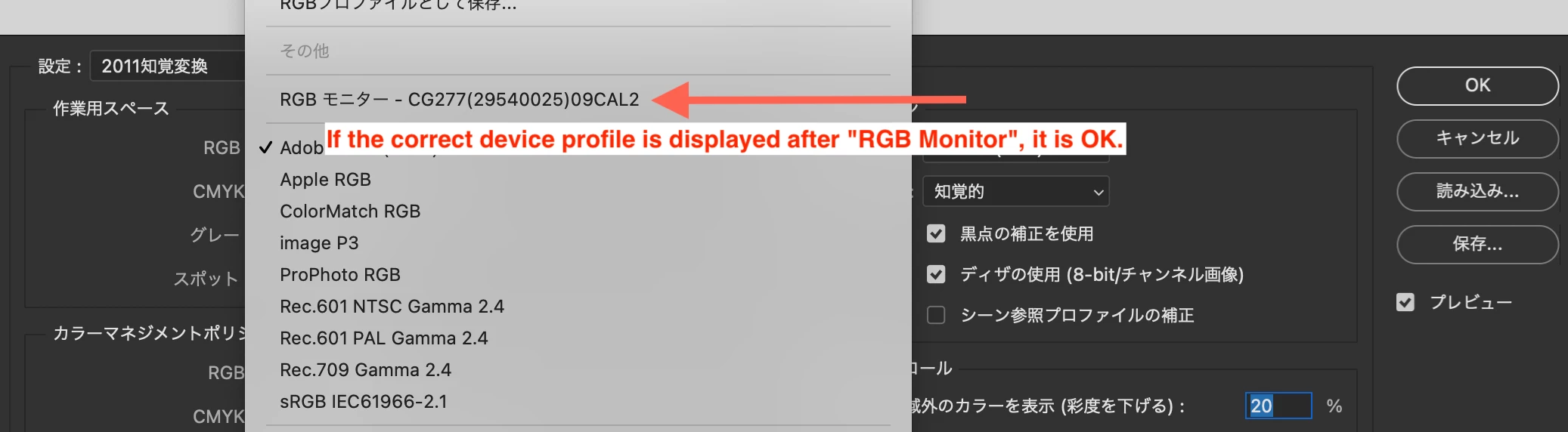


*EIZO's web page

https://www.eizoglobal.com/support/compatibility/software/win/windows11/


*The page discussing color management in Windows 11

https://techcommunity.microsoft.com/t5/windows-11/windows-11-color-management-not-working-chrome-on-secondary/m-p/2869159


(Translated from Japanese by DeepL.

This topic has been closed for replies.

8 replies

Inspiring
February 6, 2022

This got fixed in "January 25, 2022—KB5008353 (OS Build 22000.469)".

Known Participant
February 7, 2022

Has anyone else verified this, or does it show up somewhere on Adobe's website? I don't want to go thru the hassle of upgrading (again) to Win11, only to have to roll it back if it hasn't been addressed. Thanks

Uneternal
Participant
July 22, 2022

No it's not fixed, still got the same oversaturated colors in Photoshop and Bridge. 

Known Participant
December 12, 2021

I am still having a problem with Windows 11 and Adobe Lightroom and Photoshop.  Using Eizo CG319X and updated ColorNavigator 7.1.6. 

NB, colourmanagement
Community Expert
Community Expert
December 13, 2021

The change in programming has apparently happened in W11, the protocol previously used by Adobe to call for the display icc profile has apparently been removed  - I would hope that there will be an update for that from Microsoft.

Early adopters beware


I hope this helps
neil barstow, colourmanagement net :: adobe forum volunteer
google me "neil barstow colourmanagement" for lots of free articles on colour management

Yamonov
YamonovAuthor
Legend
November 21, 2021

I'm sure Adobe is already aware of this. I've reported it in various places to reach the developers.


The reason I bothered to write here, after the report was made, is that Adobe's official support page does not clearly state what kind of problem will occur when using Photoshop on Windows 11.


As of November 23, it still doesn't say.


Since it's a big problem that "Photoshop can't do color management", I think they SHOULD announce "wait for the update because of this problem" as soon as possible instead of vague "Win11 is not supported yet".

--Yamonov
NB, colourmanagement
Community Expert
Community Expert
November 23, 2021

"Since it's a big problem that "Photoshop can't do color management", I think they should announce "wait for the update because of this problem" as soon as possible instead of vague "Win11 is not supported yet"."

yep, that’s fair comment


I hope this helps
neil barstow, colourmanagement net :: adobe forum volunteer
google me "neil barstow colourmanagement" for lots of free articles on colour management

Participating Frequently
November 12, 2021

There are several Win32 API functions to get monitor profiles, but among them, the GetICMProfile and EnumICMProfiles functions have a problem that does not work properly on Windows 11.


Photoshop seems to be using GetICMProfile in the Adobe Color Engine DLL. I guess that's why Photoshop can't get the correct profile of the monitor.


I am not sure about Capture One, but Affinity Photo uses the WcsGetDefaultColorProfile function, which works fine in Windows 11.

Known Participant
November 12, 2021

Thank you - that makes sense! I've tried messing around with the color settings options in PS, but either they do nothing or make the image look fine in PS, but then when saved and viewed back in C1, they then look washed out. I hope Adobe realizes this is a SIGNIFICANT bug and is working with MS to address? Makes color editing in PS a non-starter - or even using freq sep to fix color issues - 

Known Participant
November 14, 2021

Barry, looks like you are right and this IS a significant issue between Photoshop and Win11. Please keep us posted here if you get a fix as I am sure you're not the only one.

IMO it’s a Microsoft issue as they appear to have broken a long established method for developers to call the display profile. 


However, try reporting the bug here please: 

credit to: Jean-Claude Tremblay

Below is my list of user-voice links for submitting bugs and features requests to Adobe.

Adobe Photoshop & Lightroom https://feedback.photoshop.com/

also 

You can also report it as a bug here

https://feedback.photoshop.com/photoshop_family/categories/photoshop_family_photoshop


I hope this helps neil barstow, colourmanagement net :: adobe forum volunteer google me "neil barstow colourmanagement" for lots of free articles on colour management [please only use the blue reply button at the top of the page, this maintains the original thread title and chronological order oI hope this helps
neil barstow, colourmanagement net :: adobe forum volunteer
google me "neil barstow colourmanagement" for lots of free articles on colour management


Thanks - done!

Known Participant
November 10, 2021

Yes, am seeing this issue when working with Capture One, then editing in PS, and back to C1. The image looks great in C1 on my calibrated monitor (NEC PA series), then looks oversaturated/etc. in PS, then when back in C1 after PS edits, looks fine again (in C1). If Adobe wasn't aware of this issue, then their regression testing isn't up to snuff as I'm running a new computer, latest versions of software, Nvidia graphics card, etc. - pretty standard configuration. And why smaller companies such as C1 and Affinity Photo (who also does NOT have this issue) can have their stuff working at launch vs. Adobe with all it's resources? C'mon guys - and it would have been nice to see a notification from Adobe that there is an issue (I spent over an hour on a chat with Adobe support only to come to the conclusion that this was a bug - hard to believe I'm the first person to uncover this given that Win11 has been out for a while...

NB, colourmanagement
Community Expert
Community Expert
October 25, 2021

There seems to be a bug in Windows 11 causing this issue, you'd be better to check online for issues with applications before upgrading the operating system. Apologies that this advice com,es too late for you as you've already taken the plunge.

You can see here also that Eizo have not yet provided W11 compatibility.

https://www.eizoglobal.com/support/compatibility/software/win/windows11/


I hope this helps
neil barstow, colourmanagement net :: adobe forum volunteer
google me "neil barstow colourmanagement" for lots of free articles on colour management
[please only use the blue reply button at the top of the page, this maintains the original thread title and chronological order of posts]

D Fosse
Community Expert
Community Expert
October 24, 2021

Yes, apparently a bug in Windows 11. This is why it's never a good idea to jump on a new operating system. Wait until these things are ironed out.


https://community.adobe.com/t5/photoshop-ecosystem-discussions/yellow-background-in-new-images-in-photoshop-amp-lightroom-windows-11/td-p/12468051 

TheDigitalDog
Inspiring
October 24, 2021

The profile listed next to RGB should be the name of the display profile the system is using. That "appears" to be what I'm seeing in your screen capture no? Isn't CG277.... the name of the dispaly profile for the display you're using? 

Also see this: 

https://helpx.adobe.com/download-install/kb/windows-11.html

We strongly recommend you wait until we have released a compatible version of your app.

Author “Color Management for Photographers" & "Photoshop CC Color Management/pluralsight"
Yamonov
YamonovAuthor
Legend
October 25, 2021

CG…は私の使用しているモニタプロファイルで、Color Navigatorによって作成されたものです。私の使用しているシステムはmac/BigSurですから、Windowsバグは関係ありません。皆さんが状態を自ら確認できるように作ったスクリーンショットです。


より詳しい説明はここにあります。

http://blog.livedoor.jp/yamma_ma/archives/56160506.html


AdobeやMicrosoftがこのバグを重大なものと捉えてすぐに行動することが大事です。参考blogにもあるように、うっかりアップデートしたり、Win11がプリインストールされたマシンを買った人向けに早くこれが周知され、また早くバグ修正されるとよいですね。

--Yamonov