


- Home
- Photoshop ecosystem
- Discussions
- Re: Colour Lookup Problem in Photoshop CC 20161012...
- Re: Colour Lookup Problem in Photoshop CC 20161012...

Copy link to clipboard
Copied
Hi, I didn't have this problem until recently I updated my Windows 10 to the latest version.
4 of the colour lookups in 3DLUT does not work and it blacks my screen, including 2 strip, 3 strip, bleach bypass, soft warming. The rest works just fine.
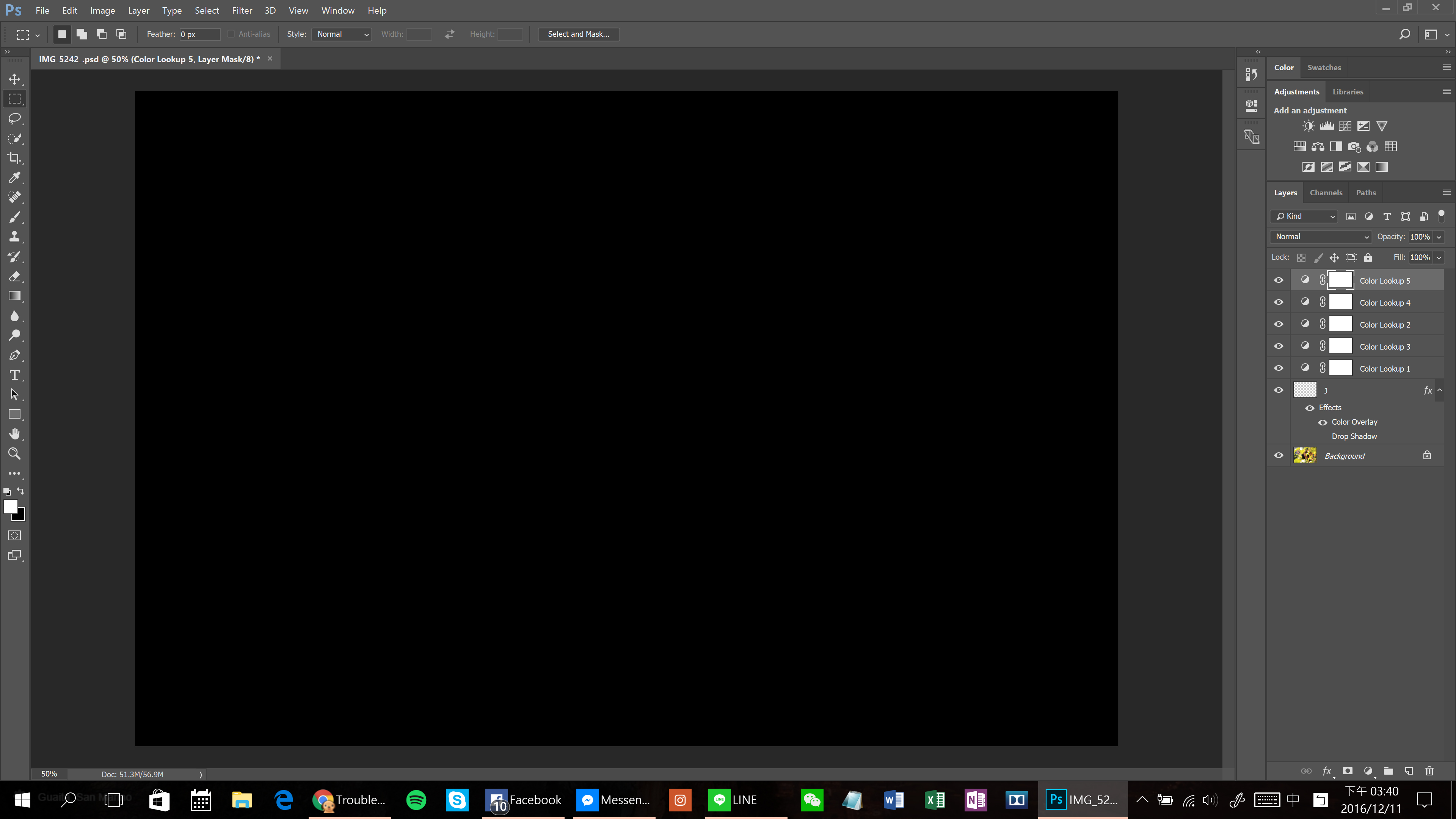
I tried every solution I saw online. Resetting the preference, disable the graphic processor, set advanced setting to basic, update my Windows and my processor driver to the latest version, even reinstall Photoshop still doesn't solve the problem.
What am I missing here?


 1 Correct answer
Ok. So I was in the live chat with an extremely nice engineer trying to solve the problem.
We had tried everything you would find online.
Re-install PS, reset preference, disable graphic processor, and etc.
In the process, we figured that it is definitely not the hardware problem.
And my software and drivers are up to date.
Just when we about to get to the no-solution end, we decided to try the ultimate solution: Enable Compatibility Mode.
I'm using Windows 10, so I don't know how other platforms work
...

Explore related tutorials & articles
 12
Replies
12
12
Replies
12

Copy link to clipboard
Copied
Ok. So I was in the live chat with an extremely nice engineer trying to solve the problem.
We had tried everything you would find online.
Re-install PS, reset preference, disable graphic processor, and etc.
In the process, we figured that it is definitely not the hardware problem.
And my software and drivers are up to date.
Just when we about to get to the no-solution end, we decided to try the ultimate solution: Enable Compatibility Mode.
I'm using Windows 10, so I don't know how other platforms work. Here is how-to:
1. Go to the folder when you install Photoshop.
2. Right click on Photoshop.exe and choose 'properties'.
3. Find 'Compatibility Mode' under Compatibility, checked the box for 'Run this program in compatibility mode for:' and choose 'Windows 7'.
In the setting section, check 'Disable display scaling on high DPI settings' and 'Run this program as an administrator', and click apply then close it.
4. Re-open Photoshop and see whether it works.
I hope this solves your problem as well as it has bugged me for a long time!
If you have any more question, hit me with a message:

Copy link to clipboard
Copied
thanks jeffreychao
it worked fine for me!
Copy link to clipboard
Copied
You are so welcome! Glad that worked out for you as well 

Copy link to clipboard
Copied
Hey foks,
It just worked fine for me as well. Now I understood, best OS is win 7 & not Mac for PS. Thanks for sharing
Copy link to clipboard
Copied
Hey glad it helped! Haha yeah that's what I've been sticking to Windows. Sometimes its just easier to solve the problem. Mac could be really complicated at times.

Copy link to clipboard
Copied
Now in 2020 still the same issue here on Windows 10 1909 with PS v21.1.0. For me it was enough to activate Windows 7 compatibility mode, nothing else.
Thx!

Copy link to clipboard
Copied
thanks a lot! it worked for me.

Copy link to clipboard
Copied
THANK YOU!!!! I was having trouble with this for ages... I installed and uninstalled it a couple of times, nothing worked. I followed your post and instructions and IT WORKED!!!
Thank you. 😃
Copy link to clipboard
Copied
Haha! You are so welcome

Copy link to clipboard
Copied
Thank you SOOOO much for this one! Saved me a bunch of time.

Copy link to clipboard
Copied
So this finally fixed the problem but now I get that loud warning noise and a pop up to authorize PS to make changes each and every single time I open something, how do I get rid of that?

Copy link to clipboard
Copied
Damn... maybe direct this question to the service team? I hope you found the solution!


Get ready! An upgraded Adobe Community experience is coming in January.
Learn more
 AdChoices