


Participant
January 10, 2019
Answered

Commands in Photoshop not available

  • January 10, 2019
  • 1 reply
  • 348 views

Hello, I have a collection of jpg files that I should edit in LR and PS. I can edit them in LR and open them in PS, but then almost all commands in the drop down menu are not available (are grey). So e.g. there is no command under "Filter", non under "Select" etc. . What can I do to solve this problem? Is there only a tick in the settings missing?

I work with the latest Version of LR and PS.

Thanks for you help.

Stefanie
This topic has been closed for replies.
Correct answer

Hi Stefanie

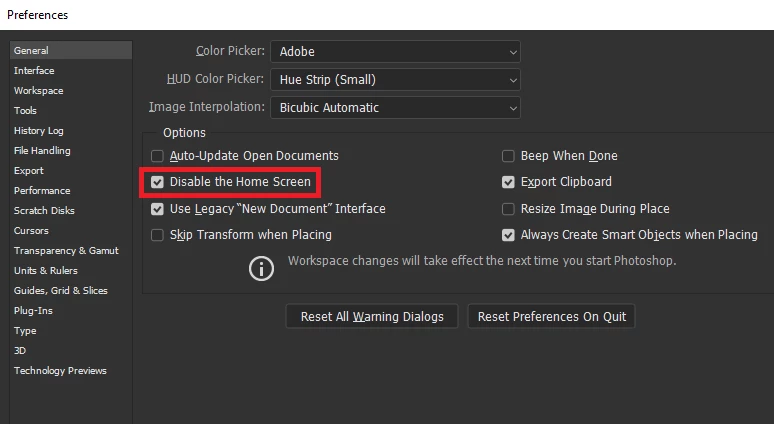
This is a known issue, workaround is to either open Photoshop first and then Lightroom or disable the home screen in preferences

1 reply

Correct answer
January 10, 2019

Hi Stefanie

This is a known issue, workaround is to either open Photoshop first and then Lightroom or disable the home screen in preferences

Participant
January 10, 2019

Hello Ged,

thanks for your quick feedback. It worked - thank you very much.

Best regards

Stefanie

January 10, 2019

You're welcome