
Participant
July 12, 2024
Answered

Content Aware Checkbox Missing

  • July 12, 2024
  • 2 replies
  • 684 views

Hello, 


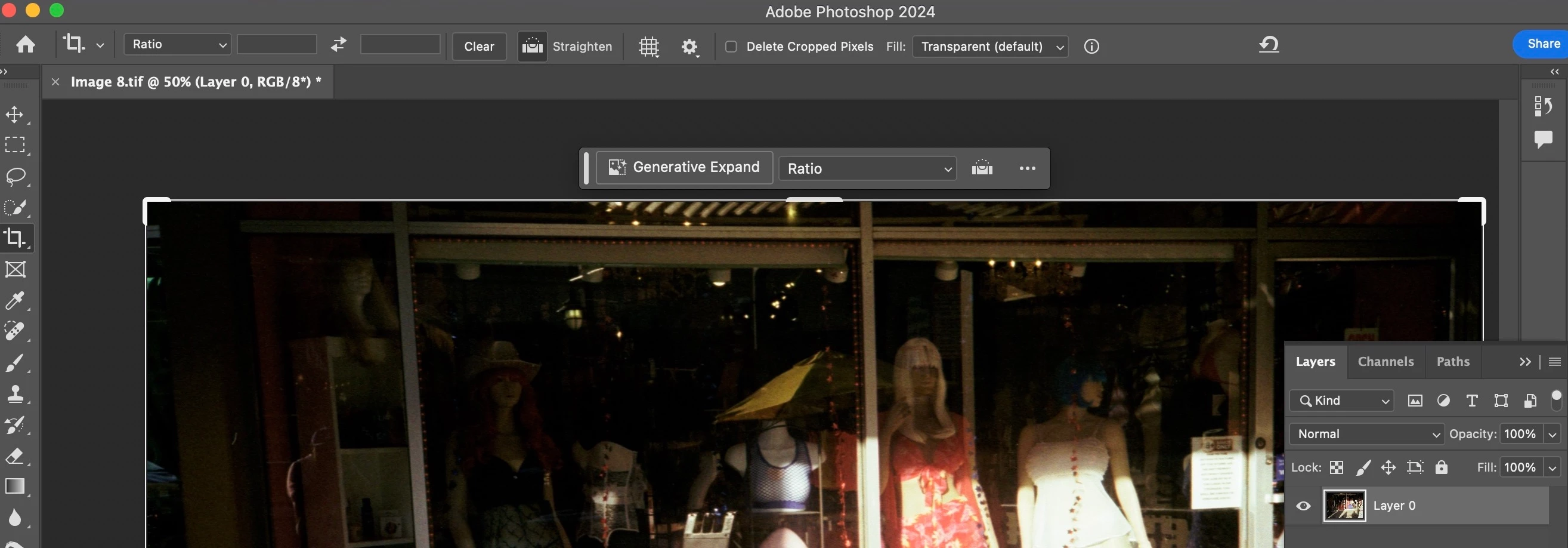
Currently on Photoshop 25.9.1 on a Mac M1. When using the Crop Tool on an unlocked layer I do not have the 'content aware' checkbox available, but rather a 'fill' dialog box.  I have toggled 'Enable Narrow Options Bar' in preferences on and off and the only change with that setting is an icon or text dialog box for 'Delete Cropped Pixels.' For reference, I am trying to straighten photos using this technique. Any help appreciated. Thank you!

Correct answer Ged_Traynor

@Stephen25048463od1b you can select Content Aware Fill from the drop-down menu

2 replies

Participant
July 25, 2024

Hello - I have the same issue!!  I'm working on a macbook pro, Ps 25.9.1.    Very frustrating.  Have tried toggling 'Narrow options bar', and resetting tool.  Any suggestions?


jane-e
Community Expert
Community Expert
July 25, 2024
quote

I have the same issue!

By @Lynn29666769qfgy


After you disabled the narrow options bar, did you also relaunch Photoshop?


Please show a screenshot of your options bar for the Crop tool — similar to the one posted by Ged.


Jane


Participant
July 25, 2024

Hi @Lynn29666769qfgy 


You said you have the same issue, but the OP said, "When using the Crop Tool on an unlocked layer I do not have the 'content aware' checkbox available," and yours is showing.


Can you clarify your issue for us?


Jane


I understood there was meant to be a check box next to the drop down menu.  I can select content aware fill, but it doesn't seem to work, just fills the space in with black.  


Ged_Traynor
Community Expert
Ged_TraynorCommunity ExpertCorrect answer
Community Expert
July 12, 2024

@Stephen25048463od1b you can select Content Aware Fill from the drop-down menu