Inspiring
July 13, 2017
Answered

Contours are not visible

  • July 13, 2017
  • 2 replies
  • 1961 views

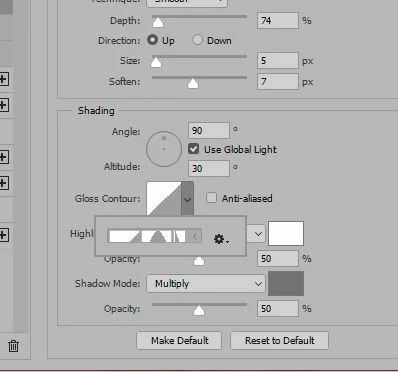
I am using Photoshop CC 2017 and when I use my bevel feature,  the contours seem to be hidden.  I know there are more  there but I can't get to them.  Can you help?

Thanks.
This topic has been closed for replies.
Correct answer Katie Houghton

Reset your preferences and see if that fixes issues in your software.

Go to your preferences. Click on "Reset Preferences on Quit" button. Quit Photoshop. Restart Photoshop. Let me know if that fixes your issue.

2 replies

davescm
Community Expert
Community Expert
July 13, 2017

When panels start to act up like this - which occasionally they can do then :

a. Try resetting the workspace. Go to the top right of the workspace and click on the down arrow. Choose reset from the menu.

If that does not work

b. Reset Preferences. Go to Preferences - General and click on "Reset Preferences on Quit". Click OK then close and restart Photoshop

Dave

davescm
Community Expert
Community Expert
July 13, 2017

Looks like Katie was typing at the same time as me, but she obviously types faster . At least we gave the same answer

Dave

pslane1Author
Inspiring
July 16, 2017

Thank you, Dave and Katie.

I did have to click on Reset Preferences on Quit and now the contours are back.  Now I've got a lot of preferences to reset!

Katie HoughtonCorrect answer
Inspiring
July 13, 2017

Reset your preferences and see if that fixes issues in your software.

Go to your preferences. Click on "Reset Preferences on Quit" button. Quit Photoshop. Restart Photoshop. Let me know if that fixes your issue.
