
Question
Copying: Issue with transparency
Hello guys,
this is a very basic problem that I just happen to never have been taught to deal with, so sorry for asking such an elementary question.
In short, when you select and copy/paste (or cut/paste) an element from one background to another, how do you deal with the original background shining through?
In the below example (taken from a much larger file) I had used color range selection to find all the black text on the page (which had a mostly white background, though some of it was within colored images, too) and pasted it onto a background of withered paper.
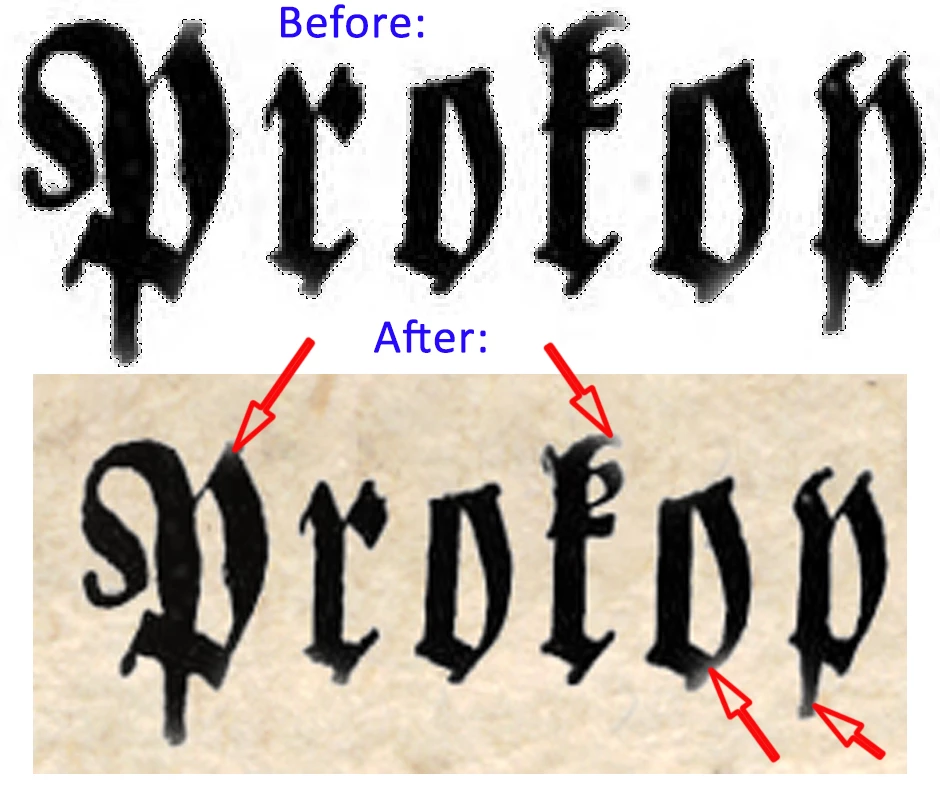
Of course, now I got the original white background shining through at the letters' edges (indicated by the arrows). What are the standard methods to avoid this?
 AdChoices