Participating Frequently
January 3, 2021
Answered

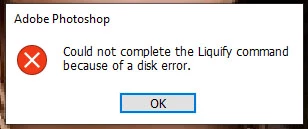
could not complete the liquify command because of a disk error in Photoshop 22.1

  • January 3, 2021
  • 7 replies
  • 61841 views

I cannot use liquify tool in photoshop 22.1.
 

Correct answer Akash Sharma

I changed the drawing mode and the problem doesnt resolve


Would you mind installing the version 21.2.4 of Photoshop from the Creative Cloud Desktop app and let us know if the isuse with Liquify tool still persists? 


See: https://helpx.adobe.com/download-install/using/install-previous-version.html 


~Akash

7 replies

Participant
February 23, 2023

How do I use the NONE gpu accelerated mode, so I can liquify masks again? I have been able to liquify masks until 2 weeks ago, and then it just stopped working giving me this same error,

Participant
September 22, 2022

I had such problem today after updating Photoshop to 23.5.1. The problem disappeared with installing 23.0 version.
I work on old but "normal" computer. It can work fast, I know it for shure. All I have to do - NOT TO UPDATE it's software)))))) 
iMac (21.5-inch, Late 2013), 16 GB RAM, Macintosh SSD, NVIDIA GeForce GT 750M 1 GB

MacOS Catalina 10.15.7 (19H114)

Participant
September 27, 2022

Thx Nik!

solved my liquify problem with your post. 

i have also a NVIDIA GT730 running on Windows 10 PRO

Participant
September 14, 2022

I am getting this same error.  And I just upgraded to the newest version today.  It didn't fix it.  I went to the link but the version they tell you to revert back to isn't available.  Now what do I do to fix this error?

Participant
August 11, 2022

Just solved similar issues with customer. 

Desktop PC, integrated Intel graphic, dedicated AMD Radeon 7700 graphic card. 
In Settings menu he had correctly AMD Radeon 7700 set to enabled. But his monitor/display was connected to the HDMI port of integrated Intel card. 


Photoshop message about "disk error" in such case is absolutely misleading for user. Simply reconnect display to dedicated card solved issue. 

Participant
August 4, 2022

I get the same error when trying use Liquify.  I have PS ver 23.4.2 running on a Mac Book Pro with MacOS Catalina 10.15.7.  
I looked though this thread for some solutions and saw someone suggesting a change to the Preferences/Graphics Processor Settings (which on 23.x is in Preferences/Performance..).  But I don't have an option to edit the current selection (which is NVIDIA GeForce GT 650M). Please advise.  I need to use Liquify.

Participant
January 29, 2021

I'm getting the same error on a Mac Mini running Big Sur version 11.1 and Photoshop version 22.1.1.

I have an external graphics card, if I disable it, the error goes away, but Liquify is totally unuseable.

I have configured different drives as scratch disks, and there is loads of free space on them.

Participant
March 24, 2021

I'm getting the same error on my Mac mini running Catalina 10.15.7 and latest version of Photoshop. If I unplug my external graphic card and run photoshop with my internal graphicard the Liquify tool works fine. I have also tested Liquify on my Hackingtosh running smillar hardware as Mac mini (same graphic card) and there is no error with Liquify tool.


I also noticed fall in Adobe programs quality of use. Tasks that used to take me couple of minutes now take me longer. I do not have the proof but I have the feeling that its taking me longer to edit photos from my Nikon D850 in Lightroom and Photoshop (photoshop is bearly digesting 16 bits psd files from D850).


I cleaned my Mac, have 150 GB free space on scratch disk, 32GB of ram of which I delegated 25GB to Photosop when in use.

Participant
March 24, 2021

I have now managed to get it to work.

Go into Preferences / Advanced Graphics Processor Settings, and tick the box at the bottom 'Use native operating system GPU acceleration'. I have the top three optins ticked as well and use Normal drawing mode.

It should then work.

This may sacrifice some graphics performance, but at least liquify now works.

Akash Sharma
Legend
January 4, 2021

Hi there,


Sorry that you're getting an error message "could not complete the Liquify command because of a disk error" while using the Liquify filter in Photoshop 22.1


What is your computer's operating system? 


Would you mind restoring the preferences for Photoshop & see if it helps? See this article for reference: https://t.co/ulJI7cGn1G You may want to backup your settings beforehand: https://t.co/4dX7gkr36D


Thanks,

Akash

KahCienAuthor
Participating Frequently
January 4, 2021

Here is my computer's specification.


I tried using the keyboard shortcut method but the same problem is still occured. 

Akash Sharma
Legend
January 6, 2021

Thanks for the details. Would you mind  checking the steps mentioned in this article https://helpx.adobe.com/photoshop/kb/invalid-numeric-entry-integer-96-8-required-photoshop.html and let us know if that helps? 


Thanks,

Akash
