Exit
  • Global community
    • Language:
      • Deutsch
      • English
      • Español
      • Français
      • Português
  • 日本語コミュニティ
  • 한국 커뮤니티
0

Create new Exposure layer by script

Explorer ,
Feb 12, 2025 Feb 12, 2025

hi all,

I want to create an exposure adjustment layer and then set the value using a script. I searched on google but no results.

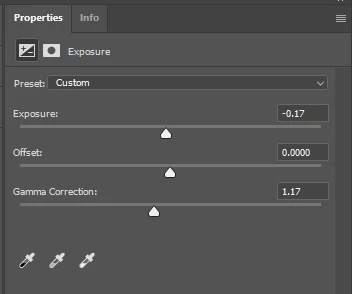
for example I want the script to create an exposure adjustment layer and set the following value:

expousure = -0.17

gamma = 1.17

please guide me the exact command.

I appreciate your help

exposure.PNG

TOPICS
Actions and scripting
367
Translate
Report
Community guidelines
Be kind and respectful, give credit to the original source of content, and search for duplicates before posting. Learn more
community guidelines

correct answers 1 Correct answer

Community Expert , Feb 12, 2025 Feb 12, 2025

@powerful_Zephyr5EF9 â€“ Here you go:


ExposureAdjLayer(-0.17, 0, 1.17);

function ExposureAdjLayer(exposure, offset, gammaCorrection) {
	var s2t = function (s) {
		return app.stringIDToTypeID(s);
	};
	var descriptor = new ActionDescriptor();
	var descriptor2 = new ActionDescriptor();
	var descriptor3 = new ActionDescriptor();
	var reference = new ActionReference();
	reference.putClass( s2t( "adjustmentLayer" ));
	descriptor2.putReference( s2t( "null" ), reference );
	descriptor.putEnumerated( s2
...
Translate
Adobe
Community Expert ,
Feb 12, 2025 Feb 12, 2025

@powerful_Zephyr5EF9 â€“ Here you go:


ExposureAdjLayer(-0.17, 0, 1.17);

function ExposureAdjLayer(exposure, offset, gammaCorrection) {
	var s2t = function (s) {
		return app.stringIDToTypeID(s);
	};
	var descriptor = new ActionDescriptor();
	var descriptor2 = new ActionDescriptor();
	var descriptor3 = new ActionDescriptor();
	var reference = new ActionReference();
	reference.putClass( s2t( "adjustmentLayer" ));
	descriptor2.putReference( s2t( "null" ), reference );
	descriptor.putEnumerated( s2t( "presetKind" ), s2t( "presetKindType" ), s2t( "presetKindDefault" ));
	descriptor.putDouble( s2t( "exposure" ), exposure );
	descriptor.putDouble( s2t( "offset" ), offset );
	descriptor.putDouble( s2t( "gammaCorrection" ), gammaCorrection );
	descriptor3.putObject( s2t( "type" ), s2t( "exposure" ), descriptor );
	descriptor2.putObject( s2t( "using" ), s2t( "adjustmentLayer" ), descriptor3 );
	executeAction( s2t( "make" ), descriptor2, DialogModes.NO );
}

 

Translate
Report
Community guidelines
Be kind and respectful, give credit to the original source of content, and search for duplicates before posting. Learn more
community guidelines
Explorer ,
Feb 13, 2025 Feb 13, 2025

@Stephen Marsh Thank you very much, it works fine.

Can I ask you one more thing?

I want to create an adjustment curve layer with the "Enhance Monochromatic Contrast " algorithm option.

Please guide me the exact command.

C1.PNG

Translate
Report
Community guidelines
Be kind and respectful, give credit to the original source of content, and search for duplicates before posting. Learn more
community guidelines
Community Expert ,
Feb 13, 2025 Feb 13, 2025

I have a feeling that this will require more AM code knowledge and experience than I have.


My suggestion is that you create a new topic so that your question's visibility isn't lost when you mark my previous reply as a correct answer.

Translate
Report
Community guidelines
Be kind and respectful, give credit to the original source of content, and search for duplicates before posting. Learn more
community guidelines
Explorer ,
Feb 13, 2025 Feb 13, 2025
LATEST

ok thank you.

Translate
Report
Community guidelines
Be kind and respectful, give credit to the original source of content, and search for duplicates before posting. Learn more
community guidelines