
Known Participant
May 29, 2021
Answered

Creating Clipping Mask that will reverse only White Color is that possible?

  • May 29, 2021
  • 2 replies
  • 877 views

Can I have Clipping Mask that reverses only White Color on Smart object its clipped to? Lets say if smart object has white and red colors, reverse white to black and leave red as is. would it be possible? 

Thanks!
This topic has been closed for replies.
Correct answer Michael Bullo

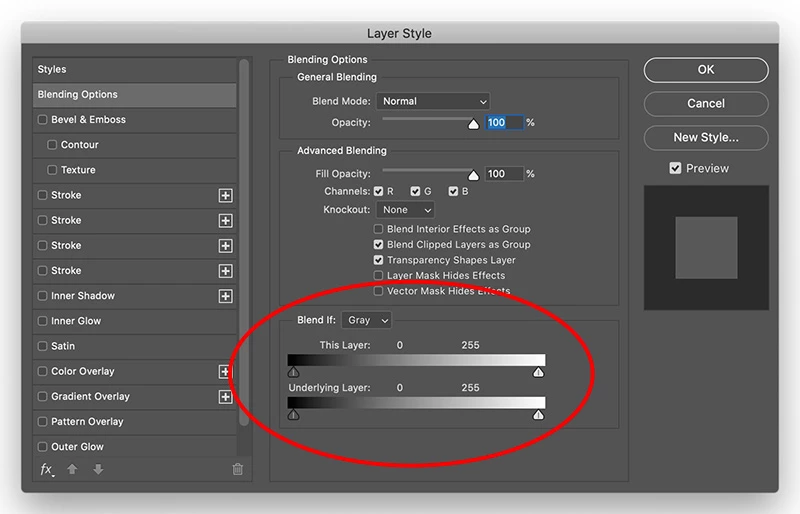
The "Blend if" sliders that @Chuck Uebele  is referring to can be found within the Layer Style dialog box. Right mouse click on a layer within the Layers panel and choose Blending Options.


2 replies

Legend
May 30, 2021

Can you please give an example of what you did, otherwise I did not understand what it was all about.

Chuck Uebele
Community Expert
Community Expert
May 30, 2021

There might be several ways to do this. Off hand, I would try clipping a inverse adjustment layer, the using the blend if sliders to bring back all the tones you want, except white.

Michael Bullo
Community Expert
Michael BulloCommunity ExpertCorrect answer
Community Expert
May 30, 2021

The "Blend if" sliders that @Chuck Uebele  is referring to can be found within the Layer Style dialog box. Right mouse click on a layer within the Layers panel and choose Blending Options.


paata01Author
Known Participant
May 30, 2021

thanks, will try tomorrow, should I do it on smart object or create blank layer and clip to smart object, that smart object will have different artworks, so need only white to auto - reverse on those different artworks, what settings should change in blending options. thanks again