Participant
June 16, 2021
Answered

Crop/trim image automation 3:4

  • June 16, 2021
  • 5 replies
  • 24470 views

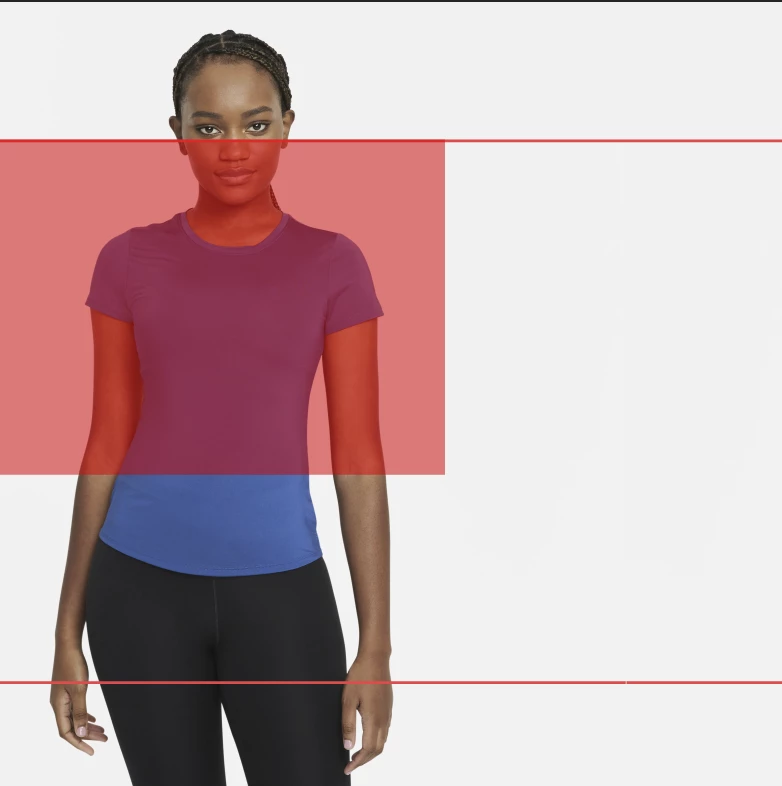
Cropping a lot of images one by one. Need your help to speed up the process.

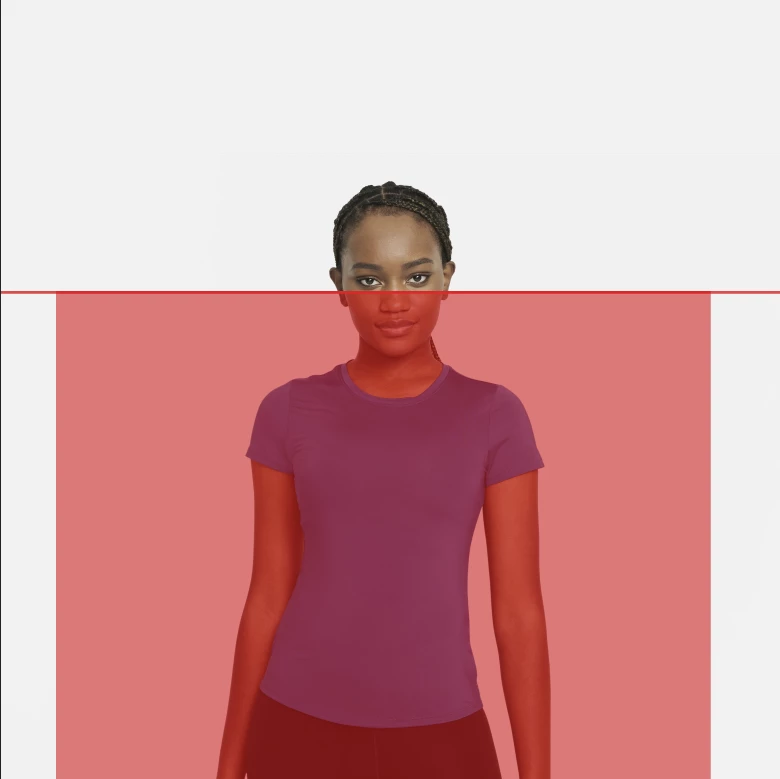
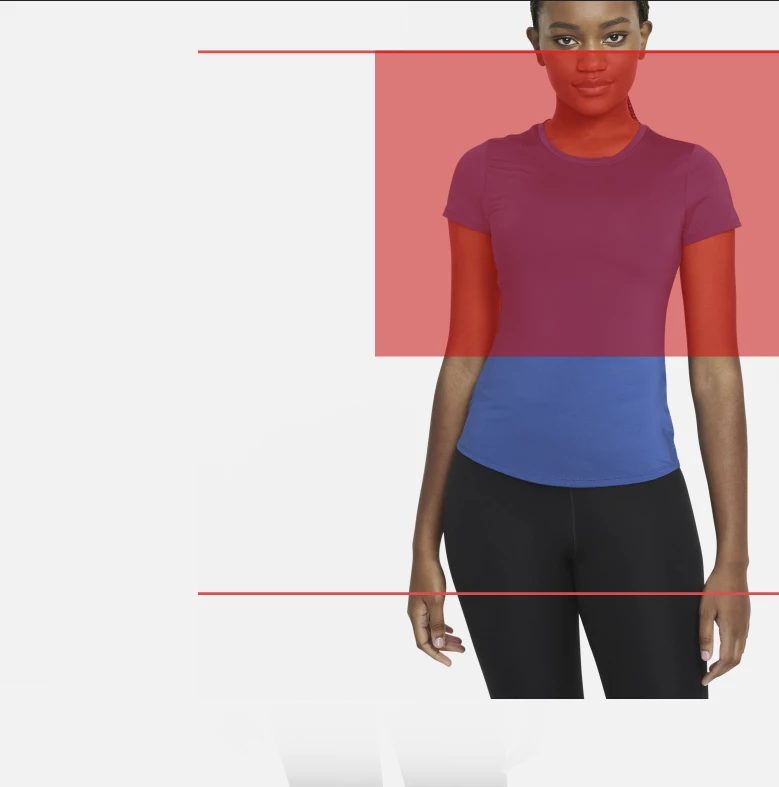
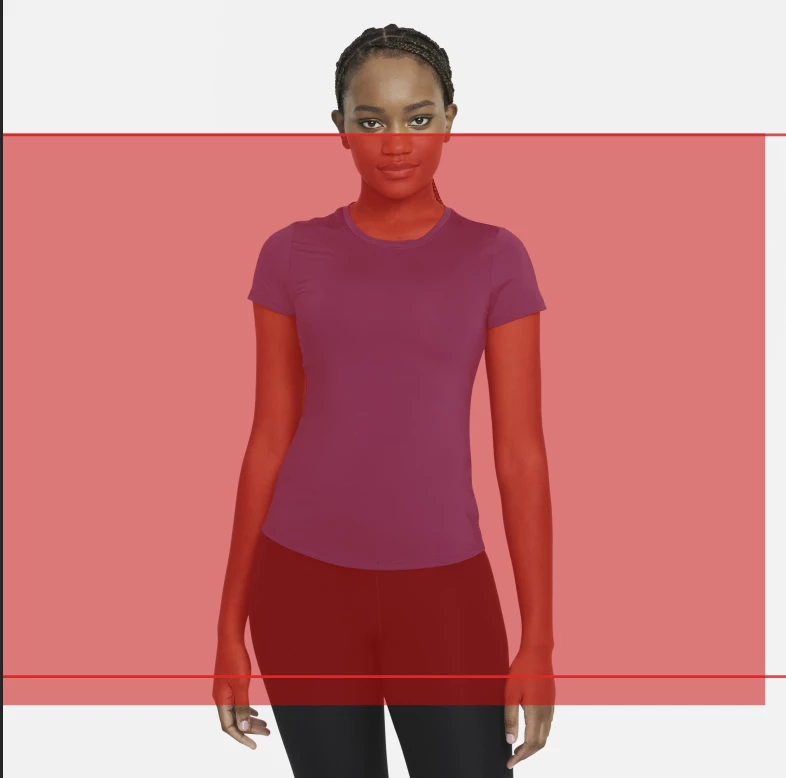
Final image should be :

Aspect ratio 3:4.

Keep the background color.(might change...but mostly in the 240-255 values)

Center the subject.

Crop above the nose.

Any help is appreciated !

Correct answer jazz-y
I didn't care about compatibility and I'm assuming you are using the latest versions of photoshopIf necessaryyou can refuse to use the Select Subject function and take the coordinates of the nose as the center of the selection


#target photoshop

var lr = new AM('layer'),
    doc = new AM('document');

lr.copyCurentToLayer()
lr.liquify()
lr.fade('difference')
lr.levels([0, 0.2, 8])
lr.makeSelectionFromChannel('blue')

if (doc.hasProperty('selection')) {
    var selectionBounds = doc.descToObject(doc.getProperty('selection')),
        noseTop = selectionBounds.bottom;

    doc.deleteCurrentLayer()
    lr.autoCutout()

    selectionBounds = doc.descToObject(doc.getProperty('selection'))
    doc.deselect()

    var bodyCenter = selectionBounds.left + (selectionBounds.right - selectionBounds.left) / 2,
        layerBounds = doc.descToObject(lr.getProperty('bounds')),
        lrHeight = layerBounds.bottom,
        lrWidth = layerBounds.right,
        selectionWidth = bodyCenter <= lrWidth / 2 ? bodyCenter : (lrWidth - bodyCenter),
        selectionHeight = selectionWidth * 2 / 4 * 3;

    if ((noseTop + selectionHeight) > lrHeight) {
        selectionHeight = lrHeight - noseTop
        selectionWidth = selectionHeight / 3 * 4 / 2
    }

    doc.makeSelection(noseTop, bodyCenter - selectionWidth, noseTop + selectionHeight, bodyCenter + selectionWidth)

}

function AM(target) {
    var s2t = stringIDToTypeID,
        t2s = typeIDToStringID;

    target = s2t(target)
    this.getProperty = function (property, descMode, id, idxMode, parent, parentIdx) {
        property = s2t(property);
        (r = new ActionReference()).putProperty(s2t('property'), property);
        id != undefined ? (idxMode ? r.putIndex(target, id) : r.putIdentifier(target, id)) :
            r.putEnumerated(target, s2t('ordinal'), s2t('targetEnum'));
        if (parent) r.putIndex(s2t(parent), parentIdx);
        return descMode ? executeActionGet(r) : getDescValue(executeActionGet(r), property)
    }

    this.hasProperty = function (property, id, idxMode) {
        property = s2t(property);
        (r = new ActionReference()).putProperty(s2t('property'), property);
        id ? (idxMode ? r.putIndex(target, id) : r.putIdentifier(target, id))
            : r.putEnumerated(target, s2t('ordinal'), s2t('targetEnum'));
        return executeActionGet(r).hasKey(property)
    }

    this.descToObject = function (d) {
        var o = {}
        for (var i = 0; i < d.count; i++) {
            var k = d.getKey(i)
            o[t2s(k)] = getDescValue(d, k)
        }
        return o
    }

    this.copyCurentToLayer = function (numberOfCopies) {
        numberOfCopies = numberOfCopies == undefined ? 1 : numberOfCopies
        for (var i = 0; i < numberOfCopies; i++) { executeAction(s2t('copyToLayer'), undefined, DialogModes.NO) }
    }

    this.liquify = function () {
        var mesh = String.fromCharCode(0, 0, 0, 16, 0, 0, 0, 1, 0, 0, 0, 0, 0, 8, 102, 97, 99, 101, 77, 101, 115, 104, 0, 0, 0, 3, 0, 0, 0, 21, 102, 97, 99, 101, 68, 101, 115, 99, 114, 105, 112, 116, 111, 114, 86, 101, 114, 115, 105, 111, 110, 108, 111, 110, 103, 0, 0, 0, 2, 0, 0, 0, 15, 102, 97, 99, 101, 77, 101, 115, 104, 86, 101, 114, 115, 105, 111, 110, 108, 111, 110, 103, 0, 0, 0, 2, 0, 0, 0, 12, 102, 97, 99, 101, 73, 110, 102, 111, 76, 105, 115, 116, 86, 108, 76, 115, 0, 0, 0, 1, 79, 98, 106, 99, 0, 0, 0, 1, 0, 0, 0, 0, 0, 8, 102, 97, 99, 101, 73, 110, 102, 111, 0, 0, 0, 3, 0, 0, 0, 10, 102, 97, 99, 101, 67, 101, 110, 116, 101, 114, 79, 98, 106, 99, 0, 0, 0, 1, 0, 0, 0, 0, 0, 0, 110, 117, 108, 108, 0, 0, 0, 2, 0, 0, 0, 0, 88, 32, 32, 32, 100, 111, 117, 98, 63, 214, 168, 24, 114, 155, 183, 191, 0, 0, 0, 0, 89, 32, 32, 32, 100, 111, 117, 98, 63, 198, 184, 100, 157, 44, 14, 74, 0, 0, 0, 13, 102, 101, 97, 116, 117, 114, 101, 86, 97, 108, 117, 101, 115, 79, 98, 106, 99, 0, 0, 0, 1, 0, 0, 0, 0, 0, 13, 102, 101, 97, 116, 117, 114, 101, 86, 97, 108, 117, 101, 115, 0, 0, 0, 3, 0, 0, 0, 9, 101, 121, 101, 72, 101, 105, 103, 104, 116, 100, 111, 117, 98, 191, 195, 51, 51, 64, 0, 0, 0, 0, 0, 0, 13, 108, 101, 102, 116, 69, 121, 101, 72, 101, 105, 103, 104, 116, 100, 111, 117, 98, 191, 195, 51, 51, 64, 0, 0, 0, 0, 0, 0, 14, 114, 105, 103, 104, 116, 69, 121, 101, 72, 101, 105, 103, 104, 116, 100, 111, 117, 98, 191, 195, 51, 51, 64, 0, 0, 0, 0, 0, 0, 20, 102, 101, 97, 116, 117, 114, 101, 68, 105, 115, 112, 108, 97, 99, 101, 109, 101, 110, 116, 115, 79, 98, 106, 99, 0, 0, 0, 1, 0, 0, 0, 0, 0, 20, 102, 101, 97, 116, 117, 114, 101, 68, 105, 115, 112, 108, 97, 99, 101, 109, 101, 110, 116, 115, 0, 0, 0, 0);
        (d = new ActionDescriptor()).putData(s2t('faceMeshData'), mesh)
        executeAction(charIDToTypeID('LqFy'), d, DialogModes.NO)
    }

    this.fade = function (mode) {
        (d = new ActionDescriptor()).putEnumerated(s2t('mode'), s2t('blendMode'), s2t(mode))
        executeAction(s2t('fade'), d, DialogModes.NO)
    }

    this.levels = function (paramsArray) {
        var left = paramsArray[0],
            gamma = paramsArray[1],
            right = paramsArray[2];

        (d = new ActionDescriptor()).putEnumerated(s2t('presetKind'), s2t('presetKindType'), s2t('presetKindCustom'));
        (r = new ActionReference()).putEnumerated(s2t('channel'), s2t('channel'), s2t('composite'));
        (d1 = new ActionDescriptor()).putReference(s2t('channel'), r);
        (l = new ActionList()).putInteger(left);
        l.putInteger(right);
        d1.putList(s2t('input'), l);
        d1.putDouble(s2t('gamma'), gamma);
        (l1 = new ActionList()).putObject(s2t('levelsAdjustment'), d1);
        d.putList(s2t('adjustment'), l1);
        executeAction(s2t('levels'), d, DialogModes.NO)
    }

    this.makeSelectionFromChannel = function (channel) {
        (r = new ActionReference()).putProperty(s2t('channel'), s2t('selection'));
        (d = new ActionDescriptor()).putReference(s2t('null'), r);
        (r1 = new ActionReference()).putEnumerated(s2t('channel'), s2t('channel'), s2t(channel));
        d.putReference(s2t('to'), r1)
        executeAction(s2t('set'), d, DialogModes.NO)
    }

    this.deselect = function () {
        (r = new ActionReference()).putProperty(s2t('channel'), s2t('selection'));
        (d = new ActionDescriptor()).putReference(s2t('null'), r);
        d.putEnumerated(s2t('to'), s2t('ordinal'), s2t('none'));
        executeAction(s2t('set'), d, DialogModes.NO);
    }

    this.deleteCurrentLayer = function () {
        (r = new ActionReference()).putEnumerated(s2t('layer'), s2t('ordinal'), s2t('targetEnum'));
        (d = new ActionDescriptor()).putReference(s2t('null'), r)
        executeAction(s2t('delete'), d, DialogModes.NO)
    }

    this.autoCutout = function (sampleAllLayers) {
        sampleAllLayers = sampleAllLayers == undefined ? false : true;
        (d = new ActionDescriptor()).putBoolean(s2t('sampleAllLayers'), sampleAllLayers);
        executeAction(s2t('autoCutout'), d, DialogModes.NO);
    }

    this.makeSelection = function (top, left, bottom, right) {
        (r = new ActionReference()).putProperty(s2t('channel'), s2t('selection'));
        (d = new ActionDescriptor()).putReference(s2t('null'), r);
        (d1 = new ActionDescriptor()).putUnitDouble(s2t('top'), s2t('pixelsUnit'), top);
        d1.putUnitDouble(s2t('left'), s2t('pixelsUnit'), left);
        d1.putUnitDouble(s2t('bottom'), s2t('pixelsUnit'), bottom);
        d1.putUnitDouble(s2t('right'), s2t('pixelsUnit'), right);
        d.putObject(s2t('to'), s2t('rectangle'), d1);
        executeAction(s2t('set'), d, DialogModes.NO);
    }

    function getDescValue(d, p) {
        switch (d.getType(p)) {
            case DescValueType.OBJECTTYPE: return (d.getObjectValue(p));
            case DescValueType.LISTTYPE: return d.getList(p);
            case DescValueType.REFERENCETYPE: return d.getReference(p);
            case DescValueType.BOOLEANTYPE: return d.getBoolean(p);
            case DescValueType.STRINGTYPE: return d.getString(p);
            case DescValueType.INTEGERTYPE: return d.getInteger(p);
            case DescValueType.LARGEINTEGERTYPE: return d.getLargeInteger(p);
            case DescValueType.DOUBLETYPE: return d.getDouble(p);
            case DescValueType.ALIASTYPE: return d.getPath(p);
            case DescValueType.CLASSTYPE: return d.getClass(p);
            case DescValueType.UNITDOUBLE: return (d.getUnitDoubleValue(p));
            case DescValueType.ENUMERATEDTYPE: return [t2s(d.getEnumerationType(p)), t2s(d.getEnumerationValue(p))];
            default: break;
        };
    }
}


5 replies

Stephen Marsh
Community Expert
Community Expert
July 31, 2021

@Adrian5FF9  (original topic poster)

 MXKS


Please mark one or multiple answers as correct so that others with the same/similar question know that an answer was found.

Participating Frequently
June 30, 2022

Can someone help me, I have never made a script before and from the same photoshoot I need to crop to different vendors at pixel ratios all 300dpi. Some vendors have the crop right under the eyes like the image posted here, others have crops right below the nose, above the lips and then also right below the lip.


i know for certian crops, the backgounds would need to be expanded, so i applied the RGB values.


Macy's Full body - 3894px x 4755px crop under eyes Background RGB 245

Macy's Half Body - 3894px x 4755px Crop mid thigh Background RGB 245

Nordstrom  -  2640px x 4048px crop right under nose Background RGB 255

Walmart - 1500px x 2000px crop right below the lip Background RGB 255

Saks Full body - 3000px x 3000px crop under eyes Background RGB 255

Saks Half Body - 3000px x 3000px Crop mid thigh Background RGB255


Thank you in advance! 

Geppetto Luis
Legend
July 23, 2021

some have noticed that the selection changes based on the dpi of the photo.

Participant
June 17, 2021

I have used lighroom for this and it works great - especially when there are alot of images

Kukurykus
Legend
June 17, 2021

I confirm, once I installed it and it detects faces really good, at the time of working, so in backround.

jazz-yCorrect answer
Legend
June 16, 2021
I didn't care about compatibility and I'm assuming you are using the latest versions of photoshopIf necessaryyou can refuse to use the Select Subject function and take the coordinates of the nose as the center of the selection


#target photoshop

var lr = new AM('layer'),
    doc = new AM('document');

lr.copyCurentToLayer()
lr.liquify()
lr.fade('difference')
lr.levels([0, 0.2, 8])
lr.makeSelectionFromChannel('blue')

if (doc.hasProperty('selection')) {
    var selectionBounds = doc.descToObject(doc.getProperty('selection')),
        noseTop = selectionBounds.bottom;

    doc.deleteCurrentLayer()
    lr.autoCutout()

    selectionBounds = doc.descToObject(doc.getProperty('selection'))
    doc.deselect()

    var bodyCenter = selectionBounds.left + (selectionBounds.right - selectionBounds.left) / 2,
        layerBounds = doc.descToObject(lr.getProperty('bounds')),
        lrHeight = layerBounds.bottom,
        lrWidth = layerBounds.right,
        selectionWidth = bodyCenter <= lrWidth / 2 ? bodyCenter : (lrWidth - bodyCenter),
        selectionHeight = selectionWidth * 2 / 4 * 3;

    if ((noseTop + selectionHeight) > lrHeight) {
        selectionHeight = lrHeight - noseTop
        selectionWidth = selectionHeight / 3 * 4 / 2
    }

    doc.makeSelection(noseTop, bodyCenter - selectionWidth, noseTop + selectionHeight, bodyCenter + selectionWidth)

}

function AM(target) {
    var s2t = stringIDToTypeID,
        t2s = typeIDToStringID;

    target = s2t(target)
    this.getProperty = function (property, descMode, id, idxMode, parent, parentIdx) {
        property = s2t(property);
        (r = new ActionReference()).putProperty(s2t('property'), property);
        id != undefined ? (idxMode ? r.putIndex(target, id) : r.putIdentifier(target, id)) :
            r.putEnumerated(target, s2t('ordinal'), s2t('targetEnum'));
        if (parent) r.putIndex(s2t(parent), parentIdx);
        return descMode ? executeActionGet(r) : getDescValue(executeActionGet(r), property)
    }

    this.hasProperty = function (property, id, idxMode) {
        property = s2t(property);
        (r = new ActionReference()).putProperty(s2t('property'), property);
        id ? (idxMode ? r.putIndex(target, id) : r.putIdentifier(target, id))
            : r.putEnumerated(target, s2t('ordinal'), s2t('targetEnum'));
        return executeActionGet(r).hasKey(property)
    }

    this.descToObject = function (d) {
        var o = {}
        for (var i = 0; i < d.count; i++) {
            var k = d.getKey(i)
            o[t2s(k)] = getDescValue(d, k)
        }
        return o
    }

    this.copyCurentToLayer = function (numberOfCopies) {
        numberOfCopies = numberOfCopies == undefined ? 1 : numberOfCopies
        for (var i = 0; i < numberOfCopies; i++) { executeAction(s2t('copyToLayer'), undefined, DialogModes.NO) }
    }

    this.liquify = function () {
        var mesh = String.fromCharCode(0, 0, 0, 16, 0, 0, 0, 1, 0, 0, 0, 0, 0, 8, 102, 97, 99, 101, 77, 101, 115, 104, 0, 0, 0, 3, 0, 0, 0, 21, 102, 97, 99, 101, 68, 101, 115, 99, 114, 105, 112, 116, 111, 114, 86, 101, 114, 115, 105, 111, 110, 108, 111, 110, 103, 0, 0, 0, 2, 0, 0, 0, 15, 102, 97, 99, 101, 77, 101, 115, 104, 86, 101, 114, 115, 105, 111, 110, 108, 111, 110, 103, 0, 0, 0, 2, 0, 0, 0, 12, 102, 97, 99, 101, 73, 110, 102, 111, 76, 105, 115, 116, 86, 108, 76, 115, 0, 0, 0, 1, 79, 98, 106, 99, 0, 0, 0, 1, 0, 0, 0, 0, 0, 8, 102, 97, 99, 101, 73, 110, 102, 111, 0, 0, 0, 3, 0, 0, 0, 10, 102, 97, 99, 101, 67, 101, 110, 116, 101, 114, 79, 98, 106, 99, 0, 0, 0, 1, 0, 0, 0, 0, 0, 0, 110, 117, 108, 108, 0, 0, 0, 2, 0, 0, 0, 0, 88, 32, 32, 32, 100, 111, 117, 98, 63, 214, 168, 24, 114, 155, 183, 191, 0, 0, 0, 0, 89, 32, 32, 32, 100, 111, 117, 98, 63, 198, 184, 100, 157, 44, 14, 74, 0, 0, 0, 13, 102, 101, 97, 116, 117, 114, 101, 86, 97, 108, 117, 101, 115, 79, 98, 106, 99, 0, 0, 0, 1, 0, 0, 0, 0, 0, 13, 102, 101, 97, 116, 117, 114, 101, 86, 97, 108, 117, 101, 115, 0, 0, 0, 3, 0, 0, 0, 9, 101, 121, 101, 72, 101, 105, 103, 104, 116, 100, 111, 117, 98, 191, 195, 51, 51, 64, 0, 0, 0, 0, 0, 0, 13, 108, 101, 102, 116, 69, 121, 101, 72, 101, 105, 103, 104, 116, 100, 111, 117, 98, 191, 195, 51, 51, 64, 0, 0, 0, 0, 0, 0, 14, 114, 105, 103, 104, 116, 69, 121, 101, 72, 101, 105, 103, 104, 116, 100, 111, 117, 98, 191, 195, 51, 51, 64, 0, 0, 0, 0, 0, 0, 20, 102, 101, 97, 116, 117, 114, 101, 68, 105, 115, 112, 108, 97, 99, 101, 109, 101, 110, 116, 115, 79, 98, 106, 99, 0, 0, 0, 1, 0, 0, 0, 0, 0, 20, 102, 101, 97, 116, 117, 114, 101, 68, 105, 115, 112, 108, 97, 99, 101, 109, 101, 110, 116, 115, 0, 0, 0, 0);
        (d = new ActionDescriptor()).putData(s2t('faceMeshData'), mesh)
        executeAction(charIDToTypeID('LqFy'), d, DialogModes.NO)
    }

    this.fade = function (mode) {
        (d = new ActionDescriptor()).putEnumerated(s2t('mode'), s2t('blendMode'), s2t(mode))
        executeAction(s2t('fade'), d, DialogModes.NO)
    }

    this.levels = function (paramsArray) {
        var left = paramsArray[0],
            gamma = paramsArray[1],
            right = paramsArray[2];

        (d = new ActionDescriptor()).putEnumerated(s2t('presetKind'), s2t('presetKindType'), s2t('presetKindCustom'));
        (r = new ActionReference()).putEnumerated(s2t('channel'), s2t('channel'), s2t('composite'));
        (d1 = new ActionDescriptor()).putReference(s2t('channel'), r);
        (l = new ActionList()).putInteger(left);
        l.putInteger(right);
        d1.putList(s2t('input'), l);
        d1.putDouble(s2t('gamma'), gamma);
        (l1 = new ActionList()).putObject(s2t('levelsAdjustment'), d1);
        d.putList(s2t('adjustment'), l1);
        executeAction(s2t('levels'), d, DialogModes.NO)
    }

    this.makeSelectionFromChannel = function (channel) {
        (r = new ActionReference()).putProperty(s2t('channel'), s2t('selection'));
        (d = new ActionDescriptor()).putReference(s2t('null'), r);
        (r1 = new ActionReference()).putEnumerated(s2t('channel'), s2t('channel'), s2t(channel));
        d.putReference(s2t('to'), r1)
        executeAction(s2t('set'), d, DialogModes.NO)
    }

    this.deselect = function () {
        (r = new ActionReference()).putProperty(s2t('channel'), s2t('selection'));
        (d = new ActionDescriptor()).putReference(s2t('null'), r);
        d.putEnumerated(s2t('to'), s2t('ordinal'), s2t('none'));
        executeAction(s2t('set'), d, DialogModes.NO);
    }

    this.deleteCurrentLayer = function () {
        (r = new ActionReference()).putEnumerated(s2t('layer'), s2t('ordinal'), s2t('targetEnum'));
        (d = new ActionDescriptor()).putReference(s2t('null'), r)
        executeAction(s2t('delete'), d, DialogModes.NO)
    }

    this.autoCutout = function (sampleAllLayers) {
        sampleAllLayers = sampleAllLayers == undefined ? false : true;
        (d = new ActionDescriptor()).putBoolean(s2t('sampleAllLayers'), sampleAllLayers);
        executeAction(s2t('autoCutout'), d, DialogModes.NO);
    }

    this.makeSelection = function (top, left, bottom, right) {
        (r = new ActionReference()).putProperty(s2t('channel'), s2t('selection'));
        (d = new ActionDescriptor()).putReference(s2t('null'), r);
        (d1 = new ActionDescriptor()).putUnitDouble(s2t('top'), s2t('pixelsUnit'), top);
        d1.putUnitDouble(s2t('left'), s2t('pixelsUnit'), left);
        d1.putUnitDouble(s2t('bottom'), s2t('pixelsUnit'), bottom);
        d1.putUnitDouble(s2t('right'), s2t('pixelsUnit'), right);
        d.putObject(s2t('to'), s2t('rectangle'), d1);
        executeAction(s2t('set'), d, DialogModes.NO);
    }

    function getDescValue(d, p) {
        switch (d.getType(p)) {
            case DescValueType.OBJECTTYPE: return (d.getObjectValue(p));
            case DescValueType.LISTTYPE: return d.getList(p);
            case DescValueType.REFERENCETYPE: return d.getReference(p);
            case DescValueType.BOOLEANTYPE: return d.getBoolean(p);
            case DescValueType.STRINGTYPE: return d.getString(p);
            case DescValueType.INTEGERTYPE: return d.getInteger(p);
            case DescValueType.LARGEINTEGERTYPE: return d.getLargeInteger(p);
            case DescValueType.DOUBLETYPE: return d.getDouble(p);
            case DescValueType.ALIASTYPE: return d.getPath(p);
            case DescValueType.CLASSTYPE: return d.getClass(p);
            case DescValueType.UNITDOUBLE: return (d.getUnitDoubleValue(p));
            case DescValueType.ENUMERATEDTYPE: return [t2s(d.getEnumerationType(p)), t2s(d.getEnumerationValue(p))];
            default: break;
        };
    }
}


Stephen Marsh
Community Expert
Community Expert
June 16, 2021

@jazz-y 


Thank you for posting your script solution, I have not yet had time to play, but I'm looking forward to it!


I was going to suggest this thread, where I explored liquify facial recognition to batch crop around the face:


batch crop from face detection?


Or this one where select subject was used:


Script help: Crop based on select subject


New script Auto Crop


Or perhaps this one:


Portraits Cropping Automation

JJMack
Community Expert
Community Expert
June 17, 2021
I do not use neural filtersfor some unknown reason they work unstable for me.
With face aware liquifywe can deform individual face elements and then blend them onto the original layer in difference modeThusyou can quite accurately get both the selection of the entire faceand individual elementsThen we analyze each selection and make calculations based on this dataIn the code aboveI deformed two eyes andbased on this dataobtained the intersection of them with the nose (in most photographsthis is approximately the middle along the lower line of the eyes).
The face aware liquify mesh can either be saved to disk or obtained from the descriptor after liquify is applied (then just take the face mesh).

I tried to use the Clean Scriptlistener script to make some sense of the neural filter step recorded. Because so many line of Action manager code is generated I tried to record as little as possible. One Face just move smoothness slider.  Still 5K lines of action manager was were recorded and it took "Clean SL.jsx" some time to convert the Action manger code to functions for the two Steps recorded. The first enters the Neural Filter Workspace. The second for the Skin Smoothing Filter seems to be an action list of 100 Photoshop Steps. Required the do the smoothing process many Photoshop tools were used to do the process several selection tools seemed to be used.  I could not see the  neural workspace face detected bounds in the code though I know it must have been used in someway.

JJMack
Bojan Živković11378569
Community Expert
Community Expert
June 16, 2021

Other images are with different subject and different nose height/position? If that is the case I think it is tough to automate. Otherwise you can post a couple of images to better understand your task. Centering is doable I believe, aspect ratio too but cropping above nose with different subjects/faces that have different height is very difficult, at least.


If nothing else you can batch with modal to transform and position path for example, or to crop then to wait action/script to do the rest. Not full automation but it will help you to save some time.

War Unicorn
Community Expert
Community Expert
June 16, 2021

I was about to say that as long as the dimensions of all the documents are the same, it should be as simple as making an action. But we all know what happens: It's never that easy.  xD