Participating Frequently
October 19, 2017
Answered

Curvature pen tool missing

  • October 19, 2017
  • 5 replies
  • 36208 views

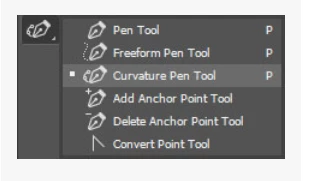
The new curvature pen tool is not visible in the pen tool menu.  How does one access it?  Am I missing something?  The menu I see is different from the photo in the new features web page.

Joe

The menu I see in Photoshop 2018:

Screenshot of the menu on the Adobe help page for the pen tool:

Draw with Pen tools in Photoshop
    This topic has been closed for replies.
    Correct answer davescm

    That does work!  Problem is semi fixed.  The tool disappears in all my custom workspaces.  You listening Adobe?  How do we make the Curvature Pen tool appear in ALL workspaces?

    Joe


    jml2035  wrote

    ........  How do we make the Curvature Pen tool appear in ALL workspaces?

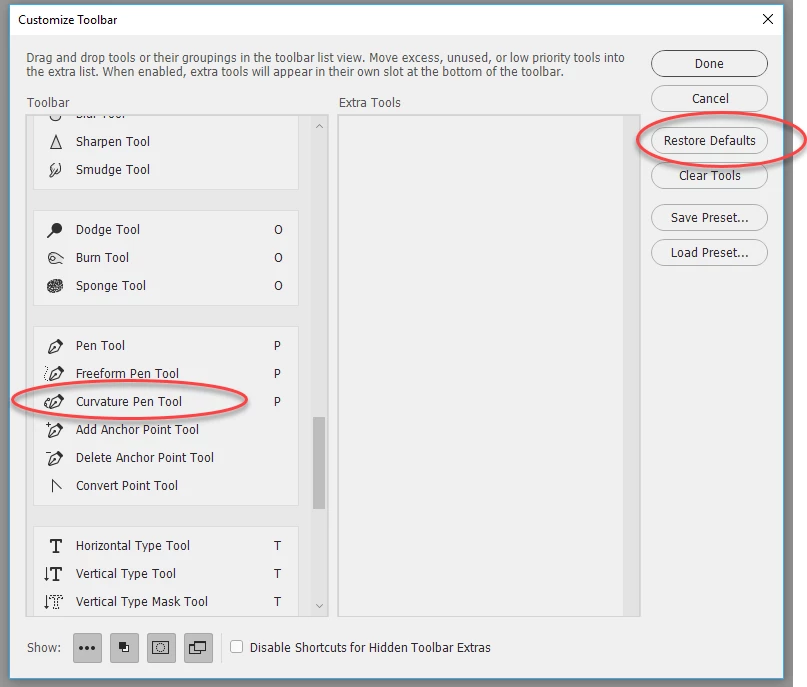
    The problem can occur if you bring across a custom workspace that included the toolbar settings. It will not have that tool in the group.

    Go into your workspace.

    Then edit the toolbar (click on the three dots) and in the Customise Toolbar dialogue move the tool into the appropriate group (or if you prefer just click on Restore defaults . Then click Done.

    Then save your workspace.

    Dave

    5 replies

    Participant
    November 9, 2021

    I don't have the 3 dots on my interface...

    victoriapersephone
    Participating Frequently
    October 25, 2017

    this doesn't work. none of these things work. I need to draw a curve sometime this century. why don't I have the curvature pen?

    davescm
    Community Expert
    Community Expert
    October 25, 2017

    victoriapersephone  wrote

    this doesn't work. none of these things work. I need to draw a curve sometime this century. why don't I have the curvature pen?

    Hi

    Can you confirm first the exact version of Photoshop that you have installed - go to Photoshop > Help > System info and copy the first line or just press the copy button and paste here

    Dave

    Participant
    October 30, 2017

    Adobe Photoshop Version: 2017.1.1 20170425.r.252 2017/04/25:23:00:00 CL 1113967  x64

    I'm having same problem here....can not get the curvature pen tool to show up after doing all steps noted here. Thanks!

    franmh
    Participant
    October 19, 2017

    I have the same problem, no Curvature pen Tool in 2018. I've tried all suggested solutions

    Participant
    October 19, 2017

    I have the same problem, I updated ps and launched it through the Creative Cloud desktop application, but cannot see the new curvature pen tool!!

    Ok I found a solution: I went to window-workspace and changed my workspace to 'essentials' and the tool appeared!

    I hope this helps!!

    Chuck Uebele
    Community Expert
    Community Expert
    October 19, 2017

    Make sure that 2018 has downloaded. Sometimes if you do a general update of all your apps, PS sometimes doesn't update.

    jml2035Author
    Participating Frequently
    October 19, 2017

    It's Photoshop 2018 I'm using.  Doesn't make any difference if I open it from my applications menu or from the CC menu.

    Participant
    October 19, 2017

    Ok I found a solution: I went to window-workspace and changed my workspace to 'essentials' and the tool appeared!

    I hope this helps!!