


Deleted/Transparent background still alters colours when placed on top of shapes
Placing images with transparent backgrounds created in Photoshop, e.g.:
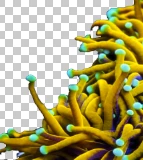
in Illustrator, over a black background, #040505.
However, when testing with colour picker, the 'transparent' part of the image changes to #08090a:
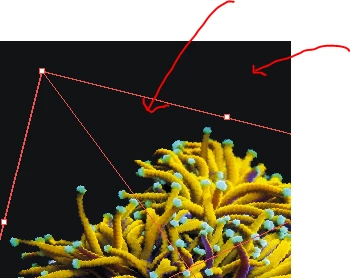
When printing, this of course leaves different-coloured boxes around all Photoshop images that are supposed to have completely transparent backgrounds.
I believe the issue is producing itself in Photoshop rather than Illustrator. When testing by inserting a black box shape #040505 behind the image in Photoshop, the same issue occurs.
Things I have tried:
- changing Blend mode from 'Normal' to 'Screen'
- checking that CMYK colour profiles match in both Illustrator and Photoshop: 'Coated FOGRA39 (ISO 12647-2:2004)' (but not helpful seeing as the issue is likely in Photoshop)
- changing to various colour profiles, both RGB and CMYK
- removing backgrounds using magic wand tool (both check and unchecking contiguous)
- removing backgrounds using select and mask
Unfortunately I am ignorant when it comes to Photoshop, so struggling here. Have you encountered anything like this before?
Using Photoshop 23.0.1.
Thank you in advance!
 AdChoices