
Inspiring
January 22, 2023
Beantwortet

Deleting a Layer-Mask causes it to be applied instead of being deleted

  • January 22, 2023
  • 1 Antwort
  • 609 Ansichten

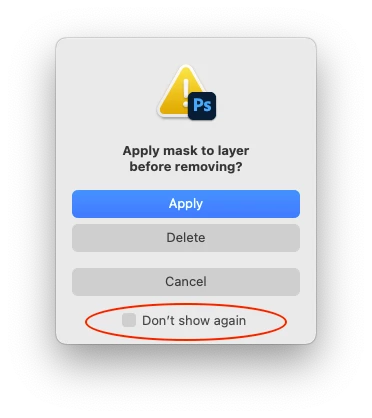
Did I somehow change some settings, or why is the layer mask on a layer being applied instead of being deleted when I drag it into the trash bin?

I've to right-click and delete the layer mask through an extra menu.


This wasn't the case before.

Dieses Thema wurde für Antworten geschlossen.
Beste Antwort von Stephen Marsh

In Preferences/General, there is a button to reset all warning dialogs if they have been disabled, I'm wondering if this is also part of the issue...
 

1 Antwort

Chuck Uebele
Community Expert
Community Expert
January 22, 2023

For that, I would reset the preferences. 

Stephen Marsh
Community Expert
Community Expert
January 22, 2023

In Preferences/General, there is a button to reset all warning dialogs if they have been disabled, I'm wondering if this is also part of the issue...


wnwkaAutor
Inspiring
February 7, 2023

Thank you Stephen, that was the issue!

The annoying part is that Photoshop changed it automatically after an update. Not the first time an Update messes with my settings. Throws me every time out of my workflow searching for the reason of such issue. #badUX