Participant
June 30, 2018
Answered

Deleting preset brush tool actions?

  • June 30, 2018
  • 1 reply
  • 553 views

Hi,

I've created a copyright watermark in brush tools but now I don't want to use it.  Every time I click on the brush tool the watermark appears rather than the brush tool.  Does anyone know how to delete the watermark and go back to the normal brush tool?  Thanks  Rob
    This topic has been closed for replies.
    Correct answer gener7

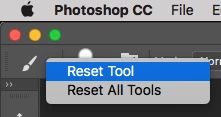
    You can Reset the brush tool by right-clicking on the Brush Tool here, and choosing Reset Tool.

    To get rid of the Copyright Brush,

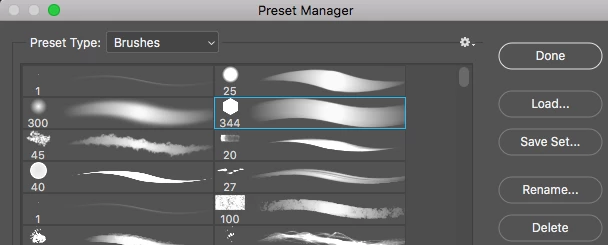
    Edit menu > Presets > Preset Manager    Choose the Brushes category, select the brush you wish to delete and click the Delete buttton on the right.

    1 reply

    gener7
    Community Expert
    gener7Community ExpertCorrect answer
    Community Expert
    June 30, 2018

    You can Reset the brush tool by right-clicking on the Brush Tool here, and choosing Reset Tool.

    To get rid of the Copyright Brush,

    Edit menu > Presets > Preset Manager    Choose the Brushes category, select the brush you wish to delete and click the Delete buttton on the right.