
Participating Frequently
October 16, 2022
Question

Duotone presets not working

  • October 16, 2022
  • 3 replies
  • 1578 views

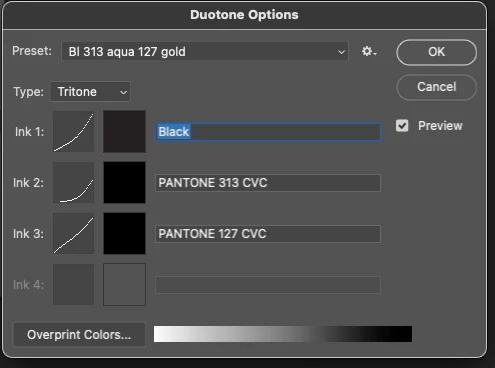
I have this problem too. This is not a problem of someone who does not know duotone. I have been doing them for years. and Years. The problem is that the standard presents are not working. If i go to quadtone and pick the first option (the yellow) it works but second choice has all colours in greyscale and that is geneeral. This seems like another bug. Adobe used to be reliable but they role out bugs more often now. I imagine some kind of reset is required. Is it the overprint colours gradient? See image showing all greys. Anybody able to help?


Branched by moderator from 2014 thread where

Duotone was grey in the menu because the image

was 16-bit CMYK. This is not the same problem.

Subject renamed.


This topic has been closed for replies.

3 replies

NB, colourmanagement
Community Expert
Community Expert
October 25, 2022

Perhaps try resetting Photoshop preferences?

(read this entire post before acting please)

Resetting restores Photoshop's internal preferences, which are saved when Photoshop closes.

If they become corrupt then various issues can occur.


Here’s some info on how to do that:

https://helpx.adobe.com/photoshop/using/preferences.html

Manually removing preferences files is the most complete method for restoring Photoshop to its default state: 

https://helpx.adobe.com/photoshop/using/preferences.html#Manually


The user Library folder is hidden by default on macOS.

To access files in the hidden user Library folder, see here for how to access hidden user library files.

https://helpx.adobe.com/x-productkb/global/access-hidden-user-library-files.html


Unexpected behavior may indicate damaged preferences. Restoring preferences to their default settings is a good idea when trying to troubleshoot unexpected behaviors in Photoshop. check out the video

https://helpx.adobe.com/photoshop/using/preferences.html#reset_preferences


Learn how to access and modify Photoshop preferences and customize per your frequent workflows

https://helpx.adobe.com/photoshop/using/preferences.html


And here’s an earlier forum discussion as an aid to understanding

https://community.adobe.com/t5/photoshop-ecosystem-discussions/quick-tips-how-to-reset-photoshop-preferences/td-p/12502668


You may want to backup your settings and custom presets, brushes & actions before restoring Photoshop's preferences.

Here is general info about that:  https://helpx.adobe.com/photoshop/using/preferences.html#BackupPhotoshoppreferences


I hope this helps
neil barstow, colourmanagement net :: adobe forum volunteer:: co-author: 'getting colour right'
google me "neil barstow colourmanagement" for lots of free articles on colour management

Participant
October 17, 2022

I understand how to do duotones / tri tones / quadtones.  I've been doing them for years.  the problem is that the presets are not loading.  When I choose a preset, the top color is there, but the rest of the choices are black.  It doesn't matter which preset I use.  I cannot find a setting to change this.  I unintsalled Photoshop and reloaded it.  I'm stumped. 


Stephen Marsh
Community Expert
Community Expert
October 17, 2022

@Mike219092755s6y From your description, I believe that my reply to @10greenmen applies in your situation as well.


What version of Photoshop? Do you have the appropriate Pantone colour books available?  Do you have the Pantone Connect extension for Photoshop and a Premium license subscription with Pantone?


https://community.adobe.com/t5/photoshop-ecosystem-discussions/changes-to-pantone-color-books/td-p/13072145


https://community.adobe.com/t5/photoshop-ecosystem-discussions/pantone-colors-converted-to-black-error/m-p/13270430

Stephen Marsh
Community Expert
Community Expert
November 4, 2022

Hey Mike, did it work for you? I can't solve the same issue yet


@ianzakharov – Please read the links that I posted before your post.


Here are some more links:


https://helpx.adobe.com/creative-cloud/adobe-color.html


https://helpx.adobe.com/au/photoshop/kb/pantone-color-books-photoshop.html


https://community.adobe.com/t5/photoshop-ecosystem-discussions/changes-to-pantone-color-books/td-p/13072145


It appears that the Pantone Color Book .acb files that are used in the file are no longer installed on your computer.


If you have a backup of the .acb file, then it can be re-installed.


If you don't have a backup, then you can click on the colour swatch, select the colour picker and dial in a new alternative preview colour, or use the colour libraries button to load in a colour from an installed Adobe Color Book (.acb) library file.


Stephen Marsh
Community Expert
Community Expert
October 16, 2022

@10greenmen wrote:

I have this problem too. 


@10greenmen – Your problem is different and a new topic would have been better... What version of Photoshop? Go to the color picker, color libraries – do you have the appropriate Pantone colour books available?  Do you have the Pantone Connect extension for Photoshop and a Premium license subscription with Pantone?


https://community.adobe.com/t5/photoshop-ecosystem-discussions/changes-to-pantone-color-books/td-p/13072145


https://community.adobe.com/t5/photoshop-ecosystem-discussions/pantone-colors-converted-to-black-error/m-p/13270430