


- Home
- Photoshop ecosystem
- Discussions
- Re: Embedded smart objects go missing - PSD
- Re: Embedded smart objects go missing - PSD
Embedded smart objects go missing - PSD

Copy link to clipboard
Copied
Hi, I'm working on PSD files with several embedded smart object (tif images) These are not from a cloud library or linked in any way but being placed individually. Once I finish with design, our copywriter goes into the psd file and makes copy edits. When I reopen all of my smart objects have gone missing and I'm prompted to relink all image files. Does any one know what setting on mine or her program needs to be turned off to prevent this from happening. Our IT has us stuck using version 2015.5
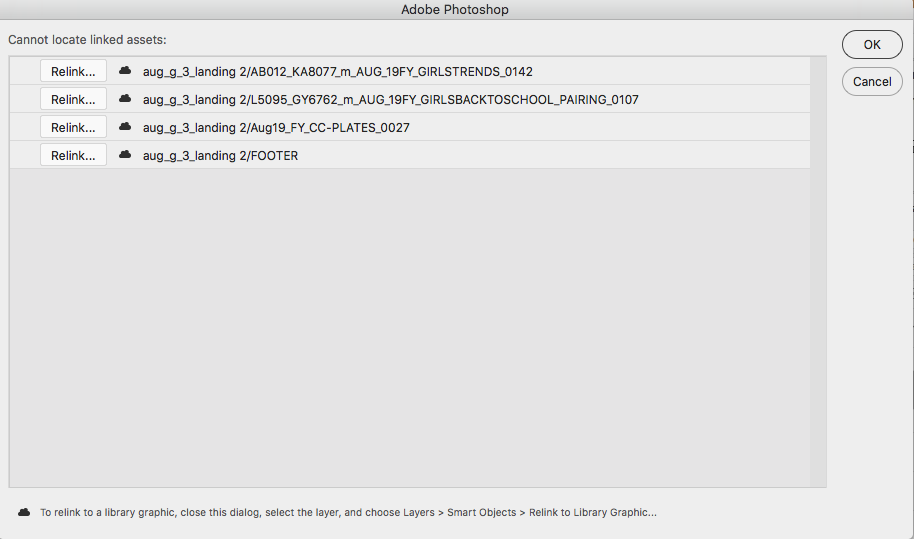
Thank you!



Explore related tutorials & articles
 15
Replies
15
15
Replies
15


Copy link to clipboard
Copied
Hi Jackie,
Linked smart objects are linked to the images or assets located outside of Photoshop, Have you moved the original assets from their location? If yes, then you need to relocate them. Please check this article to know more: https://helpx.adobe.com/in/photoshop/using/create-smart-objects.html#create-linked-smart-objects
Regards,
Sahil


Copy link to clipboard
Copied
Hi, I'm working on PSD files with several embedded smart object (tif images)
As Sahil.Chawla hinted at what you describe cannot concern embedded Smart Objects but only linked ones.
If they were embedded SOs and you didn’t change them to linked ones then someone else would appear to have done so and you should talk to the person/s who handled the file other than you.
Can you post a screenshot of the original file with the Layers Panel visible?
Copy link to clipboard
Copied
Original:

After edits by copy:

The copy team has VERY limited knowledge of photoshop so they definitely aren't doing anything on their end. And the images are definitely not linked but embedded, I'm lowering file size, making retouching notes, etc on my end through the SO.
Thanks for your prompt responses.
Copy link to clipboard
Copied
The copy team has VERY limited knowledge of photoshop so they definitely aren't doing anything on their end. And the images are definitely not linked but embedded, I'm lowering file size, making retouching notes, etc on my end through the SO.
Could you ask one of the team to do what they do right in front of you?
The options for an embedded SO to change to a linked one are limited and it is not likely/possible to happen without some user input.
Copy link to clipboard
Copied
They are just opening the psd and editing text boxes. Because of rights issues on our server, they aren't able to save over our original file and create a second psd file. This second psd is where the links are missing. I've wondered if its related to some setting in their save as?
We've also run into issues with this on occasion between designers on my team. They definitely know enough not to update SOs in this way.
Copy link to clipboard
Copied
I've wondered if its related to some setting in their save as?
There is no such setting.
The most probable culprit is still the people making the edits and I see no way around it: You need to make sure what exactly they are doing.

Copy link to clipboard
Copied
I would agree with c.pfaffenbichler. If you did indeed embed the files, then someone converted them to a linked smart object. Can't tell you how many times I've gotten IA files from a designer with none of the support files. Very frustrating!

Copy link to clipboard
Copied
The icon under the red question mark sure looks like a cloud to me.

Your copywriter may be innocent so please confront them politely. Try opening on copywriters computer, and see what libraries they have, and if the red questions marks go away.
When the item is a smart object, all someone has to do is drag it to their library, and it becomes a cloud object. Probably an error on their part, they did not know what they were doing.
Copy link to clipboard
Copied
That image definitely IS a cloud library object, but that's not how it was set up. If you look at the first layers panel screenshot, its a smart object and somewhere in this process the smart object is being converted to a library object. That conversion is what I want to prevent.
Copy link to clipboard
Copied
I am agreeing with you, and understand that is how that was set up. The 2nd screenshot is where things went bad, and I was not there so do not know what your copywriters did, can only guess they dragged to the library.
To prevent that dont send your copywriters the file, have them go old school and write with red ink on a printout their changes.
Copy link to clipboard
Copied
OPen the original file you submitted to your copywriter. Drag a smart object layer into a library, and watch how quickly it turns into a cloud object. That is what I suspect happened when your copywriter worked the file.
If you open the 2nd file on the copywriters computer, they question mark should be gone, unless they deleted the cloud library item.
Copy link to clipboard
Copied
She is out of office this week, will reply back when she's here
Copy link to clipboard
Copied
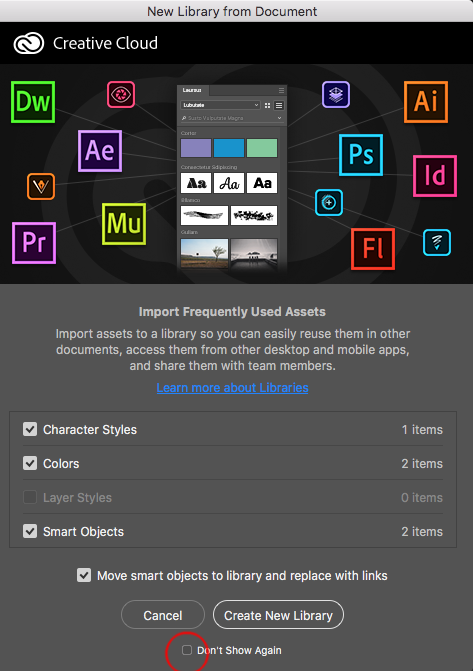
Ok I believe this is what's happening. When she opens certain files this pop up is showing.

The above is from google, as we couldn't get it to show again to take a screen shot. She has Character Styles, Colors & Layer styles selected...Not smart objects
I assume the "Move smart objects to library and replace with links" is the issue.
I can instruct her to click cancel (and don't show again) when this comes up - but is there any way to turn this feature off? We have a variety of people opening / saving our files and I'd like to prevent in the future if possible.
Thanks for any advice!
Copy link to clipboard
Copied
I think you see that on a new install, and most everyone clicks here and never sees again. So your copywriter is experiencing difficult because of a default settings they missed not unchecking
One may keep the library panel closed as they do not use, only in horror to find months later 1000s of items were added.
Adobe in an effort to promote the feature of libraries puts these checkboxes at the bottom and on by default. Almost every person here has had to experience items getting added to libraries accidentally until they notice a mess and have to clean up.

The inexperienced user especially may wish to do no harm and not change any default, when they do not know what this means.
The asset should be on your cowrkers computer, as a library item, unless it was deleted. Go there, open the file, double click on the smart object, and drag a copy from the .psb to your document and recenter. Adobe lacks a break link to library item, and I suspect this is intentional to push usage of libraries.
I assume your type was a smart object in the original file. Did you have any reason for doing that. I would avoid these new features of libraries and smart objects, until you master them, otherwise they cause you more trouble than they are worth.

Copy link to clipboard
Copied
Under Preferences you can reset all warning windows to have it show back up.


Get ready! An upgraded Adobe Community experience is coming in January.
Learn more
 AdChoices