Exit
  • Global community
    • Language:
      • Deutsch
      • English
      • Español
      • Français
      • Português
  • 日本語コミュニティ
  • 한국 커뮤니티
0

Error de Programa / Program Error

New Here ,
Dec 21, 2020 Dec 21, 2020

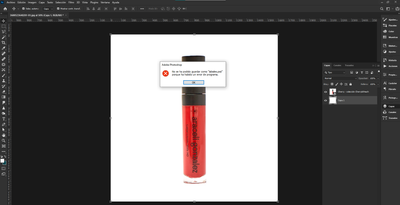
MamiyNini_0-1608586768255.png

No estoy pudiendo guardar mis trabajos, ni exportarlos, Estoy perdiendo cada cosa que intento hacer. 

NECESITO UNA RESPUESTA URGENTE!
I can't save or export my works. I am loosing every work I do. I NEED an URGENT ANSWER!

332
Translate
Report
Community guidelines
Be kind and respectful, give credit to the original source of content, and search for duplicates before posting. Learn more
community guidelines

correct answers 1 Correct answer

Community Expert , Jan 19, 2021 Jan 19, 2021

Hi! The fix is out: update to Photoshop 22.1.1 as it fixes the issue: https://helpx.adobe.com/photoshop/kb/fixed-issues.html

If the update does not appear in the CC app, go to help>check for updates.

Translate
Adobe
Explorer ,
Dec 21, 2020 Dec 21, 2020

Yeah I got the same trouble today as mentioned here: https://community.adobe.com/t5/photoshop/zoom-result-trouble/m-p/11697548?page=1


Did you try to duplicate your work into a new document then saving this new one? 

Translate
Report
Community guidelines
Be kind and respectful, give credit to the original source of content, and search for duplicates before posting. Learn more
community guidelines
New Here ,
Dec 21, 2020 Dec 21, 2020

Yes! I did all and nothing works, this trouble is happening with most of my files. 

Translate
Report
Community guidelines
Be kind and respectful, give credit to the original source of content, and search for duplicates before posting. Learn more
community guidelines
Community Expert ,
Jan 19, 2021 Jan 19, 2021
LATEST

Hi! The fix is out: update to Photoshop 22.1.1 as it fixes the issue: https://helpx.adobe.com/photoshop/kb/fixed-issues.html

If the update does not appear in the CC app, go to help>check for updates.

Translate
Report
Community guidelines
Be kind and respectful, give credit to the original source of content, and search for duplicates before posting. Learn more
community guidelines