
Participant
January 20, 2016
Resuelto

Error - The command Select is not currently available in Photoshop

  • January 20, 2016
  • 36 respuestas
  • 311766 visualizaciones

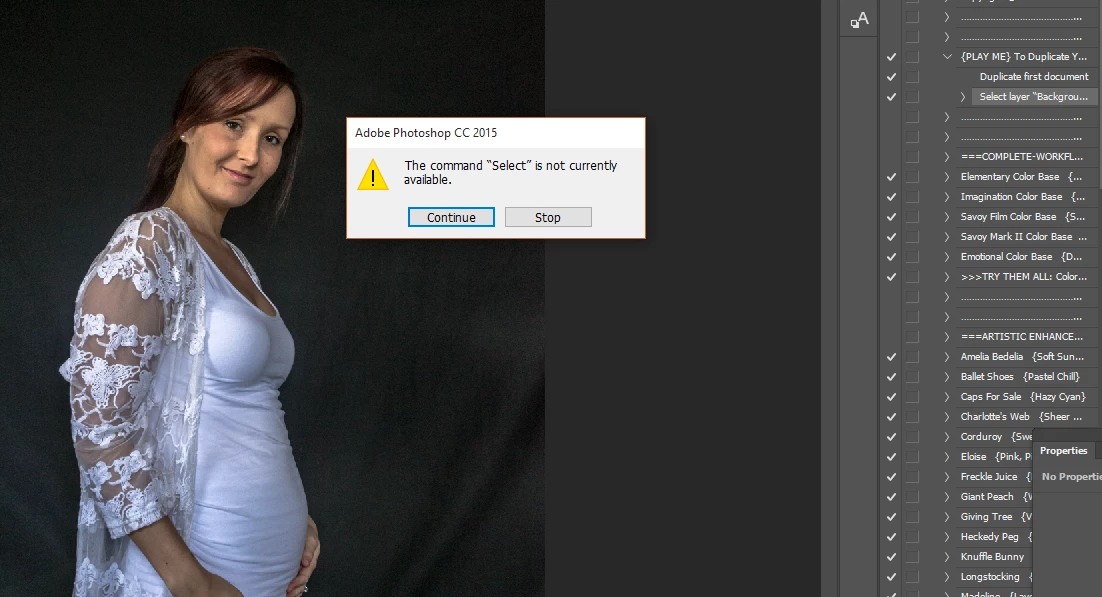
I've installed a Greater Than Gatsby Action but cant run it because I get 'The command SELECT is not currently available. I tried running a default Action and get 'The command FEATHER is not currently available.'

I went back to PREFERENCES to check everything is in order. I cant find anything amiss. Can someone help please?
Mejor respuesta de aeolate

I had this exact same issue with an action I was using.  Look down the action list at the first "Select" command.  Make sure that your layer is named the same as what is in that command.  After that it should work.

36 respuestas

Tony Zed
Known Participant
February 10, 2017

Is there still no good answers here? I've tried everything everyone has mentioned. Even my default actions are riddled with errors.

----------Become so undeniably good that you give your imposter syndrome an inferiority complex.
Inspiring
February 10, 2017

There are indeed good answers here: please read what JJMack wrote in his posts. Running the action step by step may help you identify the cause of an issue.

In regards to this particular case:

The issue doesn't have to to with a selection of pixels. It has to do with layer names. Let me explain:

I noticed (in the screenshot) that the failed step tried to select the "Background" layer. You got the error because this layer was not available in your Photoshop document. Why? Two reasons:

1. You have a non-English Photoshop version, so the default layer is named differently (e.g. "Calque" in the French version, "Ebene" in German, etc).

2. Your document doesn't contain a Background layer.

Solution for #1: the action is not well crafted, as JJMack suggested. You don't have to run this action anyway. Just duplicate image and close the original file. Action developers need to understand that there are thousands of PS users using non-English PS locales.

Solution for #2: Duplicate the image and flatten it; close the original file.

Kind regards

Panos Efstathiadis

Participant
March 3, 2018

Thank you! my issue was that I sent the image from the mobile app. It needed “flattening” to create a “background layer” before I could properly use the actions!

Participant
November 24, 2016

Amigo, aveces hacen falta los pinceles (brush), instala los pinceles y la acción se ejecuta.

Participant
April 9, 2018

Eso fue exactamente lo que me paso! mil gracias por la ayuda!!!

JJMack
Community Expert
Community Expert
January 30, 2016

If you highlight the first step in the action hold down the Ctrl or CMD key. Then every time you click the Play button one action step will Play and the Highlight will move to the next step in the action.  As long as you keep the Ctrl of CMD key held down you will single step through the action with each click on the play button. You will see the results of each step.  You will see the state you document is in when select is not available.  It will be because of the document's current document state,

JJMack
aeolateRespuesta
Participant
January 30, 2016

I had this exact same issue with an action I was using.  Look down the action list at the first "Select" command.  Make sure that your layer is named the same as what is in that command.  After that it should work.

Ranametalera
Participating Frequently
June 22, 2019

Done for me! Thanks.

JJMack
Community Expert
Community Expert
January 20, 2016

Have you tried singe stepping the action to see what condition the document is in when feather is not available? Have some pixel been selected to be feathered?

Your screen captures has no marching ants showing...

Step the other action and see why select is not available.  That is a common error message that action generated when the action is not well crafted.

Actions have dependencies.

JJMack
Participant
February 23, 2018

Hi JJMACK, Are you able to talk me through this one? been reading a few posts but I'm feeling a bit dumb not being able to figure it out!

Thanks,

John

JJMack
Community Expert
Community Expert
February 27, 2018

Hi! I'm sorry to bother you, but I'm a bit desperate. I need to send over 1,000 photos that I took this weekend of a volleyball event and I am trying to put 3 different logos on them with no success. That's the message I get every time. I tried different things and even putting just one logo at the time, but it is still not working. Been doing this since last night. Can you help?


Action have some dependencies you may need to have three different actions and it look link you may be using a watermark  with transparent borders and  may well have positioning problems for the bordered may well be primed during place or paste. If you image have different sizes and orientation you may also have sizing and position problems with action.  I have posted a script the will place in water marks based in the current document size.  You could modify it and create three scripts on for each of your logo. Record three one step action that use these scripts then batch the actions with the Images Processor Pro to create the three version of each image.  Scripts can use logic naming output files Actions have many limitations but are easy to record. So keep actions simple and use the  with features like menu file>Automate>Batch or Automate>Image Processor Pro, and Scripts like menu File>Scripts>Image processor. PlaceWatermark.jsx customize the firs few var  statements in the script. You can right click the link and save the script.

JJMack
postrophe
Inspiring
January 20, 2016

Hi

Seem a bit stupid of me to ask, but have you selected a layer (not lock) to run the action ?

Pierre