
Participant
January 20, 2016
Answered

Error - The command Select is not currently available in Photoshop

  • January 20, 2016
  • 36 replies
  • 310936 views

I've installed a Greater Than Gatsby Action but cant run it because I get 'The command SELECT is not currently available. I tried running a default Action and get 'The command FEATHER is not currently available.'

I went back to PREFERENCES to check everything is in order. I cant find anything amiss. Can someone help please?
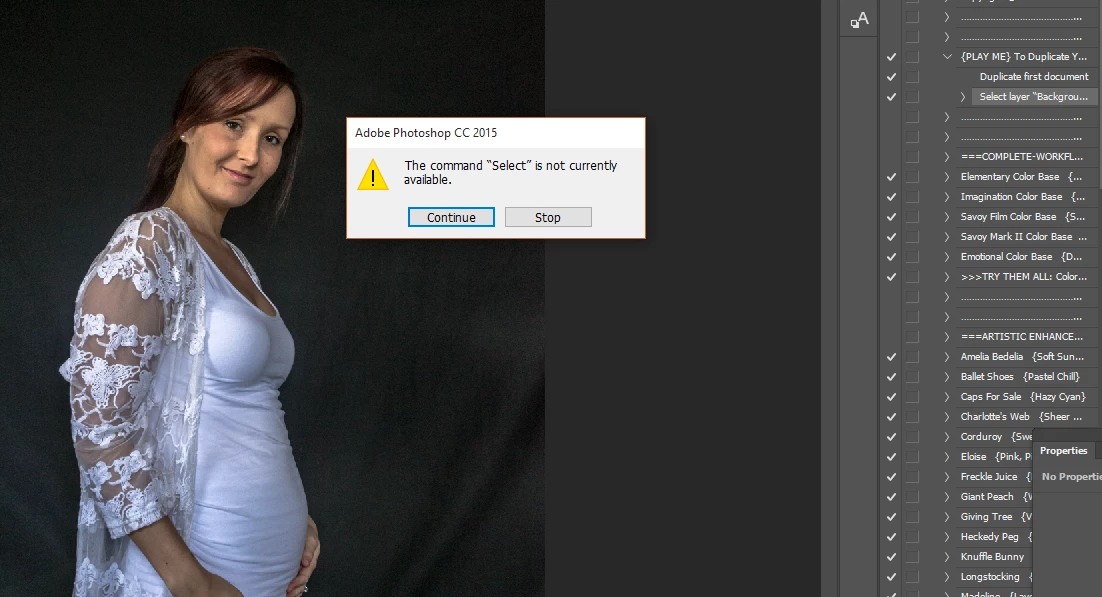
Correct answer aeolate

I had this exact same issue with an action I was using.  Look down the action list at the first "Select" command.  Make sure that your layer is named the same as what is in that command.  After that it should work.

36 replies

Participant
June 9, 2023

Guys, i almost banged my head on the wall after finding out it was only than my file wasnt set to RGB and 300dpi. *For non-native english speakers, also remember your software must be installed in english.

Participant
May 24, 2023

I solved it. Its simple:

1. Name the layer to put action as 'Background' and lock


Load the following manually:

  1. The Real Paint patterns .pat in PS presets (patterns option)
  2. The Real Paint .tpl in PS presets (tools option)
  3. The brushes .abr preset (brushes option


Finally Run the Script manually. Go to file, script, browse, and find the .jsx file

Have fun 🙂

Participant
February 3, 2023

I was having this issue. The action rcognizes the layer names that it was created with. When you start recording, make the first step renaming the base layer. Any copies made in successive steps will derive their names from that orignal name. In this way, the action will always be working on the same layer names. Maybe name the base layer the action name so you can easily recognize it. I named mine after my dog.

Participant
January 17, 2023

So....

through trial and error I have found that if the image you are running the actions on is not "labeled" exactly what the first image is labeled when you made the actions it gives you the "select command is not available" and so on. For instance, when I created my actions the original image I used as the template is labeled "Layer 1". If any other image that I am trying to edit using actions is labeled something other than "Layer 1" than I feel the actions will not work properly because it looks for the exact labeling in the tree of actions. This has just worked for me as I was having this problem myself. 

Try labeling the photo you are trying to edit using actions the same as whatever you labeled the image when you recorded the actions in the first place 

Participant
January 24, 2023

The first step after pressing the watercolour artist action is to select the area you wish to change to watercolour using a selection. You must have the focus layer selected when doing this or else you get the error message you are discussing


EpicScapes
Participant
December 18, 2021

Hello dear, had the same issue: you need to have the Photoshop Version when the Action was created. That is why I always keep PS 2017 on my PC , best Julie

Participant
December 18, 2021

Hi,


I am having the same issues. I am actually getting a lot of commands unavailable. Is it because I am using someone else's created action? But I went through these comments, and figured out that I can't create a layer mask with my background locked. It doesn't give me the option to create it unless I unlock the background. I am using the 23.1 version. This is what I am seeing on my screen:


Kukurykus
Legend
December 18, 2021

You can not mask your 'background' as it is not a background layer, just a locked layer.


Additionally background layer is always selected, while regular layer can be unselected.

Participant
July 2, 2021

You might try stopping the action and seeing what it's unable to select. I was having a problem and it turned out the brush that it was trying to select wasn't loading, I had to brush files with the same name and the wrong one was loaded.

Participant
June 1, 2021

It took me hours but at the end i solved it. In my particular case i was having a problem with brushes needed. I installed them and somehow they disappeared from the library in the middle of the action process. I loaded the brushes to the preset manager like five times one after another and they finally stayed there. IT WORKED.

Participant
April 14, 2021

I'm not a developer but it shouldn't be impossible to free the action commands from layer name on Adobe's end instead of asking users to fix layer name by hand 35 times for an action that has a hundred commands, this is ridiculous.

sergior29061733
Participant
October 16, 2020

Many thanks you are right, the name of the layer was wrong!! solved!

Participating Frequently
October 17, 2020

You're welcome good luck on your artistic adventure.
DangersTeez Digital Art

[image: --]

DangersTeez Digital Art
about.me