Participant
July 15, 2024
Question

Expand and collapse layers groups in Photoshop 25.9.1

  • July 15, 2024
  • 2 replies
  • 116 views

It should be the easiest thing in the world but it's driving me mad.

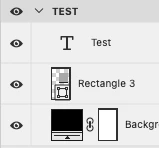
Updated to Photoshop 25.9.1. On a mac. The arrow to expand and collapse a layers group doesn't work. 

Adobe can't have decided that we don't need this function now!
 

This topic has been closed for replies.

2 replies

AxelMatt
Community Expert
Community Expert
July 16, 2024

Please try to reset the preferences of Photoshop using the steps described here:

https://helpx.adobe.com/photoshop/using/preferences.html#reset-preferences

Please backup your settings before resetting the preferences. You can check:

https://helpx.adobe.com/photoshop/using/preferences.html#backup-photoshop-preferences


My System: Intel i7-8700K - 64GB RAM - NVidia Geforce RTX 3060 - Windows 11 Pro 25H2 -- LR-Classic 15 - Photoshop 27 - Nik Collection 8 - PureRAW 6 - Topaz Photo AI
c.pfaffenbichler
Community Expert
Community Expert
July 16, 2024

Please read this (in particular the section titled "Supply pertinent information for more timely and effective answers”):
https://community.adobe.com/t5/using-the-community/community-how-to-guide-tips-amp-best-practices/td-p/11601738?page=1


I cannot reproduce the problem; clicking on the icon opens/closes Groups here.