
chuckandfriends
Participant
November 2, 2017
Answered

export a single layer without it changing?

  • November 2, 2017
  • 1 reply
  • 231 views

hi,

i would like to export a single layer as a PNG, but the problem i'm having is that layer seems to be dependent on the background for its appearance. every time i try to export/edit the layer in a separate document, it reverts from its appearance on the flyer

to its appearance as just a result of the effects i have on the original black and white logo

.

i don't want that!! please tell me there is a way to save my beautiful sunset logo!!

thanks,

chuck
    This topic has been closed for replies.
    Correct answer Trevor.Dennis

    I can't really add to what Dag has said.  Select the upper most layer, but it has to be turned on.

    Shift Ctrl Alt E — make a copy merged layer.

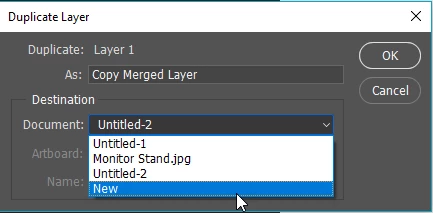
    Right click and chose Duplicate Layer.

    Use the dropdown and select New

    You now have your effect in a new document that can save with whatever name.

    1 reply

    D Fosse
    Community Expert
    Community Expert
    November 2, 2017

    You have a blend mode other than "normal" on that layer. Blend modes, by definition, interact with underlying layers to produce the final appearance.

    One way around it is to select the part you want and then "Copy Merged". That happens to be very simple in this case - just ctrl-click the layer (in the Layers panel) to get the selection. Then copy merged and paste.

    Trevor.Dennis
    Community Expert
    Trevor.DennisCommunity ExpertCorrect answer
    Community Expert
    November 2, 2017

    I can't really add to what Dag has said.  Select the upper most layer, but it has to be turned on.

    Shift Ctrl Alt E — make a copy merged layer.

    Right click and chose Duplicate Layer.

    Use the dropdown and select New

    You now have your effect in a new document that can save with whatever name.