
Participant
April 19, 2022
Answered

Export --> Save for Web (Legacy) is not working

  • April 19, 2022
  • 2 replies
  • 1991 views

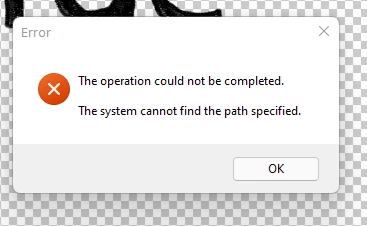
I'm trying to make a GIF. But when I go to File --> Export --> Save for Web (Legacy) I get the following error message: "The operation could not be completed. The system cannot find the path specified."


I'm using version 23.3.


Thanks in advance nice people.


This topic has been closed for replies.

2 replies

J453Correct answer
Legend
April 20, 2022
Participant
April 23, 2022

YES! That was the issue, and your link provided the fix. Thanks a lot @J453. I hope this helps other people. 

TheDigitalDog
Inspiring
April 19, 2022

You get this no matter where you specify the export is to save the document?

Author “Color Management for Photographers" & "Photoshop CC Color Management/pluralsight"
Participant
April 20, 2022

I only save it to my computer. Haven't tried saving it to the cloud. Is that required? That would not be user friendly.


Sorry, but I'm not sure what this means: Author “Color Management for Photographers" & "Photoshop CC Color Management/pluralsight"

Bojan Živković11378569
Community Expert
Community Expert
April 20, 2022
quote

I only save it to my computer. Haven't tried saving it to the cloud. Is that required? That would not be user friendly.


By @JosefromQueens


You can save anywhere you want. There is nothing wrong to save on your computer. Adobe is offering do not show again for save dialogue that offers cloud saving.


quote

Sorry, but I'm not sure what this means: Author “Color Management for Photographers" & "Photoshop CC Color Management/pluralsight"


By @JosefromQueens


That means that answer/reply provider is also author of at least 2 books, nothing else. It may be email reply or author want to add credentials to his contributions.