Exit
  • Global community
    • Language:
      • Deutsch
      • English
      • Español
      • Français
      • Português
  • 日本語コミュニティ
  • 한국 커뮤니티
0

Export Layer Autimation

New Here ,
Feb 03, 2020 Feb 03, 2020

Hello!
I am trying to automate a lenghty export process I have found myself dealing with while generating product images for my website. The product images have variant color options which I have created as different layers. Instead of hiding a layer and showing the new layer then exporting / repeating this process individually for each of the 100 variants I have is there a way to "action" "script" "timeline" etc. so i am not wasting hours of my time everytime I add a new product with these 100 variants? 


Here is a simple example of what i want to be automated into one export.

First Export:
Layer1
Layer2
Layer3
Layer4

Second Export:
Layer1
Layer2
Layer3
Layer5

Third Export:
Layer1
Layer2
Layer3
Layer6

TOPICS
Actions and scripting
605
Translate
Report
Community guidelines
Be kind and respectful, give credit to the original source of content, and search for duplicates before posting. Learn more
community guidelines
Adobe
Community Expert ,
Feb 03, 2020 Feb 03, 2020

There must be lot of questions before my suggestion how to do things using action. Have you tried layer export with Visible Layers Only checked? You can create Layer Comps to show only layers which you want to export at any perticular export.

To make things easier to understand please uload screenshot with layers panel visible so I can better understad what is all about to give you better advice.

Translate
Report
Community guidelines
Be kind and respectful, give credit to the original source of content, and search for duplicates before posting. Learn more
community guidelines
New Here ,
Feb 03, 2020 Feb 03, 2020

Screen Shot 2020-02-03 at 2.53.22 PM.png

Translate
Report
Community guidelines
Be kind and respectful, give credit to the original source of content, and search for duplicates before posting. Learn more
community guidelines
New Here ,
Feb 03, 2020 Feb 03, 2020

I am trying to export this image with every layer shown currently on the canvas + if you look under the Layers Panel you will see that I have a number of layers for the hammocks. I want to be able to export each color variation of the hammock with a single export action instead of having to manually export them and change the visible layer off then turn on the next color and export again, and again and again... 

Translate
Report
Community guidelines
Be kind and respectful, give credit to the original source of content, and search for duplicates before posting. Learn more
community guidelines
Community Expert ,
Feb 03, 2020 Feb 03, 2020

If I can understand this task correctly then easiest way can be to create Window > Layer Comps then to export layer comps as files using File > Export > Layer Comps as Files.

If this does not work for you then please explain further what is your goal and which groups should be included, for example: always export Accessories and one color group. If that is your goal then it may be best for you to use layer comps as suggested unless you have many files with the same group structure/names and you want to automate for that reason.

Translate
Report
Community guidelines
Be kind and respectful, give credit to the original source of content, and search for duplicates before posting. Learn more
community guidelines
Community Expert ,
Feb 03, 2020 Feb 03, 2020
Translate
Report
Community guidelines
Be kind and respectful, give credit to the original source of content, and search for duplicates before posting. Learn more
community guidelines
New Here ,
Feb 04, 2020 Feb 04, 2020

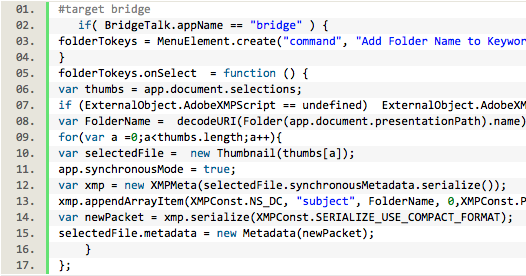
Thank you for this! Is there any way you could send the file and not the source code? I'm having trouble with converting it to a .jsx file it keep sgiving me a Syntax Error "Error on line 1: SyntaxError: Invalid character: '#'"


Ok, I was actually able to figure out how to save as .jsx and added the script but when i ran it nothing happened different than a normal export? 

Translate
Report
Community guidelines
Be kind and respectful, give credit to the original source of content, and search for duplicates before posting. Learn more
community guidelines
Community Expert ,
Feb 05, 2020 Feb 05, 2020
LATEST

You need to have a multi-layered file open and may need to select two or more layers depending on the script.


These two scripts are old, they still work, however, for greater legibility the code needs adjustment for the dark interface used in later versions of Photoshop:


ls.pnglsp.png

Translate
Report
Community guidelines
Be kind and respectful, give credit to the original source of content, and search for duplicates before posting. Learn more
community guidelines