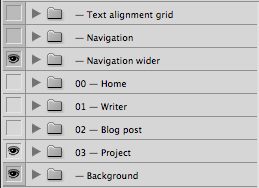
I wonder if this is close?
It will save the new psds to the same location as the original open document...
function main(){
if(!documents.length){
alert("No document is open!");
return;
}
var Includes = [];
var Export =[];
var doc = activeDocument;
if(!doc.layerSets.length){
alert("No Layersets are in this document!");
return;
}
for(var a =0;a <doc.layerSets.length;a++){
if(doc.layerSets.name[0]=='-') {
Includes.push(doc.layerSets.name);
}else{
Export.push(doc.layerSets.name);
}
}
originalPath = decodeURI(doc.path);
originalName = decodeURI(doc.name.replace(/\...
win.g5.pn1= win.g5.add("panel", undefined, "Select Includes", {borderStyle:"black"});
win.g5.pn1.lb1 = win.g5.pn1.add('listbox', undefined, undefined, {multiselect: true} );
win.g5.pn1.lb1.preferredSize=[200,200];
win.g5.pn1.lb1.add("item","No Includes");
for(var i in Includes){
win.g5.pn1.lb1.add("item",Includes.toString());
}
win.g5.pn1.lb1.selection=0;
win.g5.pnl2= win.g5.add("panel", undefined, "Select Exports", {borderStyle:"black"});
win.g5.pnl2.lb1 = win.g5.pnl2.add('listbox', undefined, undefined, {multiselect: true} );
win.g5.pnl2.lb1.preferredSize=[200,200];
for(var e in Export){
win.g5.pnl2.lb1.add("item",Export.toString());
}
win.g5.pnl2.lb1.selection=0;
win.g5.spacing=10;
win.g10 =win.p1.add('group');
win.g10.spacing=10;
win.g10.pnl1= win.g10.add("panel", undefined, undefined, {borderStyle:"black"});
win.g10.pnl1.preferredSize=[460,50];
win.g10.pnl1.orientation = "row";
win.g10.pnl1.bu1 = win.g10.pnl1.add('button',undefined,'Process');
win.g10.pnl1.bu1.preferredSize=[220,30];
win.g10.pnl1.bu2 = win.g10.pnl1.add('button',undefined,'Cancel');
win.g10.pnl1.bu2.preferredSize=[220,30];
win.g10.pnl1.bu1.onClick=function(){
ExportCount =0;
try{
ExportCount = win.g5.pnl2.lb1.selection.length;
}catch(e){ExportCount = 0;}
if(ExportCount == 0){
alert("You have not selected any LayerSets to Export!");
return;
}
IncludeCount =0;
try{
IncludeCount = win.g5.pn1.lb1.selection.length;
if(win.g5.pn1.lb1.selection[0].text == "No Includes") IncludeCount =0;
}catch(e){
IncludeCount = 0;
var ac=Window.confirm ("No Includes Have Been Selected Ok?", false, "Please select");
if(!ac) return;
}
win.close(1);
Process();
}
win.show();
function Process(){
for(var E =0 ;E< ExportCount;E++){
selectLayerByName(win.g5.pnl2.lb1.selection.toString());
for(var I =0 ;I< IncludeCount;I++){
selectLayerByName(win.g5.pn1.lb1.selection.toString(),true);
}
dupLayers(win.g5.pnl2.lb1.selection.toString());
var saveFile = File(originalPath + "/"+originalName +"["+ win.g5.pnl2.lb1.selection.toString()+"] "+time() +".psd");
SavePSD(saveFile);
app.activeDocument.close(SaveOptions.DONOTSAVECHANGES);
}
}
}
main();
function selectLayerByName(lyrName,add){
add = undefined ? add = false:add
var desc = new ActionDescriptor();
var ref = new ActionReference();
ref.putName( charIDToTypeID( "Lyr " ), lyrName);
desc.putReference( charIDToTypeID( "null" ), ref );
if(add) desc.putEnumerated( stringIDToTypeID( "selectionModifier" ), stringIDToTypeID( "selectionModifierType" ), stringIDToTypeID( "addToSelection" ) );
desc.putBoolean( charIDToTypeID( "MkVs" ), false );
executeAction( charIDToTypeID( "slct" ), desc, DialogModes.NO );
}
function dupLayers(LayerName) {
var desc143 = new ActionDescriptor();
var ref73 = new ActionReference();
ref73.putClass( charIDToTypeID('Dcmn') );
desc143.putReference( charIDToTypeID('null'), ref73 );
desc143.putString( charIDToTypeID('Nm '), "TempDoc" );
var ref74 = new ActionReference();
ref74.putEnumerated( charIDToTypeID('Lyr '), charIDToTypeID('Ordn'), charIDToTypeID('Trgt') );
desc143.putReference( charIDToTypeID('Usng'), ref74 );
executeAction( charIDToTypeID('Mk '), desc143, DialogModes.NO );
}
function SavePSD(saveFile){
psdSaveOptions = new PhotoshopSaveOptions();
psdSaveOptions.embedColorProfile = true;
psdSaveOptions.alphaChannels = true;
activeDocument.saveAs(saveFile, psdSaveOptions, true, Extension.LOWERCASE);
}
function time(){
var date = new Date();
var d = date.getDate();
var day = (d < 10) ? '0' + d : d;
var m = date.getMonth() + 1;
var month = (m < 10) ? '0' + m : m;
var yy = date.getYear();
var year = (yy < 1000) ? yy + 1900 : yy;
var digital = new Date();
var hours = digital.getHours();
var minutes = digital.getMinutes();
var seconds = digital.getSeconds();
var amOrPm = "AM";
if (hours > 11) amOrPm = "PM";
if (hours > 12) hours = hours - 12;
if (hours == 0) hours = 12;
if (minutes <= 9) minutes = "0" + minutes;
if (seconds <= 9) seconds = "0" + seconds;
todaysDate = hours + "_" + minutes + "_" + seconds + amOrPm;
return todaysDate.toString();
};







 3
Replies
3
Replies


 AdChoices