


- Home
- Photoshop ecosystem
- Discussions
- Re: Exporting 300 ppi using Export layers into Fil...
- Re: Exporting 300 ppi using Export layers into Fil...

Copy link to clipboard
Copied
I've read several posts about saying that to retain the 300 ppi (print quality) of an image, Save As is a better option than Export As. However, I have around 250 layers (across 3 different photoshop files) that needs to be saved as .png files and manually exporting these layers one-by-one is obviously inefficient.
My question is, is using "Export layers into Files" script export a layer to a 300 ppi image?


 1 Correct answer


Two things:
• If it’s for print png is not the proper file format anyway.
• The resolution of an image that is being used in a layout application is irrelevant as far as printing is concerned, its Effective Resolution is what matters.
To elaborate on point 2:
A 300ppi image being used in a layout but being scaled up to 300% means the effective resolution is just 100ppi, while a 72ppi image at 25% scale would have 288ppi effective resolution.
So you should not fixate on the images’ resolution its
...

Explore related tutorials & articles
 10
Replies
10
10
Replies
10

Copy link to clipboard
Copied
Two things:
• If it’s for print png is not the proper file format anyway.
• The resolution of an image that is being used in a layout application is irrelevant as far as printing is concerned, its Effective Resolution is what matters.
To elaborate on point 2:
A 300ppi image being used in a layout but being scaled up to 300% means the effective resolution is just 100ppi, while a 72ppi image at 25% scale would have 288ppi effective resolution.
So you should not fixate on the images’ resolution itself but on their effective resolutions.
Copy link to clipboard
Copied
I'll be exporting it into a .png file (because of the transparency) to be placed in InDesign then for printing. (sorry, should have mentioned it before)
Copy link to clipboard
Copied
png is not the proper format for that, why don’t you use psd instead?
Copy link to clipboard
Copied
I prefer using InD because its more straight forward to use than Photoshop, and because the layers I'll be exporting is just images of the layout and not the entire layout.
Copy link to clipboard
Copied
Sorry, misunderstanding, I didn’t mean for you to do the layout in Photoshop, I meant that you should export the layers in the file format psd.
Edit: Naturally page layouts with any serious amount of text and vector data and especially multi-page layouts are better done in a layout application.
Because once again: png is not a good choice here.
Copy link to clipboard
Copied
Oh you mean importing psd files to ind?
I can try, but is it possible to import a multi-layer psd file to inD then have each layer be on different pages?
Copy link to clipboard
Copied
I can try, but is it possible to import a multi-layer psd file to inD then have each layer be on different pages?
I guess that would be possible but one would need to hide all unwanted Layers for each instance via Object > Object Layer Options in Indesign (which one might be able to automate with a Script) so it seems like a suboptimal approach.
Copy link to clipboard
Copied
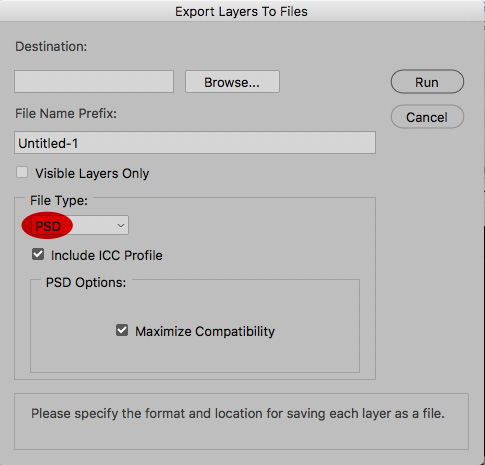
Copy link to clipboard
Copied
Oh... (then import files as usual to ind, so that I can still edit it...)
I'm dumb.
Copy link to clipboard
Copied
I'm dumb.
You got it to work, so don’t beat yourself up over this.
And keep an eye on the Preflight in Indesign to avoid surprises concerning image resolution at the very end when you (presumably) export a pdf for printing.


Get ready! An upgraded Adobe Community experience is coming in January.
Learn more
 AdChoices