Exit
  • Global community
    • Language:
      • Deutsch
      • English
      • Español
      • Français
      • Português
  • 日本語コミュニティ
  • 한국 커뮤니티
0

ExportOptionsSaveForWeb LOSSY problems

Enthusiast ,
Jan 22, 2019 Jan 22, 2019

Hello, scripters and experts.

I'm having problems trying to generate GIF files using JS in Photoshop.

I set all my properties but PS just ignore my lossy = 0 and sets it to 60.

So, I'm having bad quality GIF files.

I already read about this problem, but couldn't find any solution.

Could you help me? Thanks in advance.

var myGIFname = String(app.activeDocument.fullName).replace(".mov" , ".gif");

var myExportOptions = new ExportOptionsSaveForWeb();

    myExportOptions.lossy = 0;

    myExportOptions.format = SaveDocumentType.COMPUSERVEGIF;

    myExportOptions.colorReduction = ColorReductionType.SELECTIVE;

    myExportOptions.includeProfile = false;

    myExportOptions.colors = 128;

    myExportOptions.dither = Dither.DIFFUSION;

    myExportOptions.ditherAmount = 100;

    myExportOptions.transparency = true;

    myExportOptions.transparencyDither = Dither.NONE;

    myExportOptions.interlaced = false;

    myExportOptions.webSnap = 0;

app.activeDocument.exportDocument(File(myGIFname) , ExportType.SAVEFORWEB , myExportOptions);

TOPICS
Actions and scripting
964
Translate
Report
Community guidelines
Be kind and respectful, give credit to the original source of content, and search for duplicates before posting. Learn more
community guidelines

correct answers 1 Correct answer

LEGEND , Jan 22, 2019 Jan 22, 2019

That's not that code you should look for in SL. It is very long and should start from var idExpr = charIDToTypeID( "Expr" );

Translate
Adobe
People's Champ ,
Jan 22, 2019 Jan 22, 2019
Translate
Report
Community guidelines
Be kind and respectful, give credit to the original source of content, and search for duplicates before posting. Learn more
community guidelines
LEGEND ,
Jan 22, 2019 Jan 22, 2019
Translate
Report
Community guidelines
Be kind and respectful, give credit to the original source of content, and search for duplicates before posting. Learn more
community guidelines
Enthusiast ,
Jan 22, 2019 Jan 22, 2019

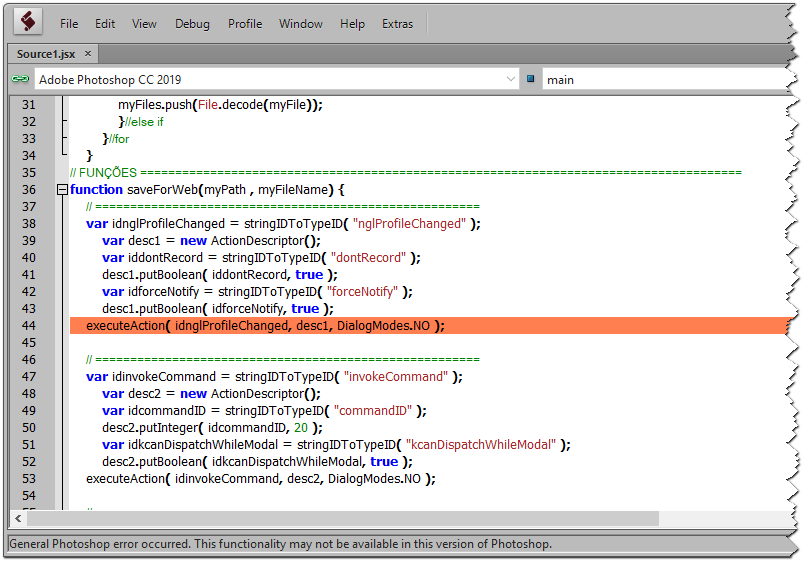
I tried it. But I receive an error saying "This functionality may not be available in this version of Photoshop".

I downloaded the eventListener, install it, and copy the code generated in the log.

But, as mentioned, it stops in the first executeAction method.

Translate
Report
Community guidelines
Be kind and respectful, give credit to the original source of content, and search for duplicates before posting. Learn more
community guidelines
LEGEND ,
Jan 22, 2019 Jan 22, 2019

That's not that code you should look for in SL. It is very long and should start from var idExpr = charIDToTypeID( "Expr" );

Translate
Report
Community guidelines
Be kind and respectful, give credit to the original source of content, and search for duplicates before posting. Learn more
community guidelines
Enthusiast ,
Jan 22, 2019 Jan 22, 2019

Thank you. I'll try it!

>

Translate
Report
Community guidelines
Be kind and respectful, give credit to the original source of content, and search for duplicates before posting. Learn more
community guidelines
Enthusiast ,
Jan 23, 2019 Jan 23, 2019
LATEST

That's it. Thank you so much!

Translate
Report
Community guidelines
Be kind and respectful, give credit to the original source of content, and search for duplicates before posting. Learn more
community guidelines
People's Champ ,
Jan 22, 2019 Jan 22, 2019

Why do you need SL?
It is better to show your full code that produces an error.

Translate
Report
Community guidelines
Be kind and respectful, give credit to the original source of content, and search for duplicates before posting. Learn more
community guidelines