
Participating Frequently
July 8, 2019
Answered

ExtendScript Toolkit cannot open on macOS 10.15 Catalina due to dropped 32 bit app support

  • July 8, 2019
  • 3 replies
  • 10521 views

While testing our CEP Extension (which uses JSX scripts) on the new macOS Catalina, I've discovered that the ExtendScript Toolkit application cannot open. Instead I see this alert.
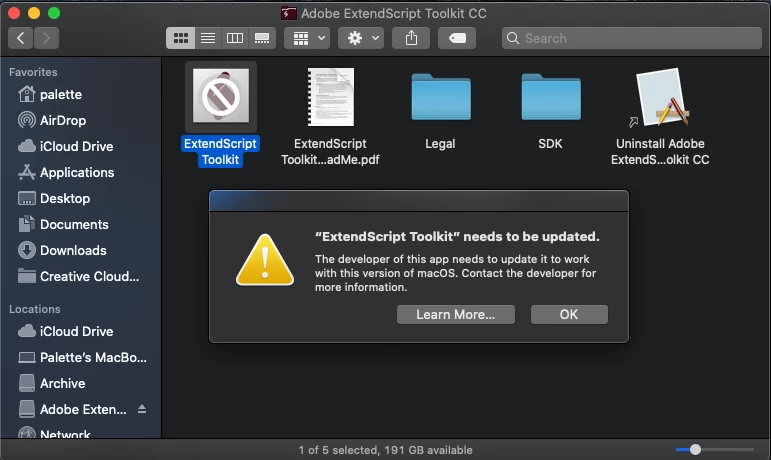
Running the app in the terminal shows the following error message:

zsh: bad CPU type in executable: /Applications/Adobe ExtendScript Toolkit CC/ExtendScript Toolkit.app/Contents/MacOS/ExtendScript Toolkit

I understand that Apple is dropping 32 bit app support from macOS going forward (32-bit app compatibility with macOS High Sierra 10.13.4 and later - Apple Support​​ ). It looks like Catalina is the first OS to do so and therefore blocks ExtendScript Toolkit from running.

I also understand that Adobe is not actively developing ESTK. However, we need ESTK to compile our JSX scripts to the JSXBIN format from the command line.

For this reason, can we get a recent, 64bit build of ExtendScript Toolkit for macOS? Or is there another application we can use to compile our JSX scripts to JSXBIN?

- Nick

This topic has been closed for replies.

3 replies

Participant
October 22, 2019

I made the edits, but I still can't get Extendscript to work launch via Terminal. Is there a way to use the new debugger with Terminal? All I see available are Adobe apps.


Adobe ExtendScript Toolkit CC/ExtendScript Toolkit.app/Contents/MacOS/ExtendScript Toolkit: Bad CPU type in executable

sberic
Legend
October 25, 2019

There is no way to use ExtendScript Toolkit (ESTK) with macOS 10.15+ (Catalina) or greater. ESTK is a 32-bit application and they are fundamentally incompatible with macOS as of 10.15. The last version of macOS that can run ESTK is 10.14.6.


Adobe has made a new debugger in the form of a plugin for Visual Studio Code. It's called the ExtendScript Debugger (ESD) and it supports some of the features of ESTK.


Please note that the ESD currently (v1.1.2) only fully supports debugging a single, synchronous script execution within a single host application from a single VSCode Workspace (window) at a time. It has partial support for debugging CEP and ScriptUI panels that feature code in callbacks/handlers (requires special configuration).

Participant
January 31, 2020

I don't see an answer


Kukurykus
KukurykusCorrect answer
Legend
July 8, 2019
robwood2
Participant
October 21, 2019

Hi Excuse me for being rather dense as i did not understand a word of what everybody wrote with regards to the update on the macbook to catalina, since updating today i cannot open lightroom at all it tells me 

an error occurred when attemoting to change modules

it doesnt say anything about the Extendscript that you gave as a link.

i am not sure how to try and update adobe to see if that does the trick but not sure what part of adobe i need to update, does anybody know where i go from here please, i am not a tech person, as you can probably tell, so really need help.


Thanks in advance 

Tracey

John Waller
Community Expert
Community Expert
October 22, 2019

> since updating today i cannot open lightroom at all 


You may have posted in the wrong forum and in an unrelated discussion. You're using Lightroom but you've posted in the Photoshop forum.

Which version of Lightroom are you running? Help > About in Lightroom.