

Participant
October 8, 2018
해결됨

FIND and USE Pantone colors in Photoshop CC

  • October 8, 2018
  • 4 답변들
  • 16667 조회

Every video I see, the color picker box is not on my PSCC!!! FRUSTRATED!!!

이 주제는 답변이 닫혔습니다.
최고의 답변: ceyhun_akgun

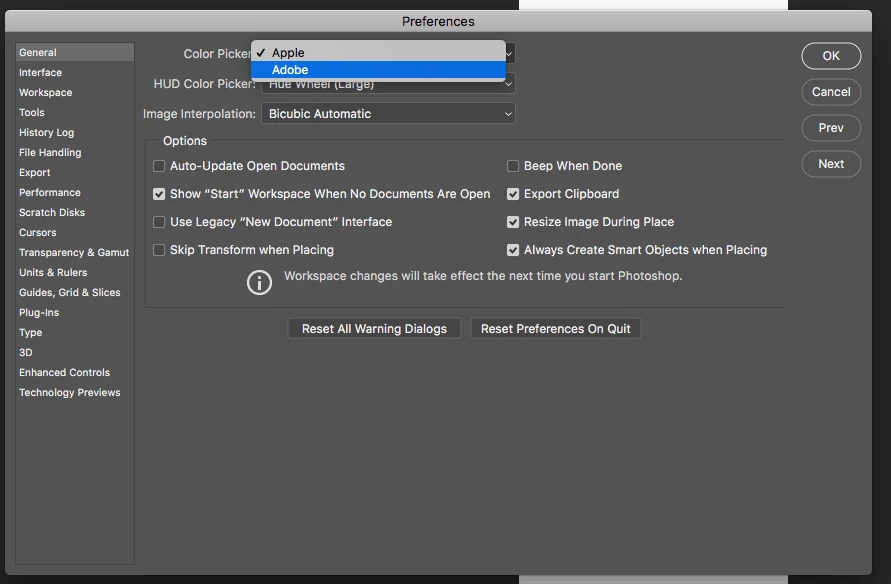
Tercihler seçim noktaları noktayı tercih. Adobe Seç.

1- Go to the Photospo preferences panel.

2- Select Adobe from the Color Picker section and close the window.

3- Your color settings need to be corrected.
4 답변

ceyhun_akgun
Legend
October 8, 2018

Photoshop can easily find the Pantone equivalent of the selected color. Pantone is more accurate if the selected color is RGB. If the selected sample color is CMYK, the result may not be successful.

Graphic Designer Educator / PrePress Consultant
pastorblok작성자
Participant
October 8, 2018

U completely understand what is being said above. Here's the problem.. I do not have these kinds of color boxes, hue boxes, nor color libraries that look like these pictures. And because I don't. I cannot look at any Pantone colors. All I have is this

Nothing in my Adobe PSCC looks like what everyone is telling me to click on.

Maybe its missing from my version. I don't know.

Thanks for assisting

B

ceyhun_akgun
Legend
October 8, 2018

Tercihler seçim noktaları noktayı tercih. Adobe Seç.

1- Go to the Photospo preferences panel.

2- Select Adobe from the Color Picker section and close the window.

3- Your color settings need to be corrected.

Graphic Designer Educator / PrePress Consultant
macpawel
Participating Frequently
October 8, 2018

Maybe check these screenshots

gener7
Community Expert
Community Expert
October 8, 2018

If you can take and post a screenshot of your color picker into the forums, it would really help us get to an answer faster.

How to take and post screenshots.

https://forums.adobe.com/message/4209263#4209263

Mohit Goyal
Community Manager
Community Manager
October 8, 2018

Hi pastorblok,

We're really sorry for the hassle. Could you please let us know the exact version of Photoshop you are using now? What difference do you see in your color picker comparatively what you see in videos.

Refer the below article for choosing colors in Photoshop.

Choose colors in Adobe Photoshop

Regards,

Mohit