Correct answer Stephen Marsh

@Delta2487 


Find this line in the code:


if (/^[ASN][:.]/i.test(layer.name)) {


The [ASN] bit controls the first letter (case insensitive), so add/remove as needed inside the square brackets.


The [:.] bit controls the characters after the letter, so add/remove as needed inside the square brackets.


When I have time, I'll try to make the script more user-friendly by adding a user interface prompt to enter characters, rather than you having to change the code.

2 replies

Stephen Marsh
Community Expert
Community Expert
November 27, 2024

@Delta2487 – Are you still out there?

Delta2487Author
Known Participant
December 16, 2024

Hi Esteban, thank you very much, it works perfectly, if I only want the highest level, but if I want to change the prefixes for another letter like V: or J: how do I do it, thank you.

Stephen Marsh
Community Expert
Community Expert
December 16, 2024

Ok thanks, I'll wait for it.... 🙂

And do you have the code to do this:


I already replied with the answer in your other topic:


https://community.adobe.com/t5/photoshop-ecosystem-discussions/group-layers-into-individual-folder/td-p/15042569


Stephen Marsh
Community Expert
Community Expert
November 22, 2024

@Delta2487 wrote:


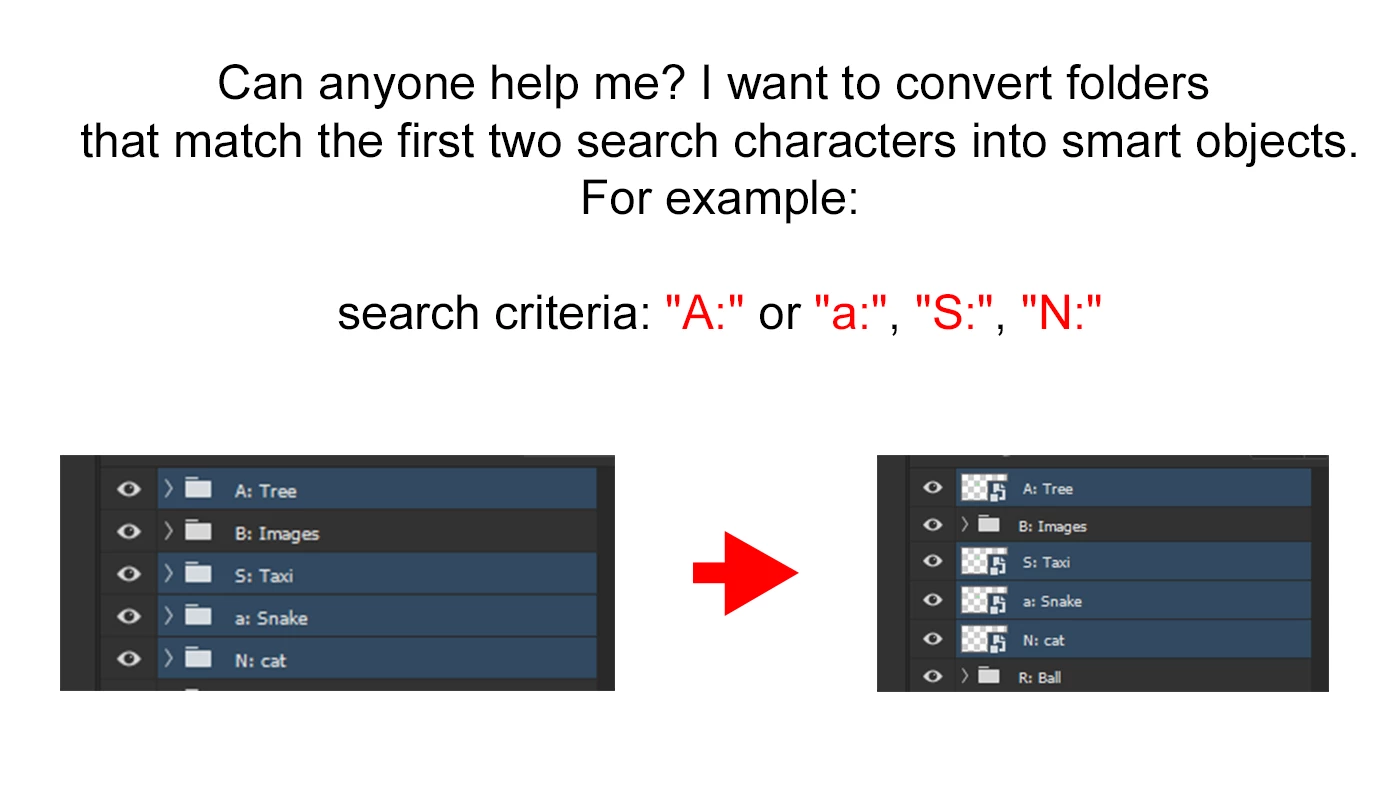
Can anyone help me? I want to convert folders that match the first two search characters into smart objects.

For example:

search criteria: "A:" or "a:", "S.", "N."


Thanks for the help.


Try this code, it will search over all root/top-level layers or groups for names beginning with "A" or "S" or "N" (case insensitive) followed by ":" or "." – it can be easily changed to only work on layer groups if you need it more specific.


/*
Convert Specific Named Layers to Embedded Smart Objects.jsx
Stephen Marsh
v1.0 - 22nd November 2024
https://community.adobe.com/t5/photoshop-ecosystem-discussions/find-part-of-the-folder-name-and-convert-it-to-a-smart-object/m-p/14996056
*/

#target photoshop;

try {

    app.activeDocument.suspendHistory("Specific Layers to Embedded Smart Objects...", "main()");

    function main() {

        if (app.documents.length > 0) {

            var doc = app.activeDocument;
            var layers = doc.layers;

            // Select the top layer if no layer is selected, no change if layer is selected, current visibility is honoured
            // by r-bin
            try {
                activeDocument.activeLayer.link(activeDocument.activeLayer);
            } catch (e) { }

            for (var i = 0; i < layers.length; i++) {

                var layer = layers[i];

                // Check if the active layer starts with "A" or "S" or "N" followed by ":" or "." (case insensitive)
                // if (/^(A:|a:|S:|s:|N:|n:|A\.|a\.|S\.|s\.|N\.|n\.)/.test(layer.name)) {
                if (/^[ASN][:.]/i.test(layer.name)) {

                    // Save the label color
                    var labelColor = getLayerColor(layer);

                    // Select the layer and convert to an embedded smart object
                    doc.activeLayer = layer;
                    convertLayerToSmartObject();

                    // Reapply the label color
                    setLayerColor(doc.activeLayer, labelColor);
                }
            }

            app.beep();
            //alert("Script completed!");

        } else {
            alert("No active document.");
        }

    }

} catch (err) {
    alert("Main Script Error!" + "\r" + err + "\r" + 'Line: ' + err.line);
}


// Helper functions
function getLayerColor(layer) {
    try {
        var ref = new ActionReference();
        ref.putProperty(stringIDToTypeID("property"), stringIDToTypeID("color"));
        ref.putIdentifier(stringIDToTypeID("layer"), layer.id);
        var desc = executeActionGet(ref);
        return desc.getEnumerationValue(stringIDToTypeID("color"));
    } catch (e) {
        alert("Error getting layer color: " + "\r" + e + "\r" + 'Line: ' + e.line);
        return null;
    }
}

function setLayerColor(layer, color) {
    try {
        var desc = new ActionDescriptor();
        var ref = new ActionReference();
        ref.putIdentifier(stringIDToTypeID("layer"), layer.id);
        desc.putReference(stringIDToTypeID("null"), ref);
        var colorDesc = new ActionDescriptor();
        colorDesc.putEnumerated(stringIDToTypeID("color"), stringIDToTypeID("color"), color);
        desc.putObject(stringIDToTypeID("to"), stringIDToTypeID("layer"), colorDesc);
        executeAction(stringIDToTypeID("set"), desc, DialogModes.NO);
    } catch (e) {
        alert("Error setting layer color: " + "\r" + e + "\r" + 'Line: ' + e.line);
    }
}

function convertLayerToSmartObject() {
    try {
        var idNewPlacedLayer = stringIDToTypeID("newPlacedLayer");
        executeAction(idNewPlacedLayer, undefined, DialogModes.NO);
    } catch (e) {
        alert("Error converting layer to Smart Object: " + "\r" + e + "\r" + 'Line: ' + e.line);
    }
}


P.S. Do you really need this to work on selected layers, and retain the selected layers afterwards?


https://prepression.blogspot.com/2017/11/downloading-and-installing-adobe-scripts.html