
Participating Frequently
July 17, 2020
Answered

Fonts too big in Photoshop cc 2020

  • July 17, 2020
  • 1 reply
  • 517 views

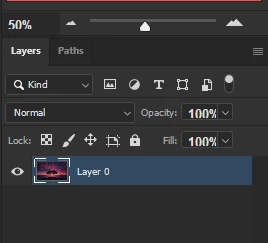
I am getting wierdly big fonts in few areas in Photoshop CC 2020 Latest version. It happened suddenly and i tried resetting my photoshop application as well but still doesnt work . I deleted font cache but still facing the problem nothing seems to solve it .. Please Help Me! The fonts are too big in opacity and fill sliders in the below pictures .
 

This topic has been closed for replies.
Correct answer Myra Ferguson

You could try the solution from this thread https://community.adobe.com/t5/photoshop/interface-font-is-too-big-cc-2018/td-p/9489194?page=1

1 reply

Myra Ferguson
Community Expert
Community Expert
July 17, 2020

You can try setting the font size in the UI by going to Edit > Photoshop > Preferences (PC) or Photoshop > Preferences > Interface (macOS), and under Presentation, setting UI Font Size to Small. You'll need to restart Photoshop.

Obscure.Author
Participating Frequently
July 18, 2020

I tried it but all the numbers shown in of all the places in photoshop are bold and big .. For some reason only the numbers displayed are bold in interface every thing else is fine.  But the numbers witten in a text layer are normal Is it because of Missing font? or something like that wrong with the font ? Maybe i need to reinstall the fonts that are shown in those places by photoshop

.

Myra Ferguson
Community Expert
Myra FergusonCommunity ExpertCorrect answer
Community Expert
July 18, 2020