Exit
  • Global community
    • Language:
      • Deutsch
      • English
      • Español
      • Français
      • Português
  • 日本語コミュニティ
  • 한국 커뮤니티
0

Go Pro 10 Video will not open in Photoshop?

New Here ,
Jan 06, 2023 Jan 06, 2023

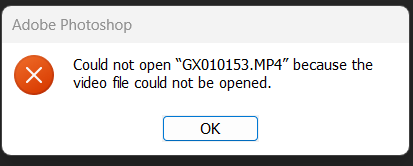
I've been using Photoshop to pull very nice stills from GoPro Hero 9 video footage now for about a year, i just bought a Go Pro 10 and Photoshop will not open the Go Pro 10 .MP4 file like it does with the GPH9 .MP4.  I get this message.  Any advice? thanks in advance. -keith
could not open because it could not be opened.png

TOPICS
Windows
666
Translate
Report
Community guidelines
Be kind and respectful, give credit to the original source of content, and search for duplicates before posting. Learn more
community guidelines
Adobe
LEGEND ,
Jan 07, 2023 Jan 07, 2023

Have you actualyl checked the recording settings? They may simply be different. To salvage your files convert/ transcode them in Handbrake or a similar tool.


Mylenium

Translate
Report
Community guidelines
Be kind and respectful, give credit to the original source of content, and search for duplicates before posting. Learn more
community guidelines
New Here ,
Jan 07, 2023 Jan 07, 2023

hi. thanks, yep, same settings on the 10 as the 9.  so are you saying photoshop will not open any .MP4 it has to a certain format/setting?  if so what does it want?

Translate
Report
Community guidelines
Be kind and respectful, give credit to the original source of content, and search for duplicates before posting. Learn more
community guidelines
LEGEND ,
Jan 07, 2023 Jan 07, 2023

Currently there's several issues related to metadata in video files in After Effects/ Premiere and possibly other stuff, so you could be seeing some side effects of this in PS since it also shares code. Perhaps your new cam is setting GPS data or such differently and things go *boom*. You could at least look into that and turn it off. Other than that perhaps check the PR forum. Maybe someone there has an idea. You could also share some sample clips and file it as a bug and the engineers may look into it.


Mylenium 

Translate
Report
Community guidelines
Be kind and respectful, give credit to the original source of content, and search for duplicates before posting. Learn more
community guidelines
New Here ,
Apr 09, 2023 Apr 09, 2023
LATEST

I'm having the same issue. A few things I've noticed. Some files will open while others won't, even if they have been recorded in the same mode it's not a sure bet PS will open the file. I've tried converted files using Handbrake, if I export to 2160p (as the same as i recorded them) the files still will not open. If I export to 1080p I can open the files in PS. It's becoming very fustrating. 

Translate
Report
Community guidelines
Be kind and respectful, give credit to the original source of content, and search for duplicates before posting. Learn more
community guidelines