


Known Participant
August 4, 2021
해결됨

Go to the top-most layer in a set of clipping masked-layers

  • August 4, 2021
  • 3 답변들
  • 748 조회

Hi all; I am new to coding in general and of course Photoshop scripting.

I am wondering how I could select the top-most (or in my case specifically, the second-to-top most) layer in a stack of clipping masks. Refer to the picture below; say I am currently on Layer 4.
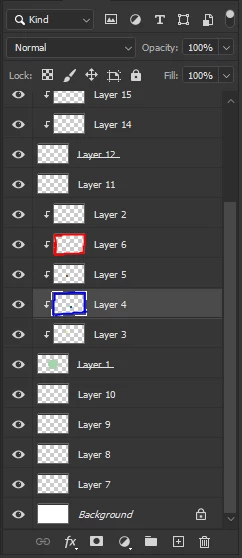
 

When I run the script, it needs to jump to Layer 6, and add a new layer. Note that this stack could be much bigger, but will never be smaller than 2. (And also instead of being on Layer 4, I might be on Layer 1 (the base layer of the stack).)


Of course it might also be in a group, and that group might be in a group, etc, and that there are also multiple clipping masks in the document.


I have a script that goes to the base layer of the stack, but unfortunately I don't know how to go the other way, and this script only works with the first stack that appears in the document.

Any guidance to set me in the right direction would be helpful!

이 주제는 답변이 닫혔습니다.
최고의 답변: jazz-y

Try this:


#target photoshop

s2t = stringIDToTypeID;
var idx = getTagetLayerIndex() + (isGrouped() ? 0 : 1);

if (isGrouped(idx)) {
    while (isGrouped(++idx)) { }
    selectLayerByIndex(idx - 2)
    addLayer(true)
}

function isGrouped(index) {
    (r = new ActionReference()).putProperty(s2t('property'), p = s2t('group'));
    index != undefined ? r.putIndex(s2t('layer'), index)
        : r.putEnumerated(s2t('layer'), s2t('ordinal'), s2t('targetEnum'));
    try { return executeActionGet(r).getBoolean(p) } catch (e) { return null }
}

function getTagetLayerIndex() {
    (r = new ActionReference()).putProperty(s2t('property'), p = s2t('itemIndex'));
    r.putEnumerated(s2t('layer'), s2t('ordinal'), s2t('targetEnum'));
    var idx = executeActionGet(r).getInteger(p);
    (r = new ActionReference()).putProperty(s2t('property'), p = s2t('hasBackgroundLayer'));
    r.putEnumerated(s2t('document'), s2t('ordinal'), s2t('targetEnum'));
    return idx - (executeActionGet(r).getBoolean(p) ? 1 : 0);
}

function selectLayerByIndex(index) {
    (r = new ActionReference()).putIndex(s2t('layer'), index);
    (d = new ActionDescriptor()).putReference(s2t('null'), r);
    executeAction(s2t('select'), d, DialogModes.NO)
}

function addLayer(group) {
    group = group == undefined ? false : true;
    (r = new ActionReference()).putClass(s2t('layer'));
    (d = new ActionDescriptor()).putReference(s2t('null'), r);
    (d1 = new ActionDescriptor()).putBoolean(s2t('group'), group);
    d.putObject(s2t('using'), s2t('layer'), d1);
    executeAction(s2t('make'), d, DialogModes.NO);
}


3 답변

Chuck Uebele
Community Expert
Community Expert
August 5, 2021

Looks like you have a script along the lines that I was mentioning: looping up until a grouped layer isn't encountered. I'm not sure about how to make it faster, as I don't know of any way to determine what layer is at the top of the stake without looping through them. 

I had asked if you manually select the clipped layer sets to select the one you want to find the top clipped layer. You still have to loop through that set, but not the entire document,  which would take a long time.

Lukas Kawalec작성자
Known Participant
August 5, 2021

I think I found something that works, partial code credit goes to Sergey Kritskiy:

var doc = activeDocument;

if (!doc.activeLayer.grouped) // If base layer is selected, move into the clipping stack
{
    selectLayer('Frwr');
}

while (doc.activeLayer.grouped)
{
    selectLayer('Frwr');
};

// Move two layers down
selectLayer('Bckw');

function selectLayer(input)
{
    var desc = new ActionDescriptor();
    var ref = new ActionReference();
    ref.putEnumerated(cTID('Lyr '), cTID('Ordn'), cTID(input));
    desc.putReference(cTID('null'), ref);
    desc.putBoolean(cTID('MkVs'), false);
    executeAction(cTID('slct'), desc, DialogModes.NO);
};

function cTID(s)
{
    return app.charIDToTypeID(s);
};

This is the basic version, but I have also expanded upon it to more suit my needs:

var doc = activeDocument;

if (!doc.activeLayer.grouped) // If base layer is selected, move into the clipping stack
{
    selectLayer('Frwr');
}
if (doc.activeLayer.grouped)
{
    while (doc.activeLayer.grouped)
    {
        selectLayer('Frwr');
    };

    // Move two layers down
    selectLayer('Bckw');
    selectLayer('Bckw');
    addLayer();
}
else
{
    // if the layer above the current layer is not a clipped layer
    // do nothing 
};

function selectLayer(input)
{
    var desc = new ActionDescriptor();
    var ref = new ActionReference();
    ref.putEnumerated(cTID('Lyr '), cTID('Ordn'), cTID(input));
    desc.putReference(cTID('null'), ref);
    desc.putBoolean(cTID('MkVs'), false);
    executeAction(cTID('slct'), desc, DialogModes.NO);
};

function addLayer()
{
    var idMk = charIDToTypeID( "Mk  " );
    var desc22 = new ActionDescriptor();
    var idnull = charIDToTypeID( "null" );
    var ref9 = new ActionReference();
    var idLyr = charIDToTypeID( "Lyr " );
    ref9.putClass( idLyr );
    desc22.putReference( idnull, ref9 );
    var idUsng = charIDToTypeID( "Usng" );
    var desc23 = new ActionDescriptor();
    var idGrup = charIDToTypeID( "Grup" );
    desc23.putBoolean( idGrup, true );
    var idLyr = charIDToTypeID( "Lyr " );
    desc22.putObject( idUsng, idLyr, desc23 );
    var idLyrI = charIDToTypeID( "LyrI" );
    desc22.putInteger( idLyrI, 903 );
    executeAction( idMk, desc22, DialogModes.NO );
}

function cTID(s)
{
    return app.charIDToTypeID(s);
};

This is greatly inefficient as the larger the clipping stack is, the more time it will take to execute the script; any ideas on making this go faster is much appreciated!


jazz-y답변
Legend
August 5, 2021

Try this:


#target photoshop

s2t = stringIDToTypeID;
var idx = getTagetLayerIndex() + (isGrouped() ? 0 : 1);

if (isGrouped(idx)) {
    while (isGrouped(++idx)) { }
    selectLayerByIndex(idx - 2)
    addLayer(true)
}

function isGrouped(index) {
    (r = new ActionReference()).putProperty(s2t('property'), p = s2t('group'));
    index != undefined ? r.putIndex(s2t('layer'), index)
        : r.putEnumerated(s2t('layer'), s2t('ordinal'), s2t('targetEnum'));
    try { return executeActionGet(r).getBoolean(p) } catch (e) { return null }
}

function getTagetLayerIndex() {
    (r = new ActionReference()).putProperty(s2t('property'), p = s2t('itemIndex'));
    r.putEnumerated(s2t('layer'), s2t('ordinal'), s2t('targetEnum'));
    var idx = executeActionGet(r).getInteger(p);
    (r = new ActionReference()).putProperty(s2t('property'), p = s2t('hasBackgroundLayer'));
    r.putEnumerated(s2t('document'), s2t('ordinal'), s2t('targetEnum'));
    return idx - (executeActionGet(r).getBoolean(p) ? 1 : 0);
}

function selectLayerByIndex(index) {
    (r = new ActionReference()).putIndex(s2t('layer'), index);
    (d = new ActionDescriptor()).putReference(s2t('null'), r);
    executeAction(s2t('select'), d, DialogModes.NO)
}

function addLayer(group) {
    group = group == undefined ? false : true;
    (r = new ActionReference()).putClass(s2t('layer'));
    (d = new ActionDescriptor()).putReference(s2t('null'), r);
    (d1 = new ActionDescriptor()).putBoolean(s2t('group'), group);
    d.putObject(s2t('using'), s2t('layer'), d1);
    executeAction(s2t('make'), d, DialogModes.NO);
}


Lukas Kawalec작성자
Known Participant
August 5, 2021

That's incredible! I'm not sure how you managed to make it go so much faster. I appreciate the code write up - it seems like mumbo jumbo code magic to me haha.

Chuck Uebele
Community Expert
Community Expert
August 5, 2021

Are you trying to access all clipped layers in the file, or do you manually select the group of clipped layers. As far as I know, you need to make a loop to go through the clipped layers, until you find one that isn't clipped, then go back in the loop.

Lukas Kawalec작성자
Known Participant
August 5, 2021

I'm not sure what the question you're asking is exactly, but I only want to have the script occur on the clipping stack I have currently selected. For example, it would go like this:

I manually select a layer (Layer 3 for example) that is in a stack of clipping masks layers (which would include only Layer 1, 3, 4, 5, 6 and 2; no others), activate the script, and it would send me to the second top most layer in the stack, so Layer 6. Or, incidentally, if I am already on Layer 6, it would just keep me there.

quote

 you need to make a loop to go through the clipped layers, until you find one that isn't clipped, then go back in the loop.


Do you mean it loops through every clipped layer in the entire document, or just the ones that are apart of the stack of the layer I currently have selected? Iterating through the entire document would be very inefficient for large documents, so I hope that is not the case.