


Participating Frequently
January 22, 2020
Question

Gradient Mask / Photographic Toning (Presets Missing)

  • January 22, 2020
  • 3 replies
  • 14353 views

Hi,

I'm using the latest version of photoshop (21.0.3)

I can't find the photographic toning presets in the gradient mask panel (gradient editor). The menu, in the top right corner looks also very different from what I've seen here (as you can see in screenshot). The Legacy Gradients option is missing entirely.
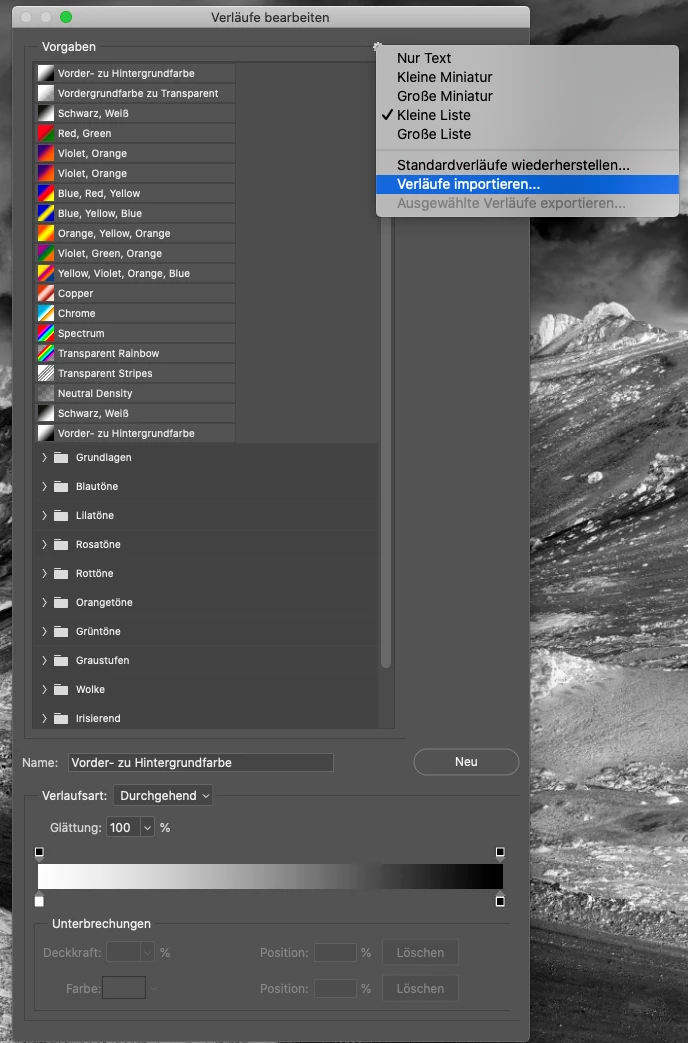
This is driving me crazy. I've tried all the solution I found in this forum to no effect. I've also tried importing them from Photoshop's 2019 presets/gradients folder but they are missing there too.

Any help is greatly appreciated.

Thanks you all!

Greg

3 replies

Jeff Arola
Community Expert
Community Expert
January 24, 2020

You need to use Window>Gradients to see Legacy Gradients from the fly-out menu.


shontas46912525
Participant
March 22, 2020

This was the only thing that actually worked. It was driving me crazy! Thanks

Participating Frequently
May 1, 2020

Yes it work for me too and I had a couple hrs trying everything, uninstalling and installing and just with the window work.

Rob_Cullen
Community Expert
Community Expert
January 23, 2020
Regards. My System: Windows-11, Lightroom-Classic 15.1.1, Photoshop 27.3.1, ACR 18.1.1, Lightroom 9.0, Lr-iOS 10.4.0, Bridge 16.0.2 .
NniicciiAuthor
Participating Frequently
January 23, 2020

Nope, that doesn't solve my problem.

Thanks for your reply anyway 🙂

Chuck Uebele
Community Expert
Community Expert
January 23, 2020

Try resetting your preferences, as it should show on the list that you have in your screen shot.

NniicciiAuthor
Participating Frequently
January 23, 2020

Thank you for your answer but I've tried to restore the default gradients and all that does ist to duplicate the already existing folders.

It is strange as all other options, that show in the pull down menu, in your screenshot (like linear gradients, radial, angle, refelcted, diamond) are also missing. This seems very odd to me.

Chuck Uebele
Community Expert
Community Expert
January 23, 2020

No, I mean reset the Photoshop preferences. Something is wrong, if the legacy gradients don't show up in your menu list.