Participant
October 31, 2021
Answered

Graphics Processor is incompatible- Adobe Photoshop CC 2022

  • October 31, 2021
  • 25 replies
  • 54482 views

Graphics Processor is incompatible shows and show. My graphic driver is uptodate. plz help me to fix this error in Adobe Photoshop CC 2022
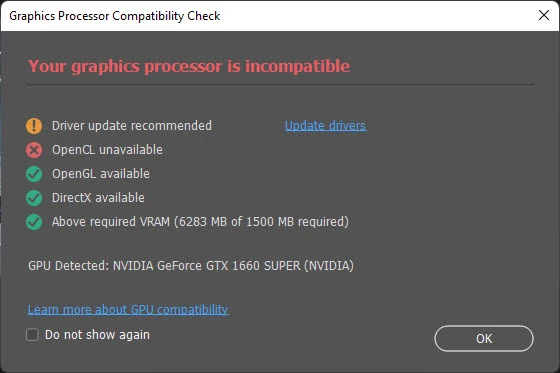
down while work

This topic has been closed for replies.
Correct answer wojteks33836948

Ok, problem semi SOLVED for me.NVIDIA Studio drivers with Clean Instalation worked.


The thing is, i forgot to mention i'm using dock station for my notebook (dell xps)... So when i use laptop screen it's all fine - GPU acceleration works, but when connected to 2 montitors via dock station (i-tec 5k dock station with usb-C and 2x display ports), its still grey out, witch is as supposed to be i guess coz dock gots its own 'graphic card' right?

25 replies

Inspiring
January 14, 2024

Opening the Microsoft Store and Installing the OpenCL™ and OpenGL® Compatibility Pack is the only thing that worked for me after countless hours of troubleshooting. 

Inspiring
March 9, 2024

Thanks. I have researched the Lightroom Classic specs for an hour now.....  It seems to me the minimum is 2 GB of memory.  It is working fine with Lightroom Classic 11.3 and the processor shows set to "auto" and says it supports basic hardware acceleration. I am just trying to figure out if I upgrade Lightroom if it will behave the same. 

I plan to upgrade my video card but as I use Lighroom a lot, I don't want to paint myself into a corner where I can't run it before I buy a new one.  Probably best to wait....

Thanks,
BJBBJB1


Participant
June 3, 2023

Operating Windows 10 Dell.  Got the message about Graphics Processor is incompatible.  Sorry, but I don't own a supercomputer, nor am I a computer expert.  Will be cancelling after my seven-day trial unless I find a solution to this.  Please help me, someone.


Ged_Traynor
Community Expert
Community Expert
June 3, 2023
wd_40
Participant
June 3, 2023
I'm guessing the user as quoting himself as "no computer expert" may not know what a GPU is.

However, to explain, every computer has a dedicated chip or card with many chips, that process the graphics that appear on screen. That is a Graphics Processing Unit (GPU).

Adobe use this power to take load/power use, away from the CPU that powers pretty much everything else.

They have strict criteria for this aspect, many many people are suffering from this. My laptop with a decent nVidia GPU designed for gaming is about 3 years old, and is now incompatible in general, giving the graphics glitches many suffer from when using filters or features.

It is a bit of a shame that the application can't be scaled me and adapt to the chipset you have, automatically optimising itself to what you have available.

But, it means you likely can't use GPU hardware processing, so try turning it off in preferences.

It will slow down image processing quite a lot, especially on large files, but it depends what you are trying to do.

Photoshop is designed for professionals, and those folk normally keep relatively up to date with their hardware as it is their business. And tax deductible.

Hope that explains it a bit.
jtu50
Inspiring
May 27, 2023

Same issue.Below is system info

jtu50
Inspiring
May 27, 2023

Sorry, here it is again with images of system info

jtu50
Inspiring
May 27, 2023

Error message started after last PS update

nidhig_the sliverblaze
Participant
September 28, 2022

I was facing the same problem. I tried the solution on this link - it's been working fine so far. Hope this helps.

https://thehelpfulmarketer.com/blog/photoshop-switching-gpu-windows/

Participant
October 7, 2022

I tried that method and it doesn't work for me.  I have a RTX 3090 and the latest Nvidia drivers direct from Nvidia.  I also have all the latest updates on Windows 10 and latest drivers updates for all of my hardware.

Known Participant
September 8, 2022

Hello,

I get the same error from time to time.

I have PS 23.5.0

I've got a MacBook Pro with an M1 Pro processor and 32GB of RAM. System is MacOS Monterey 12.3.

Still, this message appears and PS shuts down.

What's causing this and is there perhaps a fix?


Mikołaj

Participant
February 16, 2022

Graphics Processor is incompatible shows and show. My graphic driver is uptodate. plz help me to fix this error in Adobe Photoshop CC 2022

Participant
February 10, 2022

Hi There,


The fix for me was to go into control panel > device manager > Display adapters > and disable the Windows native one. This forced the system to use the Graphics Card.

We are running a Dell Inspiron 16 Plus with NVIDIA(R) GeForce RTX(TM) 3060 6GB GDDR6 [60W]. We made sure the graphics card had the latest driver and the latest version of Adobe photoshop was installed. However those two alone didn't make any change. It was only fixed when I disabled the native graphics card.


Cheers,

Kellie

brucev20192481
Participating Frequently
February 15, 2022

I'm having the same problem.    I'm on a MacBook Pro, 2018.  Processor: 2.6 GHz 6-Core Intel Core i7.  Memory: 16 GB 2400 MHz DDR4.  Graphics: Radeon Pro 560X 4 GB,  Intel UHD Graphics 630 1536 MB.  Running Photoshop 23.2.0

What do I do?  I've read some of the above answers and they call for a deeper tech knowledge than I have.

Thanks to anyone who can help.


Participant
January 28, 2022

Same error on iMac. Adobe CC constantly crashed too way before the error. 

Known Participant
December 29, 2021

As I am looking at buying a new lappy to replace my original Surfacebook (because it only has 1GB memory on the discrete graphics nVidia GPU), is this docking issue a function of the hardware (GPU/drivers) or software (Adobe)?


Anyone?

One of the best things about my Surfacebook was one plug did everything - dock, charge, audio, USB, etc... and with Thunderbolt4 in many laptops now, was looking for the same solution - one plug to do it all (I loathe wires and have ADD when it comes to cable management) and plugging in one cord when I work at the desk is better than 2-3-4 via a dock. If I can't make use of the dock + discrete graphics on the laptop, that's going to be a big hurdle...

wd_40
Participant
June 25, 2022

Do you mean OCD about cable management, if so, I'm the same, didn't know ADD was a thing in that way. But, depending on the laptop, you can use a USB-C dock from a few manufacturers like HP or Lenovo that will provide the same function, video, charging, peripherals all through one USB-C connection.

JJMack
Community Expert
Community Expert
December 19, 2021

Does your PC also have Intel HD Graphics in addition to your GeForce GTX 1660 Super? If it does use the Nvidia Control Panel the set 3D  that Photoshop prefers the GTX.

JJMack
