elfwinters
Participant
November 14, 2017
Answered

Grass Brush?

  • November 14, 2017
  • 2 replies
  • 90636 views

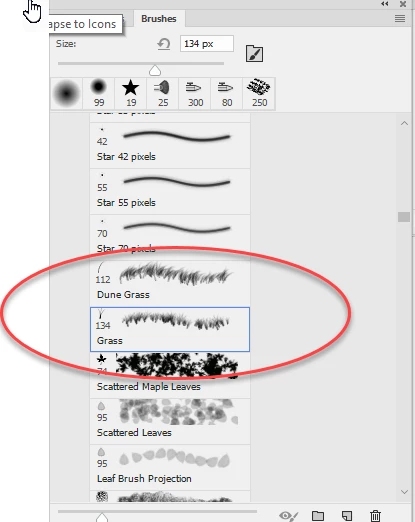
Hello. I'm learning Photoshop in a practical at university where I have to create a grassy environment. The brief says "Choose the Brush Tool, and have the shape Grass. Paint a line just below the horizon. Increase the Brush Size a bit, then draw another line of grass below the previous one. Continue down the image, increasing Brush Size as you go." However neither I nor my lecturer have been able to find the Grass option. I have the latest CC 2018. Can anyone help?

Kind Regards

Emma
Correct answer davescm

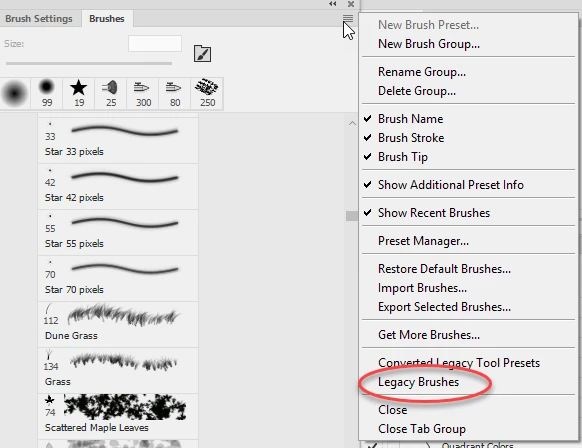
Go to the brush panel and at the top right click to open the menu. Choose legacy brushes.

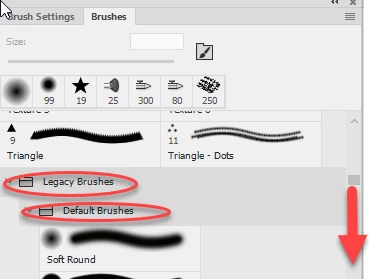
A folder will appear in your brush panel  called legacy. Within that folder is another called Default Brushes. Scroll down and the grass brush is there

Dave

2 replies

Participant
December 6, 2020

Thanks for the help! It solved the issue.

davescm
Community Expert
davescmCommunity ExpertCorrect answer
Community Expert
November 14, 2017

Go to the brush panel and at the top right click to open the menu. Choose legacy brushes.

A folder will appear in your brush panel  called legacy. Within that folder is another called Default Brushes. Scroll down and the grass brush is there

Dave

elfwinters
Participant
November 14, 2017

THANK YOU SO MUCH!! This has been driving me mad for the past hour. It was probably something really simple to most people so I feel kinda stupid but I can't thank you enough for solving this.