


Marco_Goldfinger
Participating Frequently
March 1, 2018
해결됨

Gray scale is not gray close to black and colours have strange bars

  • March 1, 2018
  • 1 답변
  • 712 조회

Hello to all.

After a system reset and application reinstall I am experiencing a strange effect.

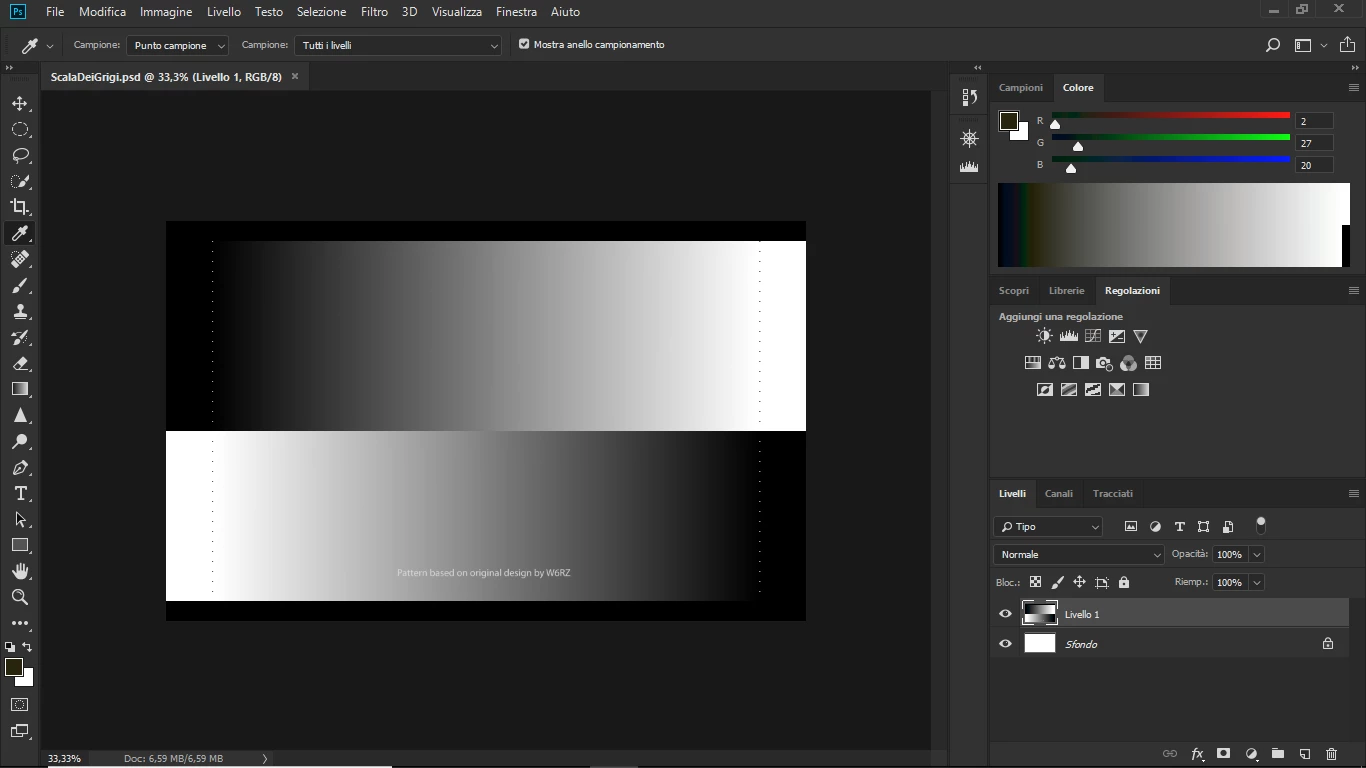
If I open a gray scale picture it is shown prperly, but in the color tab I have a gray scale that is not gray! Close to blak other colours are present.

The following image is a screenshot of what I mean. The grayscale image on the left is correct while the gray scale bar on the right is wrong. THe RGB bars represents the values obtained by clicking on the left zone of the scale.

BYW a similar effect is present in case of colour scale too.

Is there any settings that I have to do or any other suggestion to solve?

Thank you in advance.

Best regards

Marco
이 주제는 답변이 닫혔습니다.
최고의 답변: Mylenium

Without any info about your system nobody can tell you much. Such stuff typically relates to things like wrong monitor profiles or generally wrong configuration of your display settings.

Mylenium

1 답변

Mylenium
Mylenium답변
Legend
March 2, 2018

Without any info about your system nobody can tell you much. Such stuff typically relates to things like wrong monitor profiles or generally wrong configuration of your display settings.

Mylenium

Marco_Goldfinger
Participating Frequently
March 2, 2018

Thank you for you answer Mylenium. I am using a Laptop with Windows 10 Home edition and the latest Photoshop releases.

I have tested my system without any color profiling, with predefined ones and with to one obtained by my profiling devices (Spyder 5+ DisplaCal software). Even if with different results the problem is always present.

Marco_Goldfinger
Participating Frequently
March 3, 2018

If you have removed all the Dispcal monitor profiles, the Windows default is used. That's sRGB IEC61966-2.1.

Anyway, that confirms it is the monitor profile. So try to change some settings and make a new one. In particular, version 4 and/or table-based (LUT) profiles can be problematic in some circumstances. Make sure Dispcal is set to make version 2 and matrix-based profiles.


Thank you D Fosse, I have recalibrated the display using the software provided with Spider 5 and the problem is no more present. This software is normally not accurated as Dispcal. I'll tray to recalibrate again using the settings you suggest and I'll give you a feedback. Probably by today.

UPDATE. I am not able to find were to select version 2 instead of version 4 in Dispcal (I am using the GUI interface).