
Question
Has the solid color adjustment layer icon ("thumbnail") changed?
I am studying multiple tutorials for Photoshop CC (2019) on a Macbook Pro. In all the tutorials thus far, when asked to add a solid color adjustment layer to the background, the tutorial shows a new layer in the layers panel with an icon or thumbnail that looks like this:
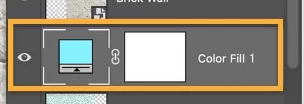
But when I click the adjustment layer icon in the layers panel and select 'solid color,' my new layer looks like this:

Has the thumbnail icon changed or am I doing something wrong? I don't see the tiny "slider" at the bottom of the color thumbnail. The tutorials I'm using are for PS CS6 or CC 2019. I try not to watch anything older because it's too confusing.
This may be a small detail, but it's driving me nuts.
 AdChoices