
Participating Frequently
August 29, 2017
Answered

HDR from layers

  • August 29, 2017
  • 3 replies
  • 8280 views

I recently took multiple bracketed pictures of the eclipse. Obviously, as the sun moves, the sun is not in the same place in all these pictures. So I created multiple layers and put each one of these 7 exposures in separate layers. Then I aligned them two at a time using Difference. So far, so good. But then, I would like to create an HDR image with these 7 layers. Is there a way of doing this? I had to save each layer as a Tiff file and then open them in the HDR program. Is there an easier way?

thanks

Luis
    This topic has been closed for replies.
    Correct answer WILDCAT54

    Another method would be to run an action on your working document on top of your existing layers.

    Here's a link to a free HDR action - HDR Tools by forfie on DeviantArt

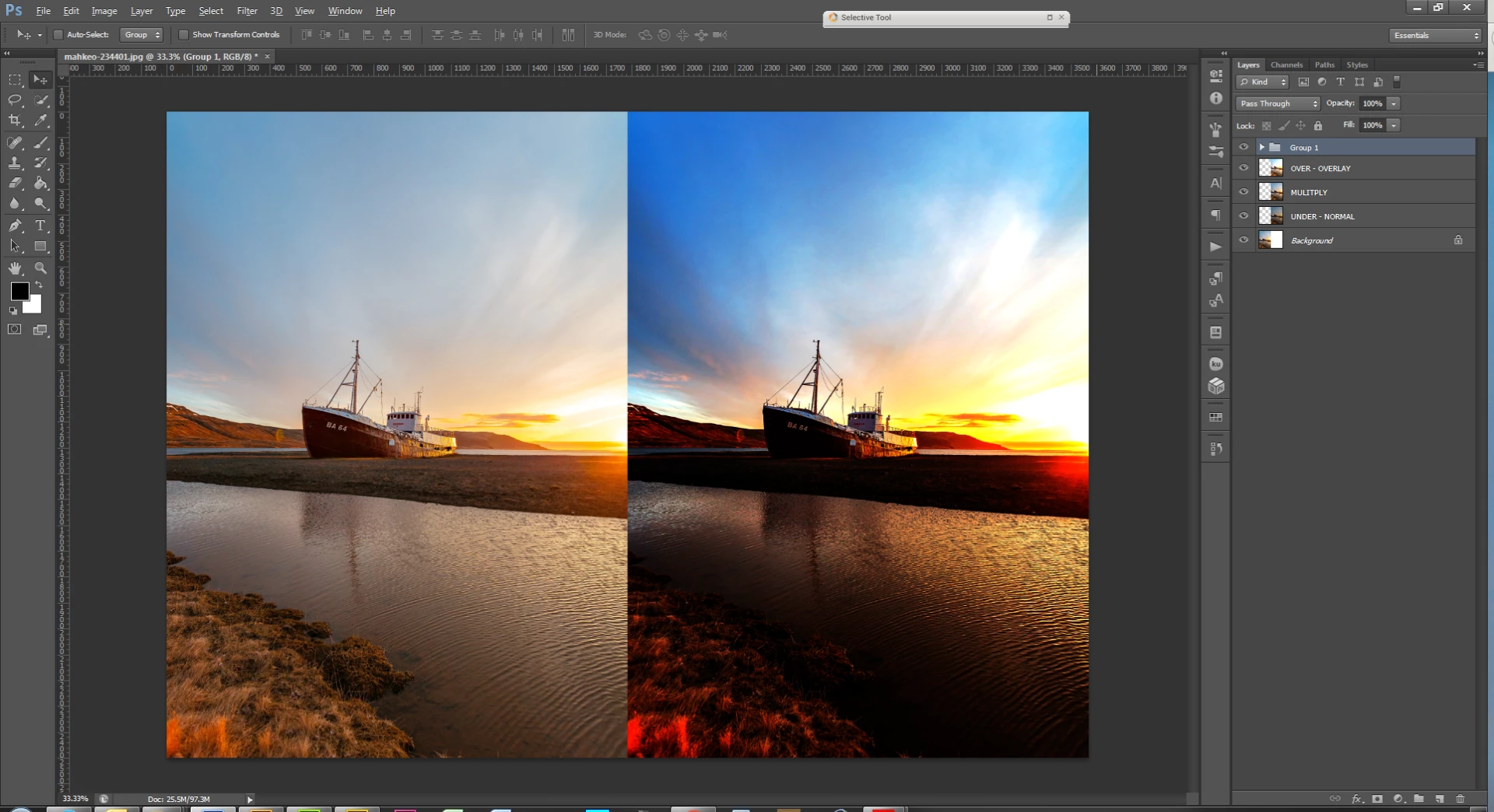
    Another, but time consuming method would be to duplicate each layer three times. On the bottom layer change your exposure to a negative number, underexposing the image. Leave the middle layer as is and set the top layer to a positive exposure making it over exposed. Play with the blending modes of each layer until you get an effect you like.

    below is a screen shot of the above method

    3 replies

    Stephen Marsh
    Community Expert
    Community Expert
    December 19, 2023

    Just stumbled over this old topic... Another method would be to select all the layers and then convert to a smart object, then use Layer > Smart Objects > Stack Mode: Mean to create an average, then use adjustments like Shadow/Highlight, curves, USM etc. Or use HDR toning etc.

    Participating Frequently
    August 15, 2024

    thanks Stephen... that actually works pretty well ... great option when need quick HDR... works better than LR and Photoshop HDR IMHO

    Stephen Marsh
    Community Expert
    Community Expert
    August 15, 2024
    quote

    thanks Stephen... that actually works pretty well ... great option when need quick HDR... works better than LR and Photoshop HDR IMHO


    By @macKARMA_online


    It probably varies from image to image.


    I should also note that ACR can also process HDR files:


    https://helpx.adobe.com/camera-raw/using/hdr-output.html


    Trevor.Dennis
    Community Expert
    Community Expert
    August 31, 2017

    I suspect that the best you can do is use Export > Layers to Files and then then import to HDR

    WILDCAT54
    Inspiring
    August 29, 2017

    crop and save each layer as a jpg to keep the images aligned. Then file> automate > Merge to HDR

    ApneamdAuthor
    Participating Frequently
    August 31, 2017

    That's exactly what I did, only I saved Tiff files, not JPEG. I know how to do an HDR. The question is, "can it be directly from layers?"

    WILDCAT54
    WILDCAT54Correct answer
    Inspiring
    August 31, 2017

    Another method would be to run an action on your working document on top of your existing layers.

    Here's a link to a free HDR action - HDR Tools by forfie on DeviantArt

    Another, but time consuming method would be to duplicate each layer three times. On the bottom layer change your exposure to a negative number, underexposing the image. Leave the middle layer as is and set the top layer to a positive exposure making it over exposed. Play with the blending modes of each layer until you get an effect you like.

    below is a screen shot of the above method