


Participating Frequently
December 10, 2022
해결됨

HELP! In photoshop I have a permanent green background and I cant get rid of it!

  • December 10, 2022
  • 5 답변들
  • 3532 조회

Whenever I open photoshop and start a new project, it always has this green background. I am running it on windows 11. Please Help!

이 주제는 답변이 닫혔습니다.
최고의 답변: Per Berntsen

In Windows display settings > Windows HD color, make sure that HDR is not enabled.

Photoshop does not support HDR.


@wnwka 

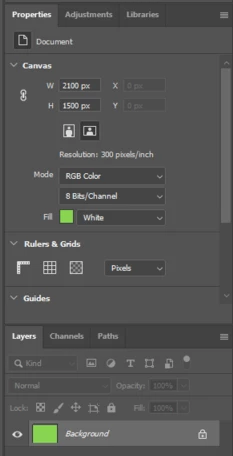
The background color is set to white, but displays green.
 

5 답변

Inspiring
December 11, 2022

Hey, you might have preset the background color while creating a new file:

Look at the section »Background contents«. Is the color set to white or something else?

TheDigitalDog
Inspiring
December 11, 2022

You could try running the Creative Cloud Cleaner Tool to remove all traces of the Adobe software before reinstalling it (yet again):  https://helpx.adobe.com/creative-cloud/kb/cc-cleaner-tool-installation-problems.html

Author “Color Management for Photographers" & "Photoshop CC Color Management/pluralsight"
RCGamerX작성자
Participating Frequently
December 11, 2022

This did not work either.

TheDigitalDog
Inspiring
December 11, 2022

Copy your Photoshop system info

  1. In Photoshop, select Help > System Info.
  2. In the System Info dialog, click Copy.
  3. paste here.
Author “Color Management for Photographers" & "Photoshop CC Color Management/pluralsight"
TheDigitalDog
Inspiring
December 10, 2022

Did you restart?

First, try disabling GPU in the Preferences (Performance tab). In Photoshop also go to Preferences > Technology Previews... and enable "Older GPU mode (pre 2016)" - Restart Photoshop. Any better? 

You can try this too: in Preferences>Technology Previews, check the box 'Deactivate Native Canvas' and uncheck 'Enable Native Canvas Rulers' options, then restart Photoshop. Does this work? 

If not, recalibrate and build a new ICC display profile, the old one might be corrupted.

If you are using software/hardware for this task, be sure the software is set to build a matrix not LUT profile, Version 2 not Version 4 profile.


If turning OFF GPU works, it's a GPU bug and you need to contact the manufacturer or find out if there's an updated driver for it. On the Mac, that's part of the OS update(s) so if this is the latest OS version, you may need to roll back a release. 

Also see: https://helpx.adobe.com/photoshop/kb/acr-gpu-faq.html

https://helpx.adobe.com/photoshop/kb/photoshop-cc-gpu-card-faq.html


Author “Color Management for Photographers" & "Photoshop CC Color Management/pluralsight"
RCGamerX작성자
Participating Frequently
December 11, 2022

None of those fixed the problem.

TheDigitalDog
Inspiring
December 10, 2022

Try the "Deactivate Native Canvas" options in preferences, and restart: is the green gone? 

Author “Color Management for Photographers" & "Photoshop CC Color Management/pluralsight"
RCGamerX작성자
Participating Frequently
December 10, 2022

The green did not disappear.

RCGamerX작성자
Participating Frequently
December 10, 2022

Please help me with this problem. Your help is greatly appreciated!