
Azzam Masood
Participating Frequently
June 29, 2022
Question

Help understanding Refine Edge using Select and Mask

  • June 29, 2022
  • 2 replies
  • 710 views

So, below is before and after refinement using Color Aware/Object Aware (Do not know which one it is, since I'm backtracking through scriptlistener). Radius of 4 px is selected in Edge Detection, and Smart Radius, Decontamination are off.
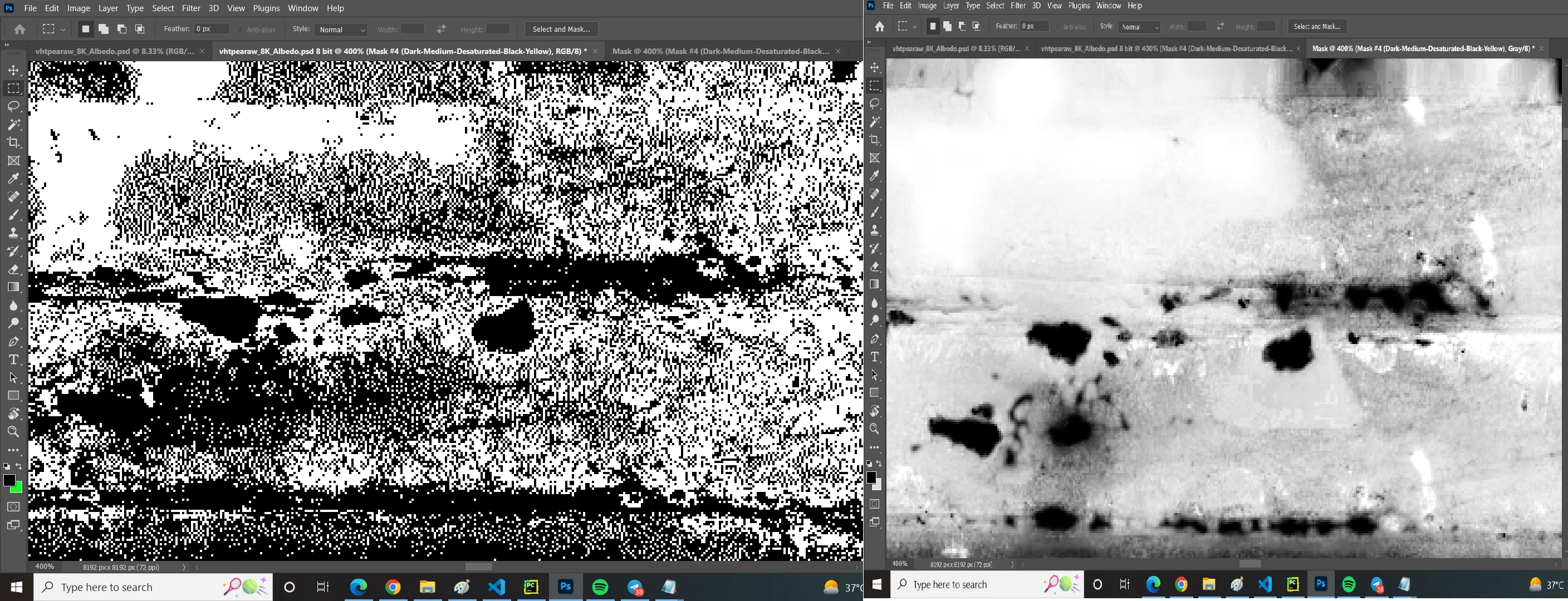
 

I need to understand what exactly happened. I do not understand edge refinement at all, or how my left pixelized binary image turned into the non-binary image on the right. Help, please?

This topic has been closed for replies.

2 replies

Trevor.Dennis
Community Expert
Community Expert
June 29, 2022

Can you show us what you are trying to select?

And explain in more detail what we are looking at in your screen shots above?

I have no more idea than mj what is going on here.

Azzam Masood
Participating Frequently
June 29, 2022

The image on the left is a mask. The white pixels represent the pixels where my original color will later be present. However, the binary mask on the left has to be converted into the grayscale mask on right.

D Fosse
Community Expert
Community Expert
June 30, 2022

So what I gather from this is that, my pixelized image on the right has all white pixels selected and refine-brushed. How does refine brush work exactly? Does it dilate the image?


I don't know how it works, but I can see what it does. It uses the image itself as basis for rebuilding the mask edge.


I honestly think the best thing you can do is play with it a bit, just to get a feel for what it does - and most importantly, where it's effective and where it's just in the way.


It doesn't always work, it's only effective on high-contrast edges. It does work with strong color contrast, but better on high tonal contrast. With poor contrast, you mainly get smearing.


Even without the refine edge brush, you still have feather, smooth, and expand/contract in the same place, with a live preview. That's way more than we had some years ago.

@mj
Community Expert
Community Expert
June 29, 2022

Hi @Azzam Masood ,


Your original image (left) looks like a 1-bit image.


Can you help us understand what your trying to do?


Are you trying to select all the black pixels for example?


Best

mj

Azzam Masood
Participating Frequently
June 29, 2022

Hello. I'm trying to select all white pixels, and then refine the edges is what I think is happening in the right image.